

Last updated: November 25, 2026
Quick answer: 2 policies usually matter most here—professional liability insurance and cyber liability insurance. For anyone figuring out how to insure freelance work that uses client software or platforms, the first step is to match the contract, the platform, and the policy wording before a claim happens.
Key takeaways
- Client systems can shift the fault line between your work and the client’s controls.
- The first thing to check is whether your policy treats platform access as part of your professional services; a qualified insurance adviser should confirm the wording.
- Cyber liability insurance is about data and systems risk; professional liability insurance is about work errors and missed duties.
- Access credentials, shared accounts, and vendor-managed environments create coverage questions that a generic freelance policy may not answer cleanly.
- If a contract puts technology duties on you, the insurance review needs to match those duties line by line.
Who needs to think about client software?
This applies to freelancers who do paid work inside a client’s software, SaaS platform, or portal, and it assumes you already have basic freelancer insurance or are comparing it now. It matters most when your work depends on access credentials, shared admin rights, or a client-run system that you do not own or control. This is information, not financial advice; a qualified adviser should review your own policy wording and contract.
The common mistake is treating “I only clicked in their platform” as if it removes risk. It does not. If you can change records, publish content, move funds, approve tasks, or manage data in a client-owned system, an error there can still lead to an insurance claim; a qualified insurance professional or attorney can help assess that risk.
This is also where the answer changes by country and by policy form. A freelancer in one market may see broad wording in a professional liability policy, while another sees a narrow exclusion for technology services or network security events. The page below sits in the site’s broader guidance on freelancer insurance coverage gaps and risk scenarios, which is the right place to start before looking at contract wording.
How does client software change the insurance question?
Client software changes the insurance question because the claim may involve both your professional mistake and the platform’s own controls. Professional liability insurance usually responds to alleged mistakes, missed instructions, or failed services. Cyber liability insurance usually responds to privacy events, data exposure, credential misuse, and some network-related losses.
That split matters in SaaS platforms and vendor-managed environments. If you make a wrong entry in a client portal, the issue may look like a professional error. If an account is hijacked because credentials were weak, the claim may look more like a cyber event. One event can trigger both questions, which is why a policy review should not stop at the word “digital.”
| Situation in client software | Main insurance question | Policy area that may be implicated |
|---|---|---|
| Wrong edit in a shared CRM | Was this a professional error or a system issue? | Professional liability insurance |
| Stolen access credentials | Was there unauthorized access to data or systems? | Cyber liability insurance |
| Mistake in a vendor-managed billing tool | Did the service fail because of your work or the platform’s controls? | Professional liability insurance, sometimes cyber |
| Contracted technology work inside a portal | Did the contract make you responsible for system outcomes? | Both, depending on wording |
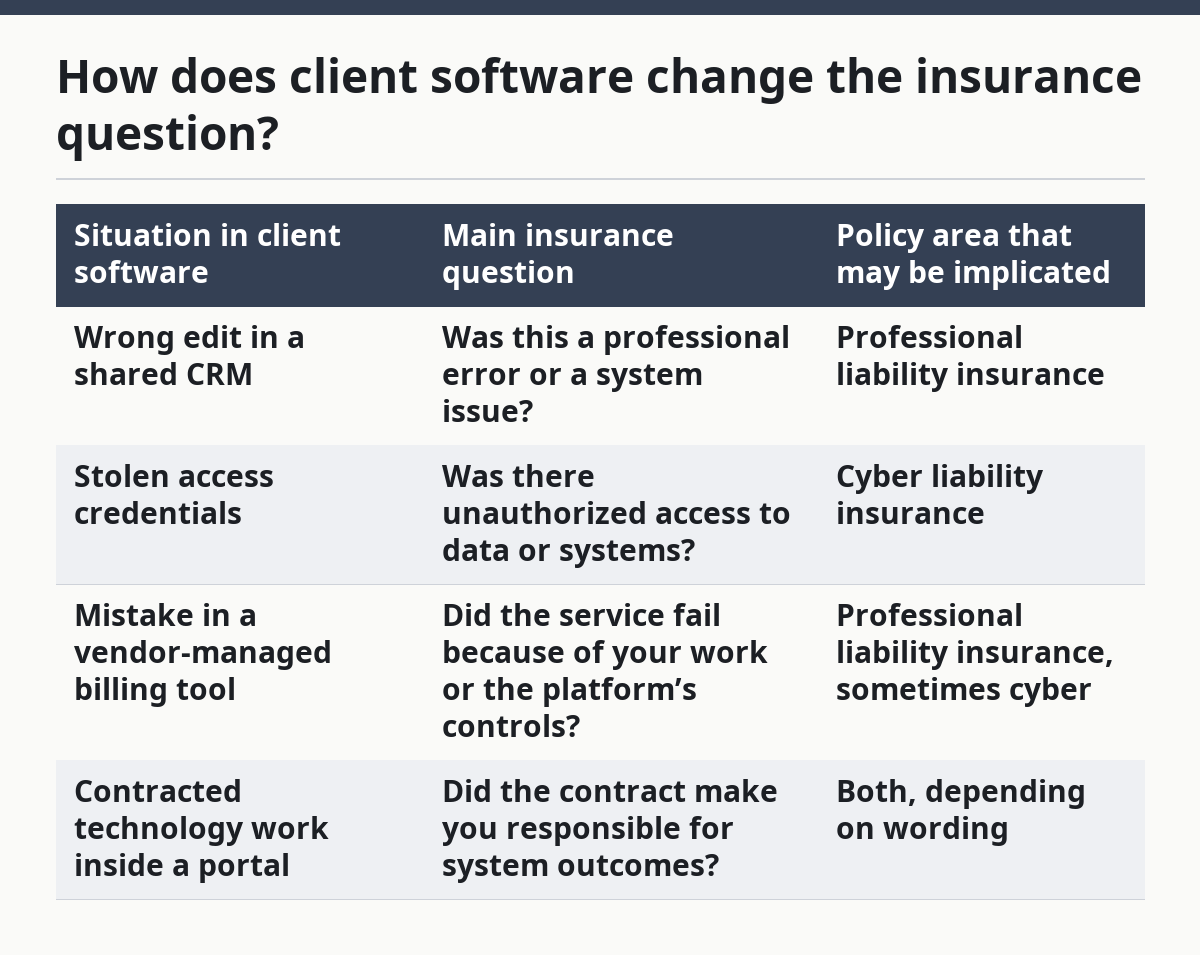
The hard part is that insurance does not follow your intent. It follows the wording in the policy and the wording in the contract. If the contract says you are responsible for account access controls, data entry, or platform configuration, that can change how the carrier views the loss.
How do you check a policy before you accept the job?
You check it by matching the contract, the platform, and the policy in one pass, not by asking only whether “freelance work” is covered. Start with the exact service you will perform in the client software, then map it to the policy form and any cyber endorsement. Two pages of wording can matter more than a 20-page proposal.

-
List every platform task you will touch. Write the tasks in plain language, such as editing records, uploading files, setting permissions, or approving changes. Keep the list to the exact job, not the whole project. A problem appears if you can’t tell whether the task is content work, admin work, or system access work.
-
Identify the access model. Note whether you use a named account, shared credentials, single sign-on, or temporary access. The difference matters because shared logins and broad admin rights increase the chance of a dispute about who caused the event. A red flag is any setup where no one can prove which user did what.
-
Pull the professional liability wording. Look for terms such as “professional services,” “technology services,” “computer services,” and any exclusion for network or data loss. Your goal is to see whether work done inside a SaaS platform is included or carved out. If the wording only describes offline consulting, that is a mismatch.
-
Pull the cyber wording. Check whether the policy defines a security breach, privacy event, or network disruption, and whether credential misuse is included. Some forms focus on stolen data; others focus on unauthorized access. A problem is a policy that mentions cyber incidents but leaves account access controls vague.
-
Match the contract to the policy. Look for clauses about account security, back-ups, platform configuration, record accuracy, and incident reporting. If the contract makes you responsible for controls you do not own, the insurance question gets harder. A warning sign is a promise to meet technology standards you cannot verify yourself, so a qualified insurance adviser should review that language.
-
Check any consent or permission terms inside the platform. Some client systems limit what outside users can do, even if the contract says otherwise. If the platform terms restrict exports, admin actions, or automation, note that limit. The problem is a contract that assumes permissions the software will not actually grant.
-
Confirm who owns the data and the logs. If a dispute arises, logs, audit trails, and access records often decide the claim. Ask whether the client keeps those records and for how long, such as 30 days, 90 days, or longer if their policy says so. A problem is no audit trail at all.
-
Ask for a written insurance response, not a casual yes. A broker or carrier can tell you how the policy is likely to read, but the wording governs. Keep the response tied to the named platform, the access model, and the exact task. If the answer is vague, treat it as unresolved and get a professional review.
What should you check in the contract?
You should check whether the contract shifts platform risk to you in a way your policy may not follow. The most important phrases are about access credentials, data handling, system configuration, indemnity, and responsibility for errors in a client-owned system. A 2-line clause can create more exposure than a 20-page statement of work.
A contract that says you are responsible for “all technology outcomes” is a warning sign, especially if the work is inside vendor-managed software you do not control. The same is true of a clause that requires you to secure accounts without defining what security means; a qualified insurance adviser or attorney should review it. If the contract uses broad language and the policy uses narrow language, you have a gap.
This is where professional liability insurance and cyber liability insurance can overlap, but not always in the same way. Professional liability may address a wrong instruction, a missed deadline, or a bad entry. Cyber liability may address unauthorized access, data exposure, or a security incident tied to credentials.
A good contract-review habit is to mark three items before you sign: who controls the system, who controls the data, and who controls the proof. If all three sit with the client, the insurance conversation is usually simpler. If one of them sits with you, the policy review has to be more careful.
When should you stop and get qualified help?
You should stop and get qualified help when the work or contract goes beyond ordinary freelance service and into defined technology responsibility. In personal finance, the cost of guessing wrong is real, so this is the point where policy wording and contract language need a professional review. The National Institute of Standards and Technology and the FTC’s business cybersecurity guidance are useful reference points for thinking about access control and data risk.

The client wants you to administer accounts or permissions: that turns a simple service role into an access-control role — get the policy and contract reviewed before you accept.
The platform stores customer data or payment data: that can pull privacy and security questions into the job — check cyber liability insurance, not just professional liability.
The contract makes you responsible for system uptime or security settings: that is a broader technology obligation than most freelance policies assume — ask for a written coverage read.
The platform is vendor-managed and you do not control logs or backups: that makes proof and fault harder to show — do not assume the client’s controls protect your policy position.
You use shared credentials or a shared admin account: that blurs attribution if something goes wrong — the access setup should be cleaned up before work starts.
The client expects you to handle regulated or sensitive information: that changes the exposure even if the software is ordinary — get advice that matches the data category and the contract.
What mistakes do freelancers make here?
Freelancers usually make the same 5 mistakes, and each one creates a different coverage problem. The fix is rarely “buy more insurance”; it is usually “match the policy to the actual work.”
Mistake 1: Treating client software as if it removes all liability. The consequence is a false sense of safety when the claim is about your error in the platform. The better approach is to confirm, with a qualified insurance adviser, whether professional liability insurance covers work done inside that system.
Mistake 2: Ignoring access credentials. The consequence is unclear blame if an account is misused or compromised. The better approach is to document how credentials are issued, rotated, and removed.
Mistake 3: Assuming cyber coverage is only for big breaches. The consequence is missing smaller but still costly events tied to unauthorized access or data exposure. The better approach is to read the cyber wording for credential-related incidents and network events.
Mistake 4: Accepting contract language that expands your duties. The consequence is a duty you may not have budgeted for in the policy. The better approach is to align contract terms with what the policy actually contemplates.
Mistake 5: Failing to keep platform logs or audit trails. The consequence is trouble proving what happened after an incident. The better approach is to preserve records according to the client’s retention rules and your own file system.
If the policy, contract, and platform setup still do not match after that review, the right answer is not to force it. The right answer is to slow down, ask for clarification, or change the scope.
What changes in edge cases?
Edge cases need a modified approach because the standard “professional liability plus cyber liability” model may not fit neatly. The main issue is not the software brand; it is the control structure around the software.
If you work through a vendor-managed environment, the vendor’s rules may limit admin access, logs, or incident response timing. If you work under a client’s SSO system, your account may be tied to the client’s identity controls rather than yours. If you use automation inside the client platform, the question becomes whether the mistake came from your workflow or from the platform’s own design.
Another edge case is contracted technology work that looks like admin support but functions like systems work. A freelancer who updates records in a 1,000-user SaaS platform is not the same as a writer uploading blog text into a CMS. The more you can alter data, permissions, or workflows, the more carefully the insurance wording needs to be read.
NIST’s Cybersecurity Framework and the FTC’s business cybersecurity guidance are useful reference points for thinking about access control and data risk, even when the policy language still controls the claim. Those standards do not decide coverage, but they help frame the kind of system behavior insurers may expect you to describe.
Where this fits in the bigger coverage picture
This topic sits inside the larger problem of freelancer insurance coverage gaps and risk scenarios, which is why a client-software job should never be judged in isolation. The same freelancer can face a plain professional error one day and a credential issue the next, and the policy has to be read with both in mind. See also what freelancer insurance usually covers and how to compare cyber liability insurance for freelancers.
That is why the safest way to think about this is simple: client software changes what you touch, who controls it, and how a loss is described. Once those three things are clear, the insurance question becomes much easier to answer honestly.
Does using client software change insurance needs?
Yes, because it can change how a loss is classified under professional liability insurance and cyber liability insurance. If the work happens inside a client-owned platform, the main question becomes who controlled the system, who controlled the access, and what the contract says about those duties. For a quick comparison, see professional liability insurance for freelancers and cyber liability insurance basics.
Who is responsible for errors in a client platform?
Responsibility usually depends on the contract, the platform rules, and the facts of the error. A wrong entry, a missed instruction, or a permissions mistake may point in different directions, so the insurer will look at both your professional duty and the client’s system controls. That is why a written scope and a written coverage read matter.
Do platform-based freelancers need cyber coverage?
They often need to at least review cyber liability insurance, because platform access risk and access credentials can create a data or security issue. The key question is not the software name but whether the work involves sensitive data, account access, or any chance of unauthorized use in a client system.
Drafted with AI; not yet reviewed by a person.
