
Last updated: November 26, 2026
Quick answer: use 3 facts — the client-owned system, your access level, and the data you can reach — and describe them in plain business terms. In How to Explain Freelance Work That Uses Client-Owned Systems on an Insurance Application, that usually gives the clearest answer for cyber insurance or professional liability insurance without turning the form into a contract memo.
Say that you do freelance work inside client-owned systems, name the systems plainly, and describe your access, data handling, and permissions in business terms. That is often the cleanest way to explain client-owned systems exposure on an insurance application for cyber insurance or professional liability insurance, without turning the form into a contract memo.
Key takeaways
- Describe the work by system type, access level, and the kind of data you can reach.
- Keep the business description short and factual; the underwriter is trying to match the risk to the policy.
- If you only work inside a client’s platform, say so directly and avoid vague phrases like “I use client tools.”
- The main issue is not who owns the software, but whether your work can affect client data, settings, or records.
- If the form is unclear, ask for a definition before you guess.
This is information, not financial advice. A qualified adviser should review your own situation, because insurance wording, country rules, and underwriting standards change.
Who does this apply to?
This applies to freelancers who work inside a client’s software, portal, dashboard, or internal platform and need to explain that setup on an insurance application. It assumes you know the basic facts of your work: what systems you enter, what you can change, and whether you can view or handle client data.
It also assumes the application is asking about your business operations, not asking for a full technical audit. The aim is to describe platform access, data handling, and system permissions in plain language that matches the job. If your work includes admin access, database access, payment data, or direct control over records, that is a different risk picture than read-only use of a client portal. For background on why data access matters, see the NIST Privacy Framework and CISA guidance on cyber hygiene.
This page fits the hub on freelance insurance application and underwriting, and it is focused on one narrow issue: how to describe work done inside someone else’s environment. It does not answer how to insure freelance work that uses client software or platforms, how to insure freelance work involving client data but no payment processing, or how to handle a freelance data breach before the insurer gets involved. For related background, see freelance cyber insurance, professional liability insurance for freelancers, and how to describe freelance services.
If the application asks for legal wording, contract terms, or a certificate title, stop and get help from the insurer or a qualified adviser. A guessed phrase can make the form less clear, not more.
How do you describe the work?
You describe the work by naming the client-owned system, the kind of access you have, and the business task you perform in it. A short, concrete answer is usually the easiest to verify against the real job.
Use this 7-step structure.
- Name the system: Write the actual type of client-owned system, such as a client platform, client software, admin portal, or internal dashboard, and state whether you access it through a browser, app, or VPN. Verify that the label matches the tool the client uses, not your own shorthand. If the name sounds vague, the underwriter may not understand the exposure.
- State the access level: Say whether your access is read-only, editor, admin, or limited to a specific module, and keep the wording to one level only. Verify that the level you write matches your actual permissions, because “I can see it” is not the same as “I can change it.” If you cannot tell the difference, the application answer is too loose.
- Describe the task: Give the business task in one sentence, such as updating records, producing reports, or managing campaign content inside the client platform. Verify that the task is something you do for more than a one-off job. If the description sounds like general IT support or broad operations, it may understate the real role.
- Identify the data: Note the broad data type you can reach, such as contact details, project files, account records, or internal documents, without listing private facts. Verify that you are not describing data you never touch. If you mention sensitive data by mistake, the application may suggest a wider cyber exposure than you actually have.
- Separate ownership from control: Make clear that the client owns and administers the system, while you use it under permission. Verify that your wording does not imply you host, sell, or maintain the platform yourself. If your sentence sounds like you own the software stack, it is the wrong description.
- Mark the permission boundaries: State whether you can change settings, export data, add users, or approve actions, and mention any limits on those powers. Verify that the boundary is real and not assumed. A permission edge matters because it helps the insurer see whether a mistake could be contained or spread.
- Check the insurance label: Put the same facts into the application fields that ask about operations, technology use, or cyber exposure, and keep the wording consistent across the form. Verify that your business description, duties, and system answers do not conflict. If one field says “no data access” and another says “full admin access,” that is a problem.
The key is to write what a claims reviewer would understand in 30 seconds. A clean description often sounds boring: “Freelance consultant using client-owned systems to update records and prepare reports with limited editor access.” That is better than a sentence full of buzzwords.
What should go in the business description?
Your business description should include the client-owned system type, the kind of access, and the kind of work you do in that system. It should not read like a contract, a privacy policy, or a technical spec sheet.
A good rule is to keep the description tied to three facts: where you work, what you can touch, and what you do there. If the form gives one line, use the highest-value words first. If it gives more room, add the permission boundary and the data type.
Here is a simple comparison:
| Better description | Riskier description |
|---|---|
| Freelance bookkeeper using client accounting software with limited edit access | Works in client systems |
| Freelance designer updating content in a client platform with browser-based access | Handles client tools |
| Freelance consultant entering and reviewing records in a client portal under permission | Manages systems for clients |
| Freelance operator with read-only access to client dashboards and reports | Works with data |
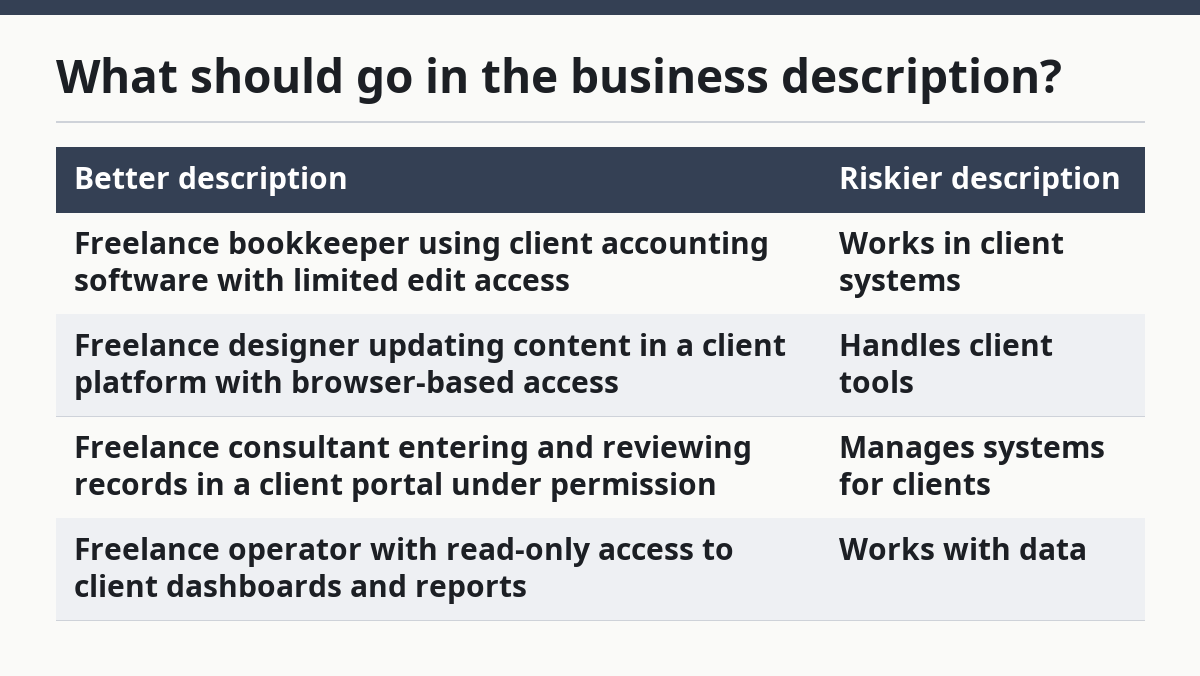
The safer version is not “safer” because it hides risk. It is better because it is specific enough to be useful and narrow enough to be true. If your real work includes direct access to records, settings, or exports, leave that out only if it is not actually part of the job.
If the application asks for a short paragraph, use plain nouns. “Client-owned systems” is a useful phrase because it tells the underwriter that the software belongs to someone else, but it does not explain the access. Pair it with a concrete verb such as update, review, enter, or report.
Does client-owned systems exposure change the risk?
Yes, client-owned systems exposure can change the risk because the insurer may care about what you can do inside the client’s environment, not just who owns the software. The same platform can mean very different things depending on whether your access is read-only, editor-level, or administrative.
This is where people often confuse ownership with exposure. A client-owned system can still create a cyber issue if you can change records, export files, or manage user access. It can also matter for professional liability insurance if your work in the system affects deadlines, records, or deliverables.
The form may not ask for the phrase “client-owned systems exposure” directly. It may ask about computer systems, cloud tools, customer data, or third-party platforms instead. That is why the answer should focus on function, not theory. Mention client software, client platform use, and the business task you perform there.
If the application has a yes/no cyber question, answer it based on the real flow of your work, not on ownership alone. A client system is still part of your operational exposure if your login, permissions, or work product can affect data or records. If the wording is unclear, ask the insurer to define the term before you submit the form.
What mistakes do people make?
People usually make five mistakes, and each one can distort the underwriting picture. The fix is to make the description narrower, clearer, and closer to the actual job.
-
Saying “I use client software” and stopping there.
That leaves the insurer guessing whether you are read-only, admin, or something in between. Use one extra line to name the access level and the task. -
Calling every tool “a platform.”
“Platform” can mean a dashboard, a SaaS app, or a full internal system. If you can name the client portal, internal app, or cloud tool, do that. -
Hiding permissions because they sound risky.
If you can edit records or approve actions, leaving that out can make the form inaccurate. The better alternative is to state the limit plainly. -
Mixing up client-owned systems with your own devices.
Your laptop, your browser, and the client’s system are not the same thing. The application may care about both, but they should not be described as one item. -
Using contract language instead of operational language.
Phrases like “independent contractor under service agreement” do not explain the work itself. State the function first, then any formal label if the form requires it.
A common cost of these mistakes is not just confusion. It can lead to the wrong policy questions, a longer review, or a follow-up request for clarification. That is avoidable if the answer sounds like a business description, not a legal brief.
When should you stop and ask for help?
You should stop and ask for help when the form asks for details you cannot answer truthfully in one pass. In an insurance application, a wrong answer can affect underwriting, claim handling, or whether the policy matches your actual work.
You do not know your actual permission level: If you are unsure whether your account is read-only, editor, or admin, the form is not ready — ask the client or insurer before you guess. A guess can make the exposure look smaller or larger than it is.
You handle sensitive records or exports: If you can download, export, or bulk-edit client records, the exposure is more than “just logging in” — get the wording reviewed. That kind of access changes how the work is seen under cyber insurance.
You use multiple client systems in one job: If your work moves between several portals, apps, or dashboards, a single vague sentence may not be enough — list the main system types separately. One label for three tools can blur the risk.
You manage settings, users, or approvals: If you can change permissions, approve actions, or alter system settings, that is a meaningful control point — ask for help if the form gives no place to explain it. Those powers matter in both cyber and professional liability contexts.
The application wording is legal or technical: If the form asks for a declaration, warranty, or specific cyber control, that is not a casual checkbox — have the wording checked by a qualified adviser or the insurer’s own support team. In an insurance application, precision matters more than speed.
How do you answer the common application questions?
You answer the common application questions by matching the wording to the real workflow, not by stretching the answer to fit a category. The better answer is usually short enough to fit in the field and specific enough to be true.
If the form asks about platform access, say what kind of system it is and what level of access you have. If it asks about data handling, say whether you view, update, export, or store client data. If it asks about system permissions, note whether you can only enter content or whether you can change settings and users. If it asks for business description, give the work in one line, such as “freelance services performed inside client-owned systems.”
The danger is overexplaining. A long paragraph can create more confusion than a short one, especially if it mixes your own tools with client tools. For insurance purposes, the application needs a clean snapshot of the work, not a biography.
A useful test is this: if the underwriter saw only your answer, would they know whether the client owns the system, what you can do inside it, and whether your access is limited? If the answer is no, tighten the wording before you submit.
FAQ
Do client systems need to be listed on the application?
Not always, but the insurer may still want the type of system and your level of access. If the form asks for software, platforms, or technology use, list the client-owned system in the way the question is framed. The goal is to show what you do inside it, not to catalog every login screen.
Does using client software create cyber exposure?
It can, because exposure depends on access and data handling, not just ownership. If you can view, edit, export, or change records in a client platform, the insurer may treat that as part of your cyber exposure. Read-only use is different from admin access, and the application should reflect that difference. For a general framework on access and data handling, see the NIST Privacy Framework and CISA cyber hygiene guidance.
What should I say if I only work inside client systems?
Say that you perform freelance work inside client-owned systems and name the access level and task. A short line such as “freelance work performed in client platforms with limited editor access” is usually clearer than a vague description. If you also use your own tools, separate those facts so the form does not mix them together.
Drafted with AI; not yet reviewed by a person.
