
Last updated: November 25, 2026
Quick answer: most freelance virtual assistants need at least 2 core policies — professional liability insurance and, when they handle client data, cyber liability insurance. General liability matters if they meet clients in person or work in shared spaces, and commercial property coverage can matter for laptops, monitors, and other gear. The right mix depends on how you work, what data you touch, and whether a client could claim an error, a breach, or property damage.
Key takeaways
- The biggest risk for most virtual assistants is not injury; it is an admin mistake, missed task, or data problem.
- Professional liability insurance is the core policy for claims about errors, omissions, and late or wrong work.
- Cyber liability matters when a VA stores passwords, files, contact lists, or client systems access.
- General liability is less central for home-based VAs, but it can matter for client visits, shared offices, or accidental damage.
- Equipment coverage helps replace work tools, but it does not protect against every loss, and it is not the same as cyber coverage.
What does freelance virtual assistant insurance cover?
Freelance virtual assistant insurance covers the main ways a client can claim loss from your work, your space, or your data handling. For a VA, that usually means professional liability insurance, general liability insurance, cyber liability insurance, and sometimes commercial property coverage for equipment.

Professional liability insurance is often called errors and omissions insurance. It is the policy that responds when a client says a task was done wrong, a deadline was missed, a file was sent to the wrong person, or advice tied to admin work caused a loss. That fit is why it sits at the center of freelance virtual assistant insurance.
A practical way to think about the stack is this: professional liability addresses service mistakes, cyber liability addresses data and systems incidents, general liability addresses bodily injury or property damage, and commercial property coverage addresses your own gear. A laptop can be covered by property insurance while the stolen client file on that laptop points to cyber exposure.
One useful source for the data side is the Federal Trade Commission’s business guidance on protecting personal information, and for broader cyber hygiene the National Institute of Standards and Technology has a Cybersecurity Framework. Those are not insurance policies, but they show why client data work creates real exposure, even for a one-person admin business. See also professional liability insurance, cyber liability insurance, and general liability insurance.
Which policy matters most for a virtual assistant?
Professional liability insurance matters most for a virtual assistant because the work is built on accuracy, timing, and communication. A missed calendar change, a wrong invoice, a botched email sequence, or a file sent to the wrong recipient can turn into a claim even when no one was physically hurt.
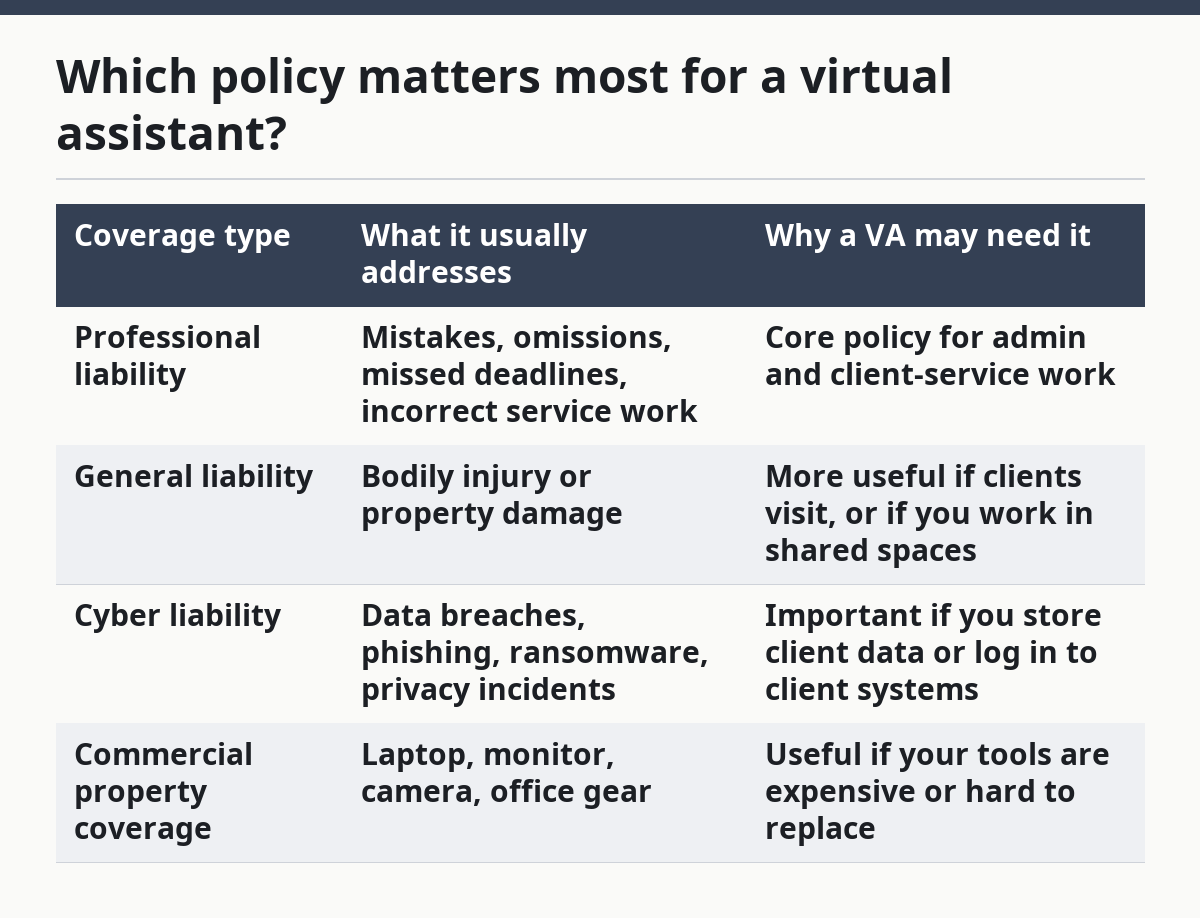
This policy is different from general liability. General liability usually deals with slip-and-fall injuries or damage to someone else’s property, while professional liability deals with financial loss tied to a service mistake. That distinction matters because most VAs have low physical risk but regular error risk.
A simple comparison helps:
| Coverage type | What it usually addresses | Why a VA may need it |
|---|---|---|
| Professional liability | Mistakes, omissions, missed deadlines, incorrect service work | Core policy for admin and client-service work |
| General liability | Bodily injury or property damage | More useful if clients visit, or if you work in shared spaces |
| Cyber liability | Data breaches, phishing, ransomware, privacy incidents | Important if you store client data or log in to client systems |
| Commercial property coverage | Laptop, monitor, camera, office gear | Useful if your tools are expensive or hard to replace |
The trade-off is simple: a policy can be cheap enough to ignore until a claim arrives, but the wrong policy leaves a gap. A VA who only has property coverage can still be exposed to a claim about a calendar error or a privacy incident. That is why the policy mix matters more than a single headline label.
What insurance do freelance virtual assistants need?
Freelance virtual assistants usually need professional liability insurance, and many also need cyber liability insurance; general liability and commercial property coverage depend on how they work. That is the short answer, but the details change with client access, storage practices, and whether work happens only from a home office.
A sound way to sort the need is to map the work to the risk. If the job includes scheduling, inbox management, bookkeeping support, CRM updates, research, or client follow-up, professional liability is the first policy to understand. If the job includes passwords, shared drives, payment records, personal data, or access to email and admin systems, cyber liability deserves a close look.
Here is a step-by-step way to check the coverage fit:
- List every service you sell. Write the exact tasks, such as inbox management, scheduling, lead sorting, or document handling, and keep the list to one page. Verify whether any task can create a money loss if done wrong. A problem sign is any service that touches deadlines, billing, or private records.
- Mark every type of client data you touch. Separate names, emails, phone numbers, contracts, login details, and payment records. Verify whether that data sits on your device, in cloud tools, or in client systems only. A problem sign is storing client access in a notes app or on an unprotected spreadsheet.
- Check how clients access your work. Note whether you use shared drives, email attachments, project boards, or password managers. Verify whether a mistake could send information to the wrong person. A problem sign is any workflow that depends on manual forwarding or copied addresses.
- Decide whether you ever meet clients or work on site. If the answer is yes, general liability becomes more relevant because a visitor injury or accidental damage can happen outside the screen. Verify the setting: home office, coworking space, or client premises. A problem sign is a location with foot traffic, shared equipment, or client visits.
- Check your equipment value. Add up the cost of your laptop, monitor, external drive, webcam, and other work tools. Verify whether a loss would interrupt work for more than a day or two. A problem sign is depending on one laptop for all client work without a backup plan.
- Review contract clauses. Look for insurance requirements, confidentiality terms, and any duty to carry cyber coverage or professional liability. Verify the wording before signing. A problem sign is a contract that asks for proof of coverage you do not yet have.
- Match the policy to the real exposure. Compare the service risk, data risk, and physical risk with the policy type. Verify that cyber coverage includes privacy incidents and that professional liability covers administrative errors. A problem sign is buying one policy and assuming it covers every mistake.
- Revisit the setup after the work changes. If you add bookkeeping support, access more client systems, or hire help, review the coverage again within 30 days. Verify whether the new work increases data exposure or claim size. A problem sign is assuming last year’s policy still fits this year’s services.
The point of the checklist is not to chase every possible policy. It is to see where the money loss could come from. A VA who only schedules social posts needs a different mix from a VA who manages invoices and client passwords. For more on policy basics, see what does professional liability insurance cover and small business cyber insurance.
Do virtual assistants need cyber insurance?
Virtual assistants often need cyber liability insurance when they handle client data, because the main exposure is privacy, access, and transfer risk. That includes stored logins, client contact lists, shared files, financial records, and any work done inside a client’s accounts.
Cyber liability is not only for large firms. A solo VA can still face a claim if a phishing message leads to account access, a file is sent to the wrong recipient, or malware locks up client documents. The policy typically exists to address the response costs tied to a breach or cyber event, not just the device itself.
The limit of this coverage is important. Cyber liability is not the same as commercial property coverage, so a stolen laptop and a leaked spreadsheet may involve two different parts of a policy stack. A privacy issue can happen even if the hardware is never lost.
A better way to think about cyber coverage is by workflow, not just by job title. If you can answer yes to any of these, cyber coverage becomes more relevant: you store passwords, you share files through cloud tools, you manage email accounts, or you hold personal data for more than a brief moment. For many freelance VAs, that is the normal job, not the edge case.
The FTC’s business data-security guidance is useful here because it explains why access control, phishing, and data handling are not just IT issues. For a VA, those are day-to-day operational issues. See the FTC’s Protecting Personal Information: A Guide for Business.
When does general liability make sense?
General liability makes sense when a freelance virtual assistant has a real chance of causing bodily injury or property damage, not just service mistakes. For a home-based VA who never meets clients in person, this coverage may be less central than professional liability or cyber liability.
That does not mean it is useless. If you meet a client at a coworking space, host a meeting at your office, or use a client site, general liability can matter. The policy is aimed at accidents like a visitor tripping over a cord or a spilled drink damaging someone else’s property, not at a wrong invoice or a data breach.
A common mistake is to assume any business insurance will do. It will not. General liability does not replace professional liability, and it does not cover most cyber events. A VA who only buys one policy because it sounds broad can still be exposed where the work actually happens.
The clean rule is this: if your work is entirely digital and remote, general liability may be secondary; if you have people physically around your work setup, it moves up the list. The setting matters as much as the role.
When should a virtual assistant stop and get advice?
A freelance virtual assistant should pause and get qualified insurance advice when the work or contract goes beyond simple admin tasks. This is information rather than financial advice, and a qualified adviser should be consulted for the reader’s own situation.

A client requires specific policy language: This usually means the contract is more demanding than a generic policy summary — ask for help matching the wording before you sign.
You handle payment records or account access: This increases the privacy and fraud exposure — check whether cyber liability needs stronger protection than a basic plan.
You work inside a client’s systems every day: Repeated access raises the chance of a data event — verify that the policy treats client data handling the way your work actually operates.
You keep expensive gear in one place: A single laptop, monitor, and backup drive can become a work stoppage if stolen or damaged — check whether commercial property coverage fits that setup.
You have coworkers, subcontractors, or a growing client list: More people and more files usually mean more claim paths — review the coverage before the workload changes again.
You are asked to sign an indemnity clause: That clause can shift financial responsibility in a way the policy may not match — get the wording reviewed before accepting it.
Each of those situations changes the risk profile in a real way. The wrong answer can leave a claim outside the policy, so the issue is not whether insurance exists but whether the policy fits the actual business model.
What mistakes do freelance virtual assistants make with insurance?
Freelance virtual assistants often make the same few insurance mistakes, and each one leaves a different gap. The most common error is buying only general liability because it sounds like basic business insurance. That can leave service errors and data incidents uncovered, which is a serious miss for a VA.

Another mistake is treating cyber liability as optional because the business is small. A solo VA can still store client files, logins, and personal data, and the size of the team does not erase the exposure. The problem is not the headcount; it is the data path. For a cautious next step, consult a professional who can compare the policy to the actual workflow.
A third mistake is assuming commercial property coverage protects the full business. It may help replace equipment, but it does not address an error claim or a privacy event. A damaged laptop and a leaked file are different problems, even if they happen on the same day.
A fourth mistake is ignoring contract terms. Some clients want proof of specific coverage, and a mismatch can delay onboarding or shift risk back to the freelancer. Read the contract before work starts, not after a problem.
A fifth mistake is leaving out the task list. If the policy application says “administrative support” but the job includes sensitive data handling, the coverage review may be too shallow. The fix is to describe the work plainly and keep the description current.
What coverage matters for client data work?
Client data work makes cyber liability and professional liability the most relevant policies for many freelance virtual assistants, because the risk comes from both information handling and service mistakes. General liability and commercial property still matter in the right setting, but they are not the first place to look for data-related exposure.
A VA who handles client data should care about three things: where the data lives, who can reach it, and what happens if something goes wrong. If client files sit in cloud storage, shared drives, or email, the exposure is bigger than a one-off file transfer. If the job includes account access, the risk grows again.
This is where the distinction between “data loss” and “physical loss” matters. A cracked screen can be a property issue. A misdirected spreadsheet can become a privacy issue. A missed deadline can become a professional liability issue. One workflow can trigger more than one claim type, which is why a single policy rarely tells the whole story.
The most useful question is not “Do I have insurance?” but “Which part of the work can turn into a claim?” For client data work, that is usually the answer that decides the policy mix.
FAQ
Do virtual assistants need cyber insurance?
Many freelance virtual assistants do need cyber liability insurance, especially if they store passwords, share files, or handle personal data. The policy matters because small businesses can still face phishing, privacy, and account-access problems. If client data never touches your systems, the need may be lower, but that is uncommon in admin work. For a clearer comparison, see cyber liability insurance and professional liability insurance.
Does a virtual assistant need general liability?
Some virtual assistants do need general liability insurance, but not all do. It becomes more relevant if clients visit your space, you work on site, or there is a chance of accidental property damage or bodily injury. A fully remote VA with no in-person contact may place less weight on this coverage than on professional liability.
What coverage matters for client data work?
Client data work usually points first to cyber liability insurance and professional liability insurance. Cyber coverage is tied to privacy and system incidents, while professional liability deals with service mistakes that cause a client loss. If your tools are expensive or you meet clients in person, commercial property coverage and general liability may also matter. See also commercial property insurance and general liability insurance.
Drafted with AI; not yet reviewed by a person.
