
Last updated: November 20, 2026
Act fast: preserve evidence, write down the timeline, tell the client what changed, and contact the insurance carrier before you lose details from the first day. What to Do in the First 24 Hours After a Freelance Incident is a practical checklist for the first day after a client property damage event, an error in delivered work, a data leak, or another event that may trigger a claim later. This is information, not financial advice; a qualified adviser should be consulted for your own situation.
Key takeaways
- The first day is for facts, not blame.
- Save the original files, messages, photos, and any version history before anything gets edited or deleted.
- Send a short client email that states what happened, what is affected, and what you are doing next.
- Check the policy period and notify the insurance carrier early, even if you do not know yet whether a claim will follow.
- Stopgap mitigation matters, but only if it does not destroy evidence or create a bigger problem.
What counts as a freelance incident?
A freelance incident is any event tied to your work that could lead to loss, damage, a dispute, or an insurance claim. That can include a broken item on a client site, a missed deliverable with a cost, or a security event that affects client data. The key point is not the label; it is whether the event may create a record you will need later.
The first 24 hours matter because memory fades and digital traces change quickly. Email headers, file timestamps, phone photos, chat threads, and cloud logs can disappear or get overwritten within a day. If the event involves cyber exposure, evidence-handling guidance from NIST Special Publication 800-61 can be a useful model for preserving logs and recording actions.
This approach is for freelancers who can already identify the incident and can still access the relevant files, devices, or client contact details. It is not for someone who is already in a formal legal dispute, has received a demand letter, or needs a specialized claim procedure. Those situations need the next step in the chain, not the first-day checklist.
What should I do first?
When a freelance incident happens, the first job is to secure the scene, preserve evidence, and create a dated record. If the situation is unclear, consult a qualified professional for the specific facts before making a move that could erase proof.
- Freeze the situation for 10 to 15 minutes. Stop the work that caused the incident and do not edit, move, repair, or delete the item, file, or message thread involved. Verify that nothing new is being written over the original data. A problem is any action that changes timestamps or destroys the original state.
- Take photos or screenshots immediately. Capture the item, screen, or workspace from at least 2 angles or views, and include any error messages, file names, and visible dates. Verify that the image shows the full context, not just the damage. A problem is a cropped image that cannot prove where or when the event happened.
- Write an incident report the same day. Record the date, local time, location, people involved, what happened, and the exact steps already taken. Keep it factual and avoid guesses about fault. Verify that the report separates observed facts from assumptions. A problem is a timeline that mixes opinion with evidence.
- Save original communications in two places. Export the client email thread, chat log, or message history and, if you are unsure how to preserve it correctly, consult a qualified professional or follow your carrier’s instructions. Keep one copy in a secure folder and one backup copy. Verify that attachments, headers, and timestamps are included. A problem is a copy that strips out the sender, recipient, or time data.
- Preserve files and version history. If the incident involves digital work, keep the original file, the last saved version, and any revision history from the platform you used. Verify that file names and dates stay unchanged. A problem is opening and resaving the file in a way that overwrites the evidence.
- List every person and system touched by the event. Note the client contact, subcontractor, host, device, software, or platform involved. Verify that you include the insurance carrier name if you already know it. A problem is a missing party that later blocks the timeline.
- Check the policy period before you contact anyone about coverage. Look at the start and end dates on the policy documents so you know whether the incident may fall inside the coverage window. Verify the dates against the paperwork, not memory. A problem is assuming an event is covered by timing without checking the actual policy period.
- Make a short stopgap fix only if it is safe. If the issue is active, reduce further harm without changing the original evidence, such as isolating a device or moving a damaged item to prevent more damage. Verify that the fix does not erase logs or photos. A problem is a repair that solves the mess but removes the proof.
For cyber-related events, the U.S. Cybersecurity and Infrastructure Security Agency and NIST both publish incident-response guidance that stresses containment and documentation before deeper cleanup. For insurance questions, the policy wording matters more than general advice, so the document set should stay intact from the first day.
What should I send to the client?
You should send a short client email that explains the known facts, the immediate effect, and the next update time. Keep it plain and avoid admitting fault, promising a fix you cannot make, or debating money in the first message.
A useful email usually includes four parts: what happened, what is affected, what you have already done, and when the next update will come. A 6-sentence note is often enough. If the incident affects a deadline or deliverable, say so directly and name the specific file, task, or service affected.
The most reliable version of this email is factual and narrow. The least reliable version tries to soften the blow with long explanations, excuses, or guesses. If you are unsure what the client already knows, stick to the incident report facts and leave out speculation. That keeps the message consistent if it is later shared with the insurance carrier or insurer-appointed investigator.
If the client asks for a phone call, use the call to clarify immediate effects, then follow up in writing. A written client email creates a timestamped record and reduces confusion about who said what. If there are several clients or stakeholders, send separate messages rather than one broad note, so each thread stays clean and easier to trace later.
When do I contact the insurance carrier?
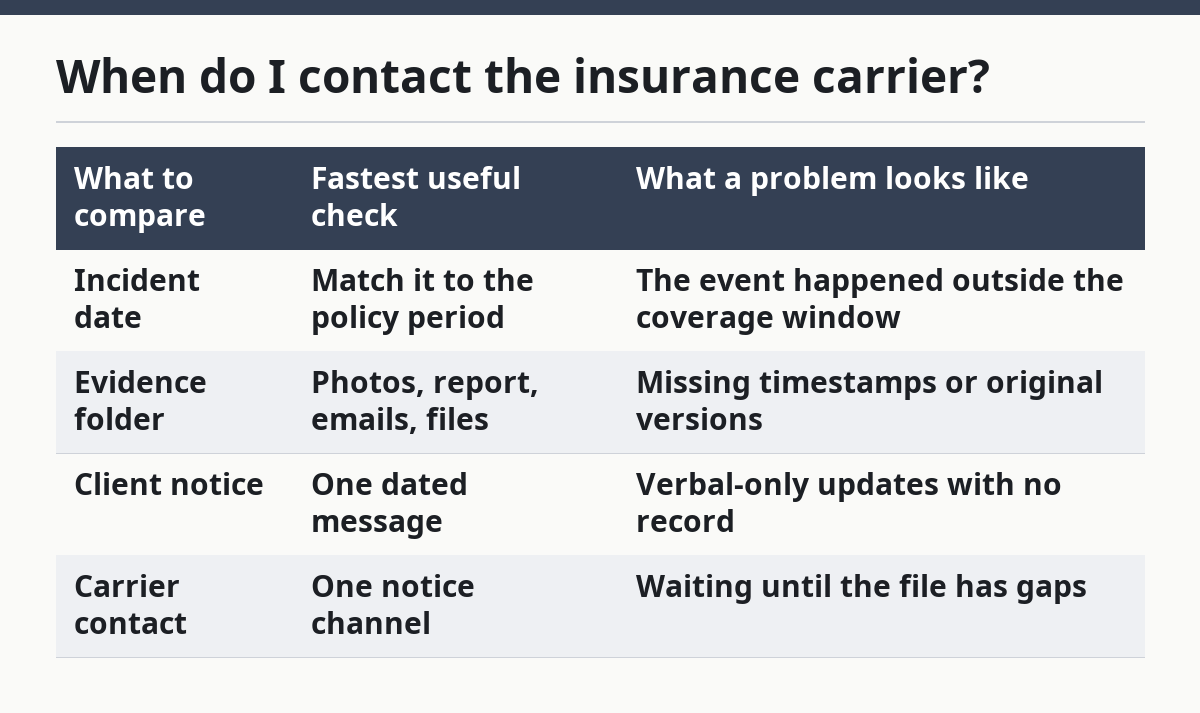
You should contact the insurance carrier as soon as you can confirm the incident may involve your policy, even if the claim is not ready yet. Early notice helps protect the record and gives you the carrier’s reporting instructions before the file gets messy.
The carrier may ask for the incident report, photos, the client email, and any policy number or claim reference it wants to use. Have those items ready in one folder. If you do not yet know whether the incident falls inside the policy period, say that plainly and provide the date of the event. That is better than waiting until the file is incomplete.
A first contact is usually about notice, not argument. You are not settling the matter in that call or email. You are telling the insurance carrier that a reportable event may exist and asking how it wants the information formatted. If the policy has a specific notice process, follow that process instead of improvising a new one.
| What to compare | Fastest useful check | What a problem looks like |
|---|---|---|
| Incident date | Match it to the policy period | The event happened outside the coverage window |
| Evidence folder | Photos, report, emails, files | Missing timestamps or original versions |
| Client notice | One dated message | Verbal-only updates with no record |
| Carrier contact | One notice channel | Waiting until the file has gaps |
A common mistake is to assume “I will sort it out later.” In insurance matters, later often means less proof and a weaker timeline. That is why first-day notice matters even when the rest of the facts are still unfolding.
What should I not do in the first day?
You should not repair, admit, guess, or delete your way through the first 24 hours. Those actions can damage the record more than the incident itself.
Damage that is still active: It means the problem is continuing — Isolate the source and document the steps before further cleanup.
Evidence that is easy to overwrite: It means the original file, chat, or photo can disappear — Export a copy now and keep the original intact.
A client wants a quick verbal fix: It means pressure is rising — Send a written update first, then talk.
The policy period is unclear: It means coverage timing needs checking — Find the policy paperwork before making assumptions.
The event seems minor: It means the loss may look small today but grow later — Record everything anyway and notify if the policy requires it.
The biggest error is treating the first day like a cleanup job instead of a records job. The second biggest is improvising a story before the facts are fixed. If the event involves injury, stolen data, or a likely legal dispute, the matter may need qualified help because the consequences can move beyond ordinary freelance admin.
What mistakes cost freelancers the most?
The most expensive mistakes are the ones that break the paper trail, not the ones that look dramatic. A deleted message, a resaved file, or a vague note can cause more trouble than the incident itself.
One mistake is waiting for a perfect timeline before acting. That can cost you the original evidence, because timestamps and memory are easiest to lose in the first few hours. The correct move is to write down what you know now and add missing facts later with clear updates.
Another mistake is sending a long, emotional client email. That can create confusion and give the other side extra material to quote later. The correct alternative is a short message with dates, facts, and the next update window.
A third mistake is making a fix before making a copy. If you patch the system, replace the damaged item, or overwrite the file first, the record may be gone. The correct alternative is to preserve the original, then mitigate.
A fourth mistake is assuming the carrier will not care until a formal claim exists. That can be costly if the policy requires notice within a certain period or if the carrier needs the first-day facts to assess the event. The correct alternative is early notice with incomplete but accurate information.
How do edge cases change the first 24 hours?
The standard checklist changes when the incident is digital, shared, or tied to several parties. In those cases, the safest move is often to preserve more than one version of the record.
If the incident involves a shared drive, save a copy of the file history and note which platform created it. If it involves a subcontractor, list the subcontractor’s role, the time of contact, and the exact task involved. If the event happened during travel or at a client site, record the address and any witness names from the same day.
When the incident is a cyber event, the first 24 hours should focus on containment, log preservation, and notification order. NIST guidance treats documentation as part of response, not an optional add-on. That means screenshots of alerts, logs, and system messages matter as much as the visible damage. It also means you should avoid cleaning up the system so fast that the cause disappears.
The hard limit is simple: if the event is already moving toward a demand letter, a formal claim, or a legal dispute, the first-day checklist is no longer enough by itself. At that point, the record you made in the first 24 hours becomes the base file, not the whole solution.
What should a freelancer do immediately after an incident?
A freelancer should preserve evidence, make a dated incident report, and send a short client email on the same day. The first hour is for freezing the facts, not fixing the story. If the event may touch insurance, the policy period and the carrier notice process should be checked right away.
How soon should i notify my insurer?
You should notify the insurance carrier as soon as you can confirm the event may relate to your policy, and in many cases that means the same day. Do not wait until every detail is complete. The carrier can tell you what it wants next, but early notice is safer than late notice when timing matters.
What evidence should I save after an incident?
You should save the original files, screenshots, photos, email threads, chat logs, file versions, and a written incident report. Keep the original version untouched and make copies for sharing. If the incident involved a client site, device, or platform, save the date, time, location, and any relevant error messages too.
Drafted with AI; not yet reviewed by a person.
