
Last updated: November 19, 2026
Key Takeaways
- Gather records first, then write the claim statement.
- Build a dated record showing the files existed, were accessible, disappeared, and will cost money or time to recreate.
- Usually, you need proof of existence, proof of loss, and proof of cost.
- When the claim is incomplete, it can create more trouble than it solves.
Lost client files need a clean paper trail, not a guess. How to Document Lost Client Files for an Insurance Claim starts with dated proof, because the insurer needs a record of what was lost, when you noticed it, how you know it existed, and what it will cost to rebuild. The steps below show how to document lost client files for an insurance claim without padding the file. In a 2023 Verizon Data Breach Investigations Report, 74% of breaches involved the human element, which is one reason dated records matter. The steps below also help if your policy wording asks for evidence before reimbursement.
Start with the facts the claim file needs
This applies if you are a freelancer, consultant, or small business owner with client files on a laptop, cloud drive, external drive, or office server. It assumes you already know which project assets are missing and that you can still reach some records, such as an invoice, a backup system log, or a client email thread. Because this is about How to Document Lost Client Files for an Insurance Claim, the record should stay factual. This is information, not financial advice; for your own policy wording and claim position, a qualified adviser can help, and the National Association of Insurance Commissioners offers consumer guidance on reviewing policy terms.
Picture this: you open a folder and half the client work is gone. You need to show the insurance carrier what disappeared, how you found out, and why it matters financially. That usually means a file inventory, backup records, access logs, reconstruction costs, and a short timeline. It also helps to anchor the loss with dates, because carriers look for consistency. A clear file date and a clear discovery date can separate a claim from a guess.
- A file inventory lists the missing items by name and type.
- Backup records show the last known copy.
- Access logs show who could reach the files and when.
- Reconstruction costs show what it will take to recreate them.
The claim gets stronger when those pieces line up with the same date range. If they conflict, the carrier will ask questions fast. That is why How to Document Lost Client Files for an Insurance Claim is mostly a timing exercise, not a storytelling exercise. The insurer wants dates, file names, and access history.
What to collect before you write the claim
You should collect the records first, then write the statement. A claim packet built from scattered notes usually leaves gaps where the carrier expects dates, filenames, and proof of access. Missing one key record can turn a straightforward loss into a long back-and-forth. The same is true whether the loss happened on a laptop, in cloud storage, or on a server.
Start with a 1-page evidence list. Include the client name, project name, file location, date you noticed the loss, and the first place you confirmed the files were gone. Then gather the documents below. That order keeps How to Document Lost Client Files for an Insurance Claim simple and audit-ready.
- The original invoice or contract for the client work
- Folder listings, file explorer screenshots, or cloud file indexes
- Backup reports from the last successful copy
- Login history, audit trails, or permission logs
- Emails or messages showing the files were shared or received
- Any ticket or incident note you wrote that day
The truth is, the carrier is trying to answer two questions: did the files exist, and can the loss be verified? A clean packet answers both before an adjuster has to ask. The insurer also has an interest in dates because a claim with a 2024 invoice and a 2024 backup log is easier to follow than one with no timeline at all.
How do I document lost client files for an insurance claim?
You document lost client files for an insurance claim by building a dated record that shows the files existed, were accessible, disappeared, and will cost money or time to recreate. That means a timeline, a file-by-file list, proof of access, backup history, and a reconstruction estimate. For How to Document Lost Client Files for an Insurance Claim, the goal is to connect those pieces with clear dates.
Picture this: you have 20 project files, but only 12 are missing. You do not need a novel. You need a simple trail from existence to loss to cost. Keep each step tied to a specific record, not a memory. A 12-file loss is easier to prove when the inventory is exact.
- Write the loss date and discovery date. Put both on the first page, with the exact time if you have it from a system alert or email. Verify the dates match your logs; a mismatch is a red flag.
- List every missing file. Use the exact filename, format, and folder path, such as PDF, DOCX, or PSD. Verify the list against a folder index or backup catalog; a vague description like “client docs” is too weak.
- Show proof the files existed. Attach file listings, shared links, sent emails, invoice attachments, or version history. Verify the evidence predates the loss by checking timestamps; if every document starts after the loss, the claim looks thin.
- Document who had access. Include user accounts, shared drive permissions, or device access records. Verify whether the files were on a system with 2-factor login, because access controls help explain how the files were protected.
- Capture backup records. Save screenshots or export reports from the backup system showing the last successful backup and any failed runs. Verify the backup covered the same folder or device; if it skipped the folder, note that plainly.
- Record the recovery effort. Note the steps taken to search drives, restore from backup, contact IT, or check cloud trash and version history. Verify the search covered each storage location, not just the obvious one.
- Estimate reconstruction costs. Use vendor quotes, staff time records, or a clean hourly estimate supported by invoices, if your policy allows it. Verify the estimate is tied to the missing files only; broad business costs blur the claim.
- Prepare a short narrative. Explain in plain language what happened, what was lost, and what remains available. Verify the narrative agrees with the attachments word for word on dates and file names.
A claim file built this way is easier for the adjuster to follow. A messy one invites delay. How to Document Lost Client Files for an Insurance Claim works best when the chronology is visible on the page.
What proof is needed for missing files?
You usually need proof of existence, proof of loss, and proof of cost. That means at least one record from before the loss, one record showing the files were no longer there, and one document showing what it will take to rebuild them. To document lost client files for an insurance claim, those three pieces should point to the same event.
Picture this: you are sorting screenshots, emails, and cloud logs into one packet. The carrier does not want 40 loose files. It wants evidence that answers a simple chain: the files were there, the files are gone, and the loss has a price. A 2024 folder listing and a 2024 backup log are easier to use than a stack of undated notes.
A solid set often includes:
- A backup log or sync report from the last successful run
- A folder listing with filenames and timestamps
- Access logs or audit history from the system that held the files
- A client email that references the attached files
- A quote, invoice, or time log for reconstruction work
If you can, label every attachment with a number and a one-line note. “Exhibit 3: Backup report, last successful copy” beats a generic file name. Clear labels save time, and they also make How to Document Lost Client Files for an Insurance Claim easier to review.
When the standard approach does not apply
You should stop the normal documentation process and get the right help if the loss is tied to a legal hold, a potential privacy breach, a forensic investigation, or a disputed client dispute. In those situations, a half-finished claim file can create more trouble than it solves. The better move is to slow down and preserve the evidence first.
Picture this: the missing files include client data, contract terms, or material marked confidential. Now the question is not just how to document the loss. The question is whether the evidence trail must be preserved in a specific way before anything else changes. How to Document Lost Client Files for an Insurance Claim can still be the right framework, but not if it interferes with preservation duties.
Possible breach or cyber event: It may require forensic steps and log preservation — stop normal cleanup and preserve devices, accounts, and logs first.
Client dispute over ownership: The insurer may want a tighter record of custody — gather contracts and handoff emails before you reconstruct anything.
Legal hold or subpoena risk: Routine deletion or overwriting can harm the record — freeze the relevant files and document who touched them.
No backup exists: The claim may still be possible, but the proof burden is heavier — focus on access logs, sent copies, and dated client communications.
Large reconstruction cost: If the dollar value is high relative to your policy wording, the carrier may scrutinize labor and scope — itemize every task and hour carefully.
If the loss sits inside one of those boxes, stop improvising. One careless step can weaken the file. That is the wrong tool for the job, especially when How to Document Lost Client Files for an Insurance Claim overlaps with breach response or legal preservation.
The mistakes people actually make, and what they cost
The most common mistake is writing a vague story and calling it evidence. “The files were lost” does not tell the carrier which files, when, or how you know. The fix is a line-by-line inventory with dates and source records. A specific record set is far stronger than a general explanation.
Another mistake is using screenshots with no context. A screenshot without a visible date, folder path, or account name may prove very little. Add the system name, timestamp, and file path so the screenshot stands on its own. That is especially important when How to Document Lost Client Files for an Insurance Claim depends on digital evidence.
A third mistake is rebuilding the work before documenting it. Once you recreate the files, the original state may be harder to prove. Save the original logs and exports first, then rebuild from copies or notes. If possible, keep the original version history untouched.
- Leaving out access records: consequence is weak proof of who could reach the files; use audit trails instead.
- Mixing old and new versions: consequence is a disputed file list; separate pre-loss files from rebuilt ones.
- Claiming broad business time: consequence is a cost dispute; tie hours to the missing files only.
- Skipping client communication records: consequence is no proof the work existed offsite; save sent emails and acknowledgments.
The rule is simple: if a record can be dated, label it. If it cannot be dated, treat it as support, not proof. If a record has no date, ask an adviser or claims professional before relying on it. That keeps How to Document Lost Client Files for an Insurance Claim aligned with what insurers can verify.
How much detail is enough?
Enough detail means the claim can be checked without a phone call for every line. A good packet lets the carrier trace a missing file from creation to loss to cost in a few pages, not a pile of guesses. One dated page can do the work of several vague ones.
Picture this: you have a 10-page file instead of a shoebox. The adjuster can see the loss date, the backup gap, the access trail, and the rebuild estimate in one pass. That does not guarantee approval, but it makes review easier. How to Document Lost Client Files for an Insurance Claim becomes simpler when each line has a date or source.
A good result usually has these features:
- One timeline with 3 to 6 dated events
- One inventory with file names, not categories
- One backup record that shows the last known copy
- One access record that shows who had permission
- One cost summary that separates labor, software, and outside help
If you have to explain the same fact three different ways, the packet is not ready yet. Trim the noise and keep the proof. As a practical target, keep the explanation to a few pages and the exhibits to the records that matter.
How should you present the packet to the insurance carrier?
You should present the packet as a short cover note plus labeled exhibits. Start with a 1-page summary, then attach the supporting records in the same order every time. That format makes the claim easier to compare against the policy terms and the adjuster’s checklist. It also keeps How to Document Lost Client Files for an Insurance Claim organized from the start.
Picture this: you are sending the claim by email or portal upload. A clear subject line, a dated summary, and numbered exhibits make it easy to track what you sent and when. That matters if the carrier later asks for the same file again. It also helps if you need to resend only one exhibit.
A practical order is:
- Claim summary
- Loss timeline
- File inventory
- Backup records
- Access logs
- Reconstruction estimate
- Client communication
- Any follow-up notes
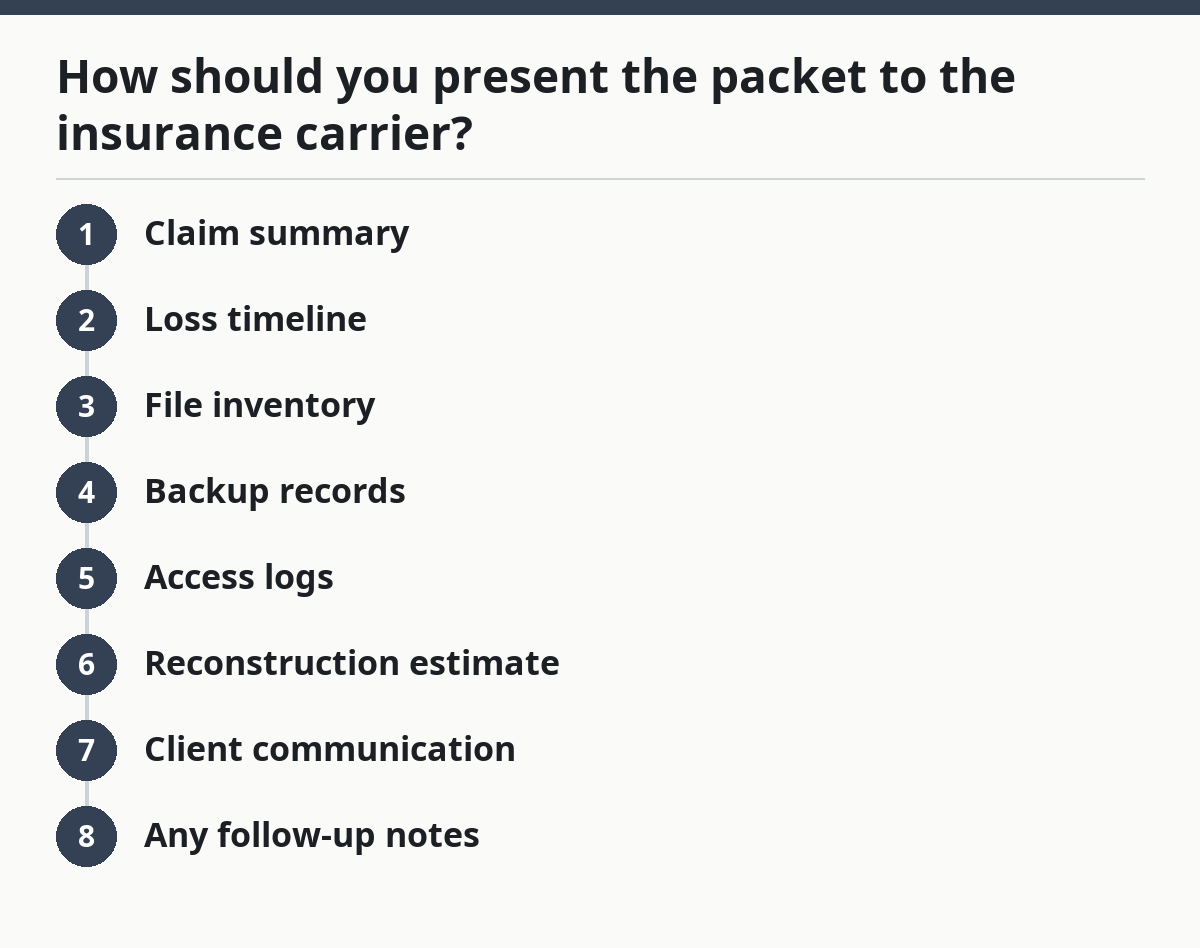
The claim is cleaner when every exhibit is named the same way in the summary and the attachment list. A mismatch wastes time. Keep the wording consistent. The same wording also makes How to Document Lost Client Files for an Insurance Claim easier to search in email and portal records.
The guide to freelancer financial protection on the hub page goes deeper on how file loss fits into a wider risk plan.
FAQ
What proof is needed for missing files?
You need proof the files existed, proof they disappeared, and proof of the cost to recreate them. The strongest set usually includes a backup record, a file list with timestamps, an access log, and a dated invoice or estimate. If one piece is missing, the rest should still point to the same loss event.
Can I claim time spent recreating files?
You may be able to claim reconstruction time if your policy covers that kind of expense and the time is documented well. Keep a dated time log that names each task, such as search, restore, reformat, or redraw, and connect it to the missing files only. General admin time is harder to support.
How do I show the files existed before the loss?
Use dated records from before the loss, such as sent emails, backup reports, shared links, version history, or folder listings. The key is that the evidence must predate the loss and identify the files by name or path. If the only proof appears after the loss, it weakens the claim.
Drafted with AI; not yet reviewed by a person.
