

Last updated: November 25, 2026
Send a short, factual message that acknowledges the problem, explains what you are doing next, and avoids any sentence that accepts legal fault. This guide on How to Communicate With a Client After a Freelance Error Without Admitting Liability focuses on the first reply: keep it to the facts, timing, and fix steps, while you protect your rights and loop in your insurer if an insurance claim may follow.
Key takeaways
- Say what happened in plain language, then stop before you guess at fault.
- Use an apology for the impact, not a statement that you were negligent.
- Keep every update tied to a concrete fact: file name, date, version, deliverable, or deadline.
- If the client hints at a claim, preserve the email thread and notify the insurer early.
- This is general information, not legal advice; rules vary by jurisdiction, and a qualified lawyer should be consulted for your matter.
This article is for freelancers who have already found the mistake, know which client it affects, and need to respond without making the situation worse. It assumes you can describe the error in one sentence and that you are prepared to check your contract, your insurance policy, and your inbox before you send anything. If the client has already threatened suit, sent a formal demand, or raised a payment dispute with legal language, stop and get qualified help before you write back.
What should I say first?
You should lead with a calm acknowledgment, not a defense. The first sentence of your reply should show that you have seen the issue and are looking at it now, because that is the fastest way to lower friction without admitting liability.
A useful first move is to separate three things: the error itself, the effect on the client, and your response. Say the error in factual terms. Then name the work item, such as “the March 12 draft” or “version 4 of the design file,” so there is no confusion about what you mean. Do not add guesses about why it happened unless you are certain of the cause and the wording is neutral.
Keep the message short enough to fit on a phone screen. A client who opens an email and sees 400 words of explanation may read that as self-protection. A client who sees 4 crisp lines can see that you are engaged and not hiding. If you need more detail, send a second message after you have checked the facts.
How do I apologize without admitting fault?
You apologize for the impact, not for legal responsibility. That distinction matters because “I’m sorry this caused delay” is different from “I was negligent” or “I accept full responsibility,” and those later phrases can matter in a liability dispute.
Use wording that names the inconvenience or disruption. For example: “I’m sorry this created extra work on your side” or “I’m sorry for the delay this caused.” Those lines show human judgment without saying you breached a duty. Avoid phrases like “my mistake was entirely my fault,” “I accept liability,” or “I should have known better,” because those are more than courtesy in a legal setting.
A simple comparison helps:
| Safer phrasing | Riskier phrasing |
|---|---|
| “I’m sorry this caused a delay.” | “I was negligent.” |
| “I’m reviewing what happened.” | “I admit fault.” |
| “I’ll update you by 3 p.m. tomorrow.” | “I’ll take full responsibility.” |
| “I want to fix the issue.” | “I’m liable for the damage.” |
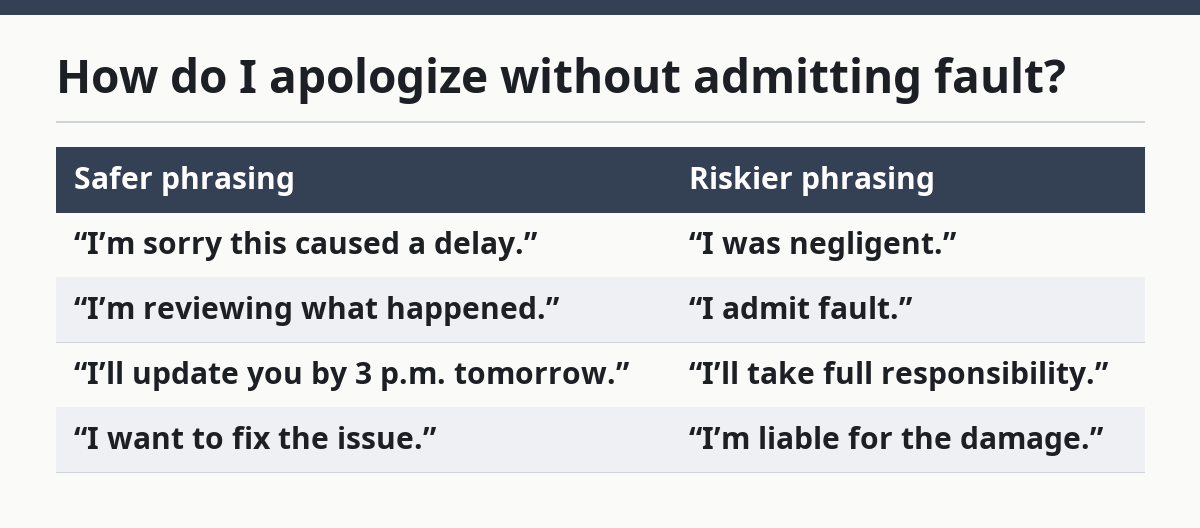
The safer version is not cold. It still shows concern. It just keeps the line between empathy and liability intact, which is the point of client communication after an error.
How do I reply by email step by step?
You should reply in a fixed sequence: acknowledge, state facts, give the next step, set a time, and preserve your records. Use the smallest possible correction first, because a tight reply is easier to defend than a sprawling explanation.
- Open with a factual acknowledgment. Identify the deliverable, date, or file in one sentence. Verify that the client can tell exactly which issue you mean. If the subject line is vague, that is a problem because it invites the wrong interpretation.
- State the error without guessing at cause. Use concrete terms such as “the incorrect logo version was attached” or “the spreadsheet contained an outdated formula.” Verify that your description matches the actual file or message. If you write “I think” or “probably,” you are still speculating.
- Offer the immediate correction. Say what you will send, fix, or replace next. Give a time window such as “by 2 p.m. tomorrow” or “within the next business day” if you can honestly meet it. If you cannot name a real time, the update is not ready.
- Keep the apology limited to impact. Use one short sentence about the inconvenience or delay. Verify that the sentence does not assign legal fault. If it sounds like a confession when read aloud, rewrite it.
- Avoid promises you cannot control. Do not promise that the client will be “made whole” or that the problem is “fully covered” unless that is already confirmed. Verify whether the fix is under your control. A promise tied to a third party, such as a printer or subcontractor, often becomes a new problem.
- Preserve rights in neutral language. If there is any chance of a claim, add a line such as “I’m sharing this as a factual update while I review the issue.” Verify that you are not waiving any contractual rights by accident. If you see words like “final,” “complete settlement,” or “full release,” stop.
- Save the full thread and related files. Keep the original email, attachments, timestamps, and any version history in one folder. Verify that the metadata is intact. If you move the file or rewrite the subject line, you can make later reconstruction harder.
- Escalate when the tone changes. If the client shifts from “please fix this” to “we may seek damages,” do not keep improvising. Verify whether the matter is turning into an insurance claim or formal dispute. If so, the next message should be slower, shorter, and reviewed before it goes out.
A clean email often beats a clever one. The goal is not to win the argument in the first reply. The goal is to avoid language that turns a correctable mistake into a liability problem.
What should I check before sending anything?
You should check the contract, the facts, and the insurance notice requirements before you hit send. Those three checks usually take less than 30 minutes, and they prevent the most common self-inflicted damage.
Start with the contract. Look for any clause about notice, cure, limitation of liability, dispute process, or required written communication. Then compare your draft against the actual error. If the contract says you must give prompt notice of a defect and you wait a week, that can create a separate issue. For a cautious approach, check the wording with a qualified lawyer before you rely on it for your specific matter.
Next, check the insurance policy if you carry professional liability coverage. Many policies treat a potential claim differently from an actual claim, so the wording in your email matters. If you are unsure whether the issue may become an insurance claim, err on the side of preserving the thread and reviewing the policy terms before you send more detail, and consult your insurer or broker if needed.
Finally, check the facts twice. Confirm the file version, the date, the deliverable, and the client contact. A message that contains one wrong date or one mistaken attachment can undercut your credibility fast. If you need to say more than five sentences to explain the situation, pause and tighten it.
For general legal process and professional conduct guidance, you can also compare your approach with resources from the American Bar Association and your local bar association, since rules vary by jurisdiction. One useful starting point is the ABA’s Model Rules of Professional Conduct and its guidance on communications; another is your local regulator’s guidance on professional communications and disputes. Those sources will not tell you what to say in your exact case, but they can help you spot risky wording. See the ABA’s Model Rules of Professional Conduct at americanbar.org and the FTC’s guidance on what to do if you’re sued or threatened with a lawsuit for a broader view of dispute handling.
When should I stop and get help?
You should stop writing and get qualified help when the message may affect rights, deadlines, or a claim. In a legal context, the wrong email can matter even if the original error was minor.
The client mentions “damages,” “claim,” or “legal action”: That language means the issue may have moved from customer service to dispute handling — stop improvising and get a lawyer involved before sending a new substantive reply.
The client asks you to sign something with a release or waiver: That can change your legal position — do not sign or draft a response until a qualified lawyer has reviewed it.
Your contract has a strict notice or cure clause: Missing the notice window can hurt your position — check the clause first and follow the written process exactly, with qualified legal advice if the deadline is close.
Your insurer may need to be notified: A delayed notice can create coverage problems under some policies — preserve the thread and review the policy notice terms immediately, and ask your insurer or broker how to report it.
The client wants a dollar amount, refund, or settlement now: Money changes the stakes fast — do not negotiate numbers casually in email if a claim is possible.
You are unsure whether the error is yours alone: Shared blame can still turn into a dispute — gather the facts first and get advice before assigning responsibility.
The rule here is simple: if the email could shape a legal outcome, it is no longer just an email. It is part of the record.
What mistakes make this worse?
The biggest mistake is overexplaining. A long explanation often creates new openings, especially when it contains guesses, excuses, or timelines you cannot meet. The correct alternative is a short fact statement and a promised follow-up.
Another mistake is apologizing in legal language. Saying “I take full liability” may sound mature, but it can be read as an admission. The better move is to apologize for the inconvenience and leave liability questions to counsel or the insurer.
A third mistake is blaming the client, the subcontractor, or the software. Even if another party contributed, a blame chain in your first reply looks defensive and can inflame the relationship. If another person is involved, keep the first message neutral and save the allocation of fault for the formal process.
A fourth mistake is sending the message by text or chat because it feels faster. Chat is useful for simple logistics, but it is weaker as a record when a dispute grows. If the issue is serious enough to mention insurance or legal rights, use email and keep the thread intact.
A fifth mistake is waiting too long. Silence can make the client assume concealment. If you need an hour to verify facts, say that you are checking the details and will respond by a specific time. A 2-hour delay is better than a vague promise that turns into a day.
What changes if the client is angry or the error is small?
You should still use the same structure, but the tone and length change. With an angry client, keep the email even shorter and avoid debate; with a small error, you can often fix the issue in 3 to 4 sentences and move on.
If the client is upset, do not mirror the emotion. Angry language in reply can become part of the record and make settlement harder. Use a simple acknowledgment, one fact, one action, one time. If the client keeps sending heated messages, respond once in writing and then move the rest of the discussion to a calmer channel if appropriate.
If the error is minor, such as a wrong label, a small typo, or a short delay, do not turn it into a grand confession. A brief correction and apology for the inconvenience is usually enough. That said, “minor” is not the same as “no risk.” A small mistake can still matter if the client relies on the work for a deadline or if the contract treats accuracy as essential.
The one thing that does not change is the need to preserve the record. A tiny error can still become a large dispute if the later emails are messy. Save the message, the attachment, and the corrected version in the same folder.
How does this tie to the rest of a freelance claim?
It is the first record in the chain, and it can shape what happens next. A careful email helps the conversation stay factual while the claim status, coverage questions, and any later resolution are handled elsewhere in the process.
This is also where a lot of freelancers accidentally create two problems instead of one. They try to fix the work and settle the language at the same time. The better approach is to separate the correction from the legal position. One message says what happened and what will be corrected. A later step, if needed, deals with insurance, counsel, or formal dispute handling.
If you need a broader picture of how incidents, notices, and response steps fit together, the hub page on freelance claims, incidents, and loss response gives the larger frame. This page stays with the client email itself, because that is the point where a careful sentence can still change the path of the dispute.
FAQ
What should I say to a client after a mistake?
You should say that you saw the problem, state the fact in one sentence, and explain what you will do next. Keep the message short and avoid blame, guesses, or legal phrases like “liability” or “fault” unless a lawyer has told you to use them. A direct apology for the inconvenience is usually safer than a full admission.
How do I apologize without admitting fault?
You should apologize for the impact, not for legal responsibility. Phrases like “I’m sorry this caused a delay” or “I’m sorry this created extra work” are usually safer than “I was negligent” or “I accept liability.” The key is to sound human without writing a confession into the email record.
Should I contact my insurer before replying?
You should check the policy and consider notifying the insurer if the issue could become a claim. In some cases, the first reply should be very short until you know what notice the policy requires. If the client has mentioned damages, a refund demand, or legal action, getting qualified help before sending a detailed reply is a wise move.
Drafted with AI; not yet reviewed by a person.
