

Last updated: November 21, 2026
A neutral project incident log for insurance is a dated record of what happened, who was involved, what was seen, and what records support it. Write it as facts only, with a clear timeline, project notes, email records, and attachments, so an insurer can review the event without sorting through blame or guesswork.
Key takeaways
- Keep the log to observable facts, not feelings or conclusions.
- Use a simple timeline with dates, times, names, and direct quotes from records.
- Attach the original evidence, not just a summary of it.
- Leave out blame, diagnosis, and predictions unless a source document already states them.
- This is information, not financial advice; for your own claim or policy situation, ask a qualified adviser.
Who is this for?
This is for a freelancer, contractor, or project manager who needs a project incident log that can support an insurance review later. It assumes you already have the basic records: project notes, email records, message threads, files, and any attachment that shows what was said or done on the project.
This page is not for writing a client message about fault, and it is not for drafting a claim summary. It is also not the place to decide whether an event is covered. If the incident may involve a formal claim, a policy dispute, or a legal dispute, get qualified help for your own situation rather than relying on a template alone.
A neutral log works best when it is built within 24 hours of the incident or as soon as you can reconstruct the sequence from records. The point is to preserve the 1st version of the facts, not the most polished version.
What makes a log neutral?

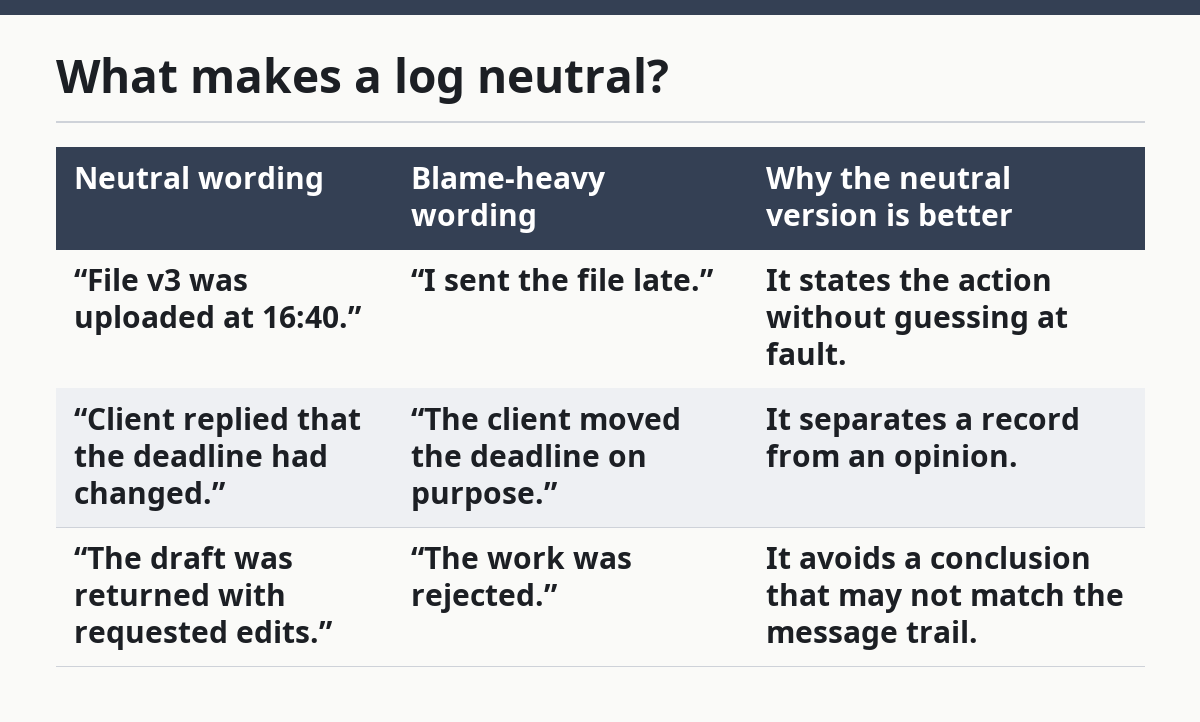
A neutral log records what can be verified, not what somebody believes caused the problem. That means the entry should say “sent proof file at 14:20” rather than “sent the wrong file by mistake,” unless an email or message from that date actually says it was wrong.
A useful test is simple: if a sentence could be disputed, reword it as an observation. “The client was upset” is weaker than “The client wrote at 09:12: ‘This version does not match the brief.’” The second line shows who said what and when, which is what an insurer usually needs.
The same rule applies to project notes. Notes can include context, but they should still point back to an email, file name, chat record, invoice, or version history. If the log reads like an argument, it stops helping. If it reads like a record, it can be checked against the source.
| Neutral wording | Blame-heavy wording | Why the neutral version is better |
|---|---|---|
| “File v3 was uploaded at 16:40.” | “I sent the file late.” | It states the action without guessing at fault. |
| “Client replied that the deadline had changed.” | “The client moved the deadline on purpose.” | It separates a record from an opinion. |
| “The draft was returned with requested edits.” | “The work was rejected.” | It avoids a conclusion that may not match the message trail. |
For general record-keeping standards, the National Archives and Records Administration has guidance on preserving records, and the Chartered Insurance Institute is a useful professional body for insurance terms and process. If you need a public reference point, see the National Archives records management guidance and the Chartered Insurance Institute.
How do you write the log?
You write it by building a dated sequence from the source records and then attaching proof to each entry. The cleanest way is to use one document, one line of time, and one source for each statement.
- Create a header in your notes file with the project name, incident date, and version number. Use a format such as “Project Incident Log v1” and keep the incident date in one line. Verify that the project name matches your contract or project notes exactly. If the title is vague, the log can get separated from the right job.
- List the first observable event with date and time in a 24-hour format. Record what happened first, such as “08:15 — client email received” or “10:30 — upload failure reported.” Verify that the time comes from the email header, chat stamp, file history, or system record. If the time is estimated, mark it as estimated, because guessing creates weak evidence.
- Enter each later event in sequence, using one sentence per event. Keep the sequence tight and write only what changed at each point. Verify that each line follows the previous one without gaps you cannot explain. If you jump around in time, the timeline becomes hard to follow during review.
- Capture who said what using direct quotes from email records or messages. Put quotation marks around the exact wording when you have it, and note the source beside it. Verify that the quote matches the record word for word. If you paraphrase a quote, mark it as a summary so it is not treated as exact wording.
- Add project notes only when they explain the record, not when they judge it. A note can say “draft attached in folder A” or “brief changed in email at 11:05.” Verify that the note points to a document, message, or file name. If the note contains blame, emotion, or speculation, remove that line.
- Attach the original supporting files in a numbered set. Include the email thread, screenshots, version history, and any file export that shows the event. Verify that each attachment is named to match the log entry, such as “Attachment 2 — email thread 2026-03-14.” If the attachment cannot be opened or matched to the entry, it is not useful evidence.
- Check the final version for gaps, duplicate claims, and unsupported statements. Read it once as if you were a claims handler seeing it for the first time. Verify that every line can be traced to a source record within the log package. If a sentence has no source, either add one or cut the sentence.
A good log entry is short enough to scan in under a minute, but complete enough that a third person can reconstruct the event. The goal is not literary polish. The goal is a clean paper trail.
What should go in each entry?

Each entry should include the same core pieces every time: date, time, event, people involved, source, and attachment reference. That consistency matters because insurance review depends on comparing one record with another.
Use the exact names or roles already used in the project file, such as client, contractor, editor, or account manager. If a name appears in an email thread, match it rather than inventing a nickname. If there are 2 versions of a file, name them both so the record shows which one was current at the time.
A neutral entry may still be detailed. It can note that a payment reminder was sent at 09:40, that a file was returned at 13:10, and that a reply came at 13:42. What it should not do is infer motive or fault. The more your entry reads like a clean timeline, the less room there is for dispute.
When should you stop and get help?
You should stop writing the log as a do-it-yourself record when the incident stops being a simple factual note and starts affecting rights, liability, or coverage. The log can still exist, but the wording and use of it may need qualified review.
The event involves a possible policy claim: The log may be used to assess coverage, exclusions, or loss details — ask a qualified adviser before you file or send it if you are unsure what your policy needs.
There is a dispute over who caused the loss: A neutral log can preserve facts, but it cannot decide fault — stop adding conclusions and keep to source-backed records only.
There are missing records for a key hour or day: A gap can change the meaning of the timeline — mark the gap honestly and look for the original email, chat export, or file history before you fill it in.
The other side is asking for a written statement: A project log is not the same thing as a statement of liability — do not turn the log into a response letter unless you know what it will be used for.
The incident may involve legal action or a formal dispute process: The wording can matter in a way ordinary project notes do not — get professional help so the record supports, rather than harms, your position.
This is the point where a generic template stops being enough. The safer move is to keep the record factual, preserve the attachments, and get advice on how the log should fit the claim process. For a wider framework on evidence readiness, this page sits under the freelancer claims readiness and evidence hub.
What mistakes cause the most trouble?
The biggest mistakes are usually small wording errors that make a record look unreliable. A clean incident log can lose value fast if it is padded with opinions, guesswork, or missing sources.
First, people write blame into the first draft. That can make the log look argumentative and can also hide the real sequence of events. The fix is to replace judgments with quotes, timestamps, and file names.
Second, people skip the source. A line that says “client approved change” is weak if there is no email or message attached. The fix is to point every key line to a record that can be checked later.
Third, people mix the incident log with project notes that belong elsewhere. When task notes, payment notes, and incident details are all in one block, the timeline gets hard to read. The fix is to keep the incident section separate and label the rest clearly.
Fourth, people summarize too much. A summary can be useful, but it is not enough on its own when insurance review may depend on wording. The fix is to keep the summary brief and attach the original message or document.
How detailed should it be?
It should be detailed enough that someone else can follow the event, but not so detailed that it starts collecting irrelevant background. A practical line is 1 entry per event, with the event tied to a date, time, and source.
If a note does not affect the sequence, leave it out. A log that includes every emotion, side issue, and project annoyance becomes harder to trust than one that sticks to the 3 or 4 facts that matter. If the incident spans several days, split the timeline by date so each day can be reviewed on its own.
The right detail level also depends on the attachment trail. If the log says “file sent,” the supporting record should show which file and when it was sent. If the log says “reply received,” the attachment should show the reply itself. The standard is not length; it is traceability.
What counts as a solid result?
A solid result is a log that a claims handler can read without asking basic follow-up questions. It shows a clean timeline, identifies the people and records involved, and keeps the wording factual from start to finish.
If the log can be cross-checked against email records, project notes, and attachments in a few minutes, it is in good shape. If it relies on memory, theory, or vague wording like “something went wrong,” it is not ready. The best version is plain, boring, and easy to verify.
A neutral incident log is not meant to prove your case by itself. It is meant to preserve the facts so the claim, dispute, or review can be assessed on the record rather than on recollection.
What should be in an incident log?
An incident log should include the date, time, people involved, what happened, and the source for each line. It should also point to supporting attachments such as emails, screenshots, or file history. If a detail cannot be traced to a record, it should be left out or marked as unverified.
How detailed should a project incident log be?
It should be detailed enough that someone else can follow the sequence without guessing. A few precise lines with timestamps are usually better than a long narrative full of background. The right level of detail is whatever lets a reader match the log to the original records.
Should an incident log include opinions or blame?
No, it should not include opinions or blame unless a source document already states something in those exact words. A neutral log works because it records facts, quotes, and attachments, not conclusions. Blame belongs in a separate process, if it belongs anywhere at all.
Drafted with AI; not yet reviewed by a person.
