

Last updated: November 21, 2026
Quick answer: save 6 record types right away — email threads, chat messages, project files, invoices, payment records, and approval messages — plus calendar records if they show dates, times, or reschedules. If a dispute has started, What to Save After a Freelance Client Dispute Starts is the full paper trail, not a polished case file. Keep the original evidence intact before anything gets deleted, edited, or lost.
Key takeaways
- Keep the first version of each record, not just the latest one.
- Save messages from email, chat, and any project tool in the same place.
- Keep invoices, payment proof, and approval messages together.
- Record dates and times exactly as they appear on the screen.
- Do not rely on memory if the client later disputes what was agreed.
What counts as client dispute evidence?
Client dispute evidence is any record that shows what was agreed, what was delivered, and what changed after the work started. That includes email threads, chat messages, invoices, calendar records, file versions, and payment records. If the dispute could later turn into a claim, the cleanest evidence is usually the record created at the time, not a summary written after the fact.
A generic “save everything” answer is too vague. Save the records that show five things: the scope, the deadline, the approvals, the delivery, and the payment history. A screenshot of one angry message is not enough on its own if the rest of the timeline is missing.
The useful question is not “Is this important?” but “Could this show what happened on a specific date?” If the answer is yes, save it. If the answer is no, it can usually wait. That rule matters especially during the first 24 hours after the dispute starts, when people often change messages or move files around.
What should I save first?
Save the records that can disappear or change in minutes, not the records that are easy to re-create later. Start with the active communication thread, the current file versions, the payment trail, and any approval messages that show the client accepted work or asked for changes. If the dispute is live, those four groups matter more than a polished summary.
Use this order because it matches what usually gets lost first. Messages can be deleted. Shared files can be overwritten. Payment apps can hide older entries behind a current balance screen. Calendar records can be edited after the meeting.
Save in this order
- Email threads — Save the whole thread, not just one message. Keep the subject line, sender names, timestamps, attachments, and quoted replies. The result should be a record that shows the discussion in sequence.
- Chat messages — Save messages from Slack, WhatsApp, text, or any project tool. Capture the full conversation around the dispute, including the 24 hours before and after the key message. The result should be a timeline, not a single quote.
- Project files — Save the working file, the final file, and any version that shows a change in scope or content. If a document has version history, preserve that view too. The result should be proof of what changed and when.
- Invoices and payment records — Save issued invoices, receipts, bank confirmations, card confirmations, and any note showing partial payment or nonpayment. The result should be a payment trail that matches the work.
- Approval messages — Save any “approved,” “go ahead,” “looks good,” or “please continue” message. Those short replies can matter as much as a long brief.
- Calendar records — Save meeting invites, reschedules, and call notes. A calendar entry with a date and time can support the timeline when a client later disputes a call or deadline.
The common mistake is to save only the angry exchange and ignore the older records that explain it. That costs context. The better move is to capture the whole chain around the dispute point, even if it takes 15 minutes longer than a quick screenshot.
How do I save emails, chats, and file versions?
You should save each record in a form that shows the date, time, sender, and content without depending on live access to the client’s system. That usually means exporting, downloading, or taking a dated screenshot that includes the full screen and the visible timestamp. If a tool offers version history, save that view before the file changes again.
A file named “final_final2” is not evidence. A file with version history, a clear timestamp, and a visible path is much stronger. The same is true for messages: a cropped screenshot of one line can be disputed more easily than a full thread with the header visible.
For email threads and documents, the most useful source pages are the platform help pages for export and version history. Google Workspace Help and Microsoft Support both document those functions, and NIST’s guidance on digital evidence handling is also worth reading if the dispute may turn formal. See Google Workspace Help, Microsoft Support, and NIST.
How to save the dispute record without losing details
Save the dispute record by making copies in at least two places and keeping the originals untouched. If one copy is lost, edited, or locked out, the second copy is still there. The point is preservation, not organization, so do not spend an hour building folders before you capture the raw material.
Use this process in the first pass:
- Copy the original file or export from the platform, email client, or chat tool. If the tool offers an export file, save that file before you edit anything.
- Capture the visible screen with the date, time, sender, and message shown. If possible, include the full browser window or app frame so the source is clear.
- Save attachments separately so they are not trapped inside one thread or message. Attachments often get missed when people only save the body of an email.
- Keep the working version and the final version of each project file. If the file has version history, preserve that too.
- Store a second copy in a separate location, such as another folder or device, so one mistake does not erase the whole set.
This is the stage where many freelancers lose useful proof. They save a single screenshot, then clean up the inbox or rename files, and the chain breaks. That costs time later because the record has to be rebuilt from memory, and memory is the weakest source in a dispute.
What not to save, and what that costs
You should not waste time saving every stray message if it does not help prove the timeline, the scope, or the payment trail. Random jokes, unrelated side chats, and repeated “just checking in” messages usually add noise. The cost is clutter: the useful records become harder to find when you need them fast.
You also should not save only a pasted summary of what happened. A summary can help you think, but it is not the same as the original record. If a client says a message was edited, the summary will not help much. Keep the source record instead, then add your summary later if you need it.
A second mistake is deleting duplicates too early. Yes, duplicates take space. But a duplicate of an invoice, an approval email, or a payment receipt is safer than having none when one file is corrupted or hidden inside a tool you can no longer access.
This page is not the place for a full claim file structure, and it is not the place to explain how to present the evidence to an insurer or lawyer. It is about the first save, which should happen before the dispute becomes more serious.
What should the saved set include?
The saved set should include one clean trail for each part of the job: agreement, delivery, approval, and payment. If one of those parts is missing, the record is weaker. A dispute often turns on the gap between what was promised and what was actually delivered, so the evidence should show both sides.
A simple check is enough. If you can answer these four questions from the saved records, you are in much better shape: What was asked for? What was sent? What did the client approve or reject? What was paid, and when? If one answer depends on memory alone, save more records from that part of the thread.
Use the following comparison to decide what to keep first:
| Record type | Why it matters | Best form to save |
|---|---|---|
| Email threads | Shows scope changes, warnings, and approvals | Full thread with headers and attachments |
| Chat messages | Shows fast decisions and live reactions | Full conversation with timestamps |
| Project files | Shows the work itself and its versions | Current file plus older versions |
| Invoices | Shows what was billed | Original invoice and any revisions |
| Payment records | Shows what was paid or missed | Receipt, bank record, or platform confirmation |
| Calendar records | Shows calls, deadlines, and reschedules | Invite, event details, and notes |
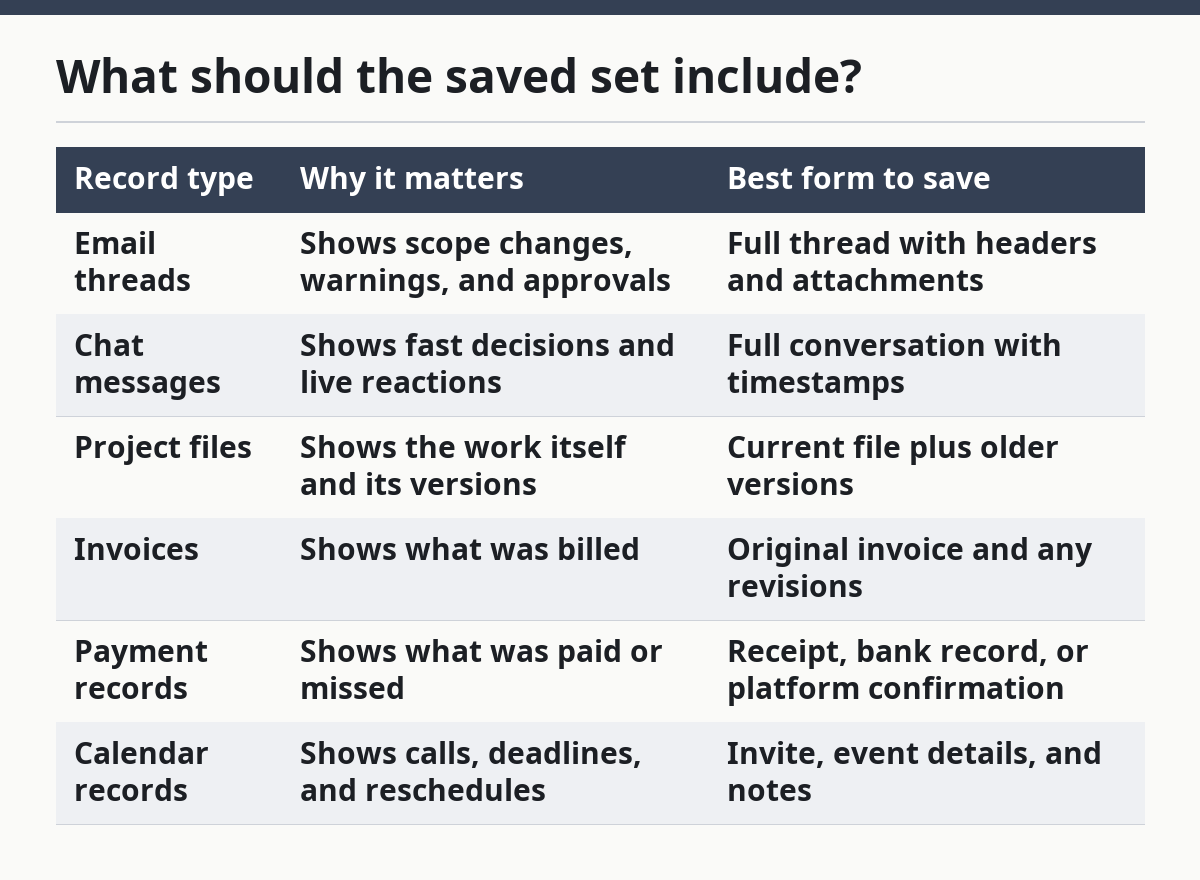
That table is not a full evidence plan. It is a triage list. Save the top row first if time is tight, then work down the list.
What records help if the dispute becomes a claim?
The records that help most are the ones that show the sequence of events without gaps. A claim often depends on whether the work was approved, whether the client changed direction, and whether payment followed the agreed path. Dates matter here, so keep the original timestamps and do not rewrite them in a cleaner format.
That means holding onto approval messages, payment records, file versions, and the original communication thread. If a meeting changed the brief, keep the calendar invite and any notes tied to that call. If a file was handed over on a specific day, keep the upload record or delivery email.
This is also where a careful limit helps: do not start adding your own commentary to the saved evidence itself. Add notes in a separate file if you need them. The record should stay as close to the original as possible, because a clean source is easier to trust than a story built later.
If the dispute moves toward a formal claim, a solicitor, insurer, or other professional may ask for the same core records listed here. Keeping them now saves time later, and it can prevent the awkward gap where everyone agrees the work happened but nobody can prove the sequence.
What evidence should I keep during a client dispute?
Keep the communication thread, the file versions, the invoice trail, the payment proof, and any approval messages. Those records show what was agreed and what happened after the work started. If you only keep one thing, keep the original thread that explains the dispute and the records that sit around it.
Should I save all versions of the file?
Yes, save the versions that show real changes, especially the working draft, the delivered file, and any version that shows a scope change. You do not need every tiny autosave if it adds noise, but you should keep the versions that show what changed and when. That can matter more than the final file alone.
What records help if the dispute becomes a claim?
The most useful records are the ones that show the full path from brief to payment. Save emails, chat messages, project files, invoices, approval messages, and calendar records with dates and times visible. If the matter becomes formal, those records are easier to use when they were preserved before anyone started tidying them up.
Drafted with AI; not yet reviewed by a person.
