
Last updated: November 21, 2026
How to Keep Time Records That Support a Freelance Claim starts with recording who did what, when, for how long, and under which change request. The record should be simple enough to trust 6 months later and detailed enough to match invoices, work logs, project management records, and any dispute about rework, delay, or loss valuation.
Key takeaways
- Use one system for all time entries so your dates, hours, and task names stay consistent.
- Pair each time record with work logs, invoices, and project notes instead of relying on hours alone.
- Write down change requests as soon as they happen, or the extra work may look voluntary.
- Save the original record, not just a cleaned-up summary, because summaries can hide the trail.
- Keep records after the job ends; a claim often starts long after the invoice is paid.
What makes a time record useful in a claim?
A useful time record proves the work, not just the hours. It should show a date, a task, a duration, the client or project name, and the reason the time was spent, so the record can line up with invoices and project management records later.
A weak record says only “8 hours.” A stronger one says “8:00–12:00 and 13:00–17:00, revised website copy after client change request, task ID 14.” That kind of entry helps when the issue is rework, delay, or a disputed bill, because it ties time to a specific event.
This matters most when a freelance claim depends on what work was done and why it took longer than planned. If the record does not connect to the task history, it can look like a loose estimate. That leaves room for the other side to say the hours were padded, unrelated, or never requested.
The best records stay plain and consistent. They use the same format for every job, even small ones that only take 15 minutes. Mixed styles, vague labels, and missing dates make a file harder to trust than a plain spreadsheet or time tracking app with clear entries.
For recordkeeping basics, the IRS recordkeeping page and the Association of International Certified Professional Accountants’ guidance on records are useful starting points. Those sources are about keeping business records generally, which is the same habit a claim file depends on.
How do I keep time records that support a freelance claim?
You keep time records that support a freelance claim by logging each task as it happens, linking it to the work product, and saving the record in at least 2 places. The procedure below keeps the trail clear without turning recordkeeping into a second job.
-
Open your time tracking app and start each entry with the client name, project name, and date.
A named project can help prevent one client’s hours from being mixed with another’s, and if you are unsure how to structure client files, consult a lawyer, accountant, or other qualified professional for your situation. The IRS recordkeeping guidance is a useful starting point for keeping business records organized. -
Record the task in one sentence before the work begins or right after it ends.
Use a label like “draft homepage hero copy” or “revise invoice terms,” not “work on project,” so the entry can be matched to a deliverable. -
Log the start and stop time in the same format every day, such as 09:15 to 10:40.
Exact clock times are easier to audit than “about 1.5 hours,” especially when a dispute asks whether the time was reasonable. -
Attach the reason for the time in your work log, change request note, or project management record.
If the extra hour came from a client email, quote the email subject or change request ID so the cause is visible. -
Save the output beside the entry as a file, link, or screenshot.
A draft, revision, exported file, or proof of delivery shows what the time produced, not just that time passed. -
Match the entry to the invoice when the work is billed.
If the invoice says 4.5 hours for editing, the time record should show the same 4.5 hours or explain the split across tasks. -
Export or back up the record at least once per project in PDF or CSV.
A backup keeps the original timestamp and makes it easier to share the record without changing it.
This process works best when it is routine. It is less useful if the entries are rewritten at the end of the month from memory, because memory turns clean records into guesses. It is also less useful for cash jobs with no written scope, since the missing paper trail will still be missing.
What details should a time record include?
A time record should include 5 core details: date, task, duration, client or project name, and the reason for the work. Those details are enough to connect the entry to the claim without turning every line into a report.
Use a standard format for each line item. A simple structure like “date / start time / end time / task / result / note” works well in a spreadsheet, a time tracking app, or a work log. If you use task IDs in project management records, add the ID so the record can be traced quickly.
Do not leave out the reason for the work when the issue is delay, rework, or loss valuation. The reason is what shows whether the time was planned, requested, or caused by a change request. Without it, the record may show effort but not cause.
A claim file also benefits from a few supporting labels. Mark whether the time was billable or non-billable, whether it was original work or rework, and whether it came before or after a client approval. Those labels can save a lot of explanation later.
If a task was split across a day, keep the split visible. A 2-hour task done in 4 short bursts can look messy if it is collapsed into one guessed entry. The real shape of the work often matters more than the total.
Which records should sit beside the time log?
The time log should sit beside invoices, work logs, change requests, and project management records because those records explain why the hours existed. A lone timesheet can show effort, but it rarely tells the full story.
| Record type | What it adds | Why it helps a claim |
|---|---|---|
| Time tracking app | Start and stop times | Shows the hours were captured close to the work |
| Work log | Short note on what changed | Shows the task history behind the hours |
| Change request | Client-approved scope shift | Explains extra time or rework |
| Invoice | Billable amount and date | Links the hours to payment or dispute |
| Project management record | Task status, comments, due dates | Shows the order of events |
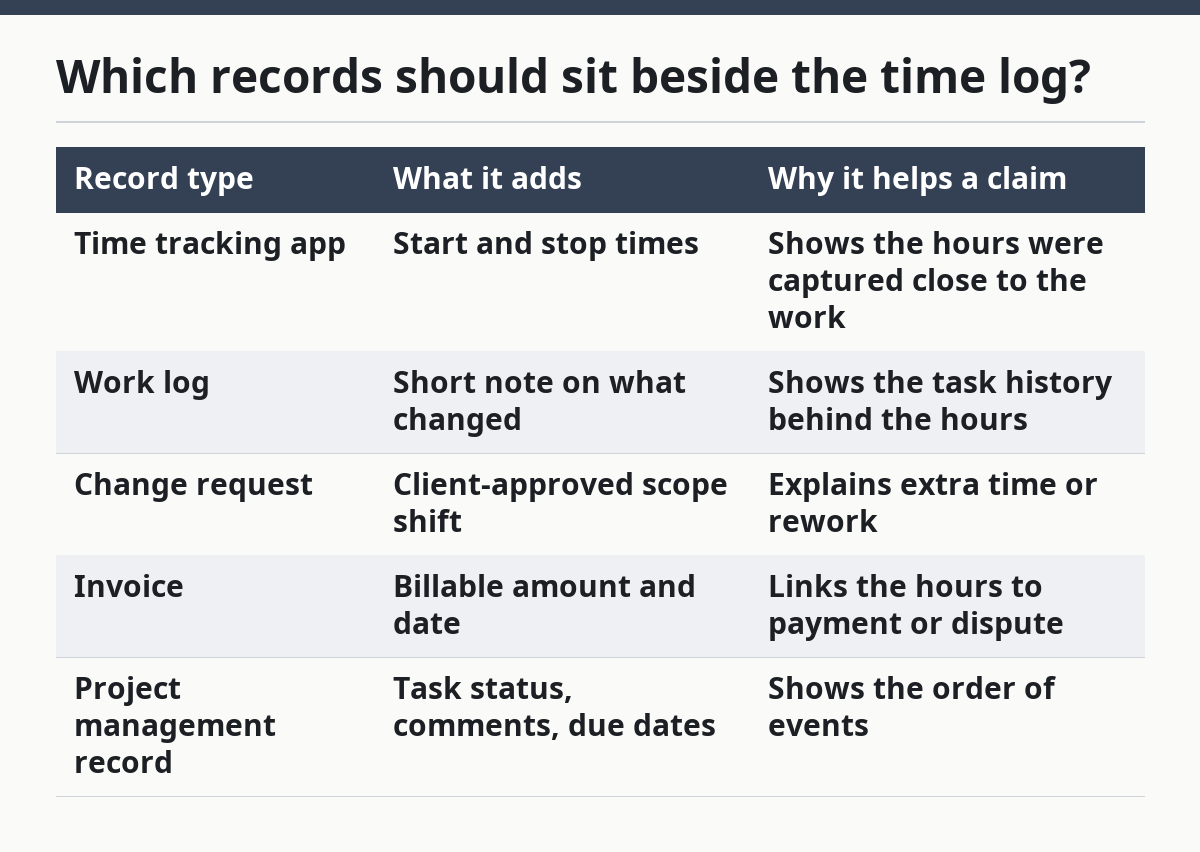
That mix matters because claim questions are usually about sequence, not just totals. For example, a client may accept that 6 hours were spent but dispute whether 4 of them were caused by a new brief. A change request and task history can answer that faster than a timesheet alone.
Keep the records in the same folder or project space when possible. If the invoice is in one place, the work log in another, and the change request in a third system, the trail becomes slower to follow. A clean file set saves time when someone asks for proof.
The hard limit is that records can support a claim, but they cannot invent one. If the scope was never written down and the work was never approved, even perfect time records may only show that time was spent. That is why the supporting paperwork matters as much as the clock.
What are the mistakes that weaken a claim?
The biggest mistakes are backfilling hours, using vague task names, and saving only a final summary. Each one makes the record look less trustworthy and can reduce how much weight it carries in a dispute.
Backfilling is the riskiest. Writing a whole week from memory on Friday may feel efficient, but it creates gaps, rounded numbers, and dates that no longer match emails or file edits. A claim built on that kind of record is easier to attack.
Vague task names cause another problem. “Research,” “admin,” or “client work” does not explain what changed, what was delivered, or why the hour mattered. A better entry tells the story in plain words, such as “revise product page after client feedback.”
Only saving summaries is also a mistake. A summary hides the original timestamps and the order of events, which are often the details a claim needs most. Keep the original entries, even if you also keep a monthly total.
One more weak spot is mixing billable and non-billable work without a label. If a claim needs to show billable hours, the file should make that split visible. Otherwise, the time log can look inflated or unclear.
The fix is simple, but it takes discipline: log work close to the moment it happens, use the same naming pattern every time, and keep the source record. That habit is more valuable than any fancy tool.
Should I save time records after the job ends?
Yes, you should save time records after the job ends because a claim can come up well after delivery or payment. A 1-month archive is not enough when a dispute appears later and you need the original trail.
Keep the records with the invoice, final deliverable, and any change request notes for the same project. If the file is ever questioned, that bundle shows the path from assignment to completion. Deleting old entries saves space, but it can also erase the very proof a claim may need.
A good rule is to keep the original record in one place and a backup in another. A PDF export and a CSV export cover different needs: one is easy to read, the other is easier to sort. If your time tracking app allows both, save both.
This page sits under the broader freelancer claims readiness and evidence hub, so the same principle applies here: keep records that explain events, not just totals. Time logs are strongest when they sit alongside the rest of the paper trail.
When is a time record not enough?
A time record is not enough when the dispute turns on scope, approval, or the value of lost work. In those cases, the hours may be only one piece of the file, not the whole answer.
If a client says the extra work was never approved, the record needs a matching email, message, or change request. If the issue is delay, the timeline of tasks and handoffs matters as much as the hours. If the issue is loss valuation, the time log alone usually cannot show the full financial effect.
That is why time records should usually be treated as support, not as a lone defense. They help most when they are tied to invoices, work logs, project management records, and task history. Without that chain, the hours can look incomplete even if they are accurate; if you are dealing with a claim, consult a lawyer or other qualified professional about the evidence your case needs.
A practical warning: do not try to build the whole claim from cleaned-up notes made after the fact. A tidy file is useful, but a tidy file with no source trail is still weak. Keep the original timestamps, the original files, and the original request for the work.
Do time logs help with an insurance claim?
Yes, time logs can help with an insurance claim if the claim asks what work was done, when it was done, and why it took that long. They are strongest when they sit beside invoices, work logs, and change requests, not when they stand alone. Time logs are support records, so they should match the rest of the file.
What details should a time record include?
A time record should include the date, task, duration, client or project name, and the reason for the work. Those 5 details make it easier to match the entry to an invoice, a change request, or a project note. If the work was billable, mark that too.
Should I save time records even if the job is done?
Yes, save time records after the job is done because disputes often appear later. Keep the original log, the invoice, and the final deliverable together for the same project. A later claim is much easier to support when the record has not been rewritten or lost.
FAQ
How often should I update time records?
Update time records as you work, or as soon as possible after each task. That habit keeps the date, duration, and task description closer to the original event.
Can a spreadsheet work as well as a time tracking app?
Yes. A spreadsheet can work if it captures the same core details and you keep it consistent. A time tracking app can be easier to audit, but the structure matters more than the tool.
Should I keep screenshots or file exports?
Yes, when they help show the original timestamp, the deliverable, or the request that caused the extra work. Screenshots and exports work best as backups to the main time log, not as replacements.
What should I do if my client never approved the extra work?
Keep the time record, the message trail, and any draft or file showing the work. If the issue becomes a claim, consult a lawyer, accountant, or other qualified professional about how to present the record and what evidence to pair with it.
Drafted with AI; not yet reviewed by a person.
