

Last updated: November 22, 2026
Quick answer: in most cases, freelancers add coverage for offline client data handling by making sure the policy expressly reaches paper records, local storage, and portable media, then confirming the form or endorsement covers the loss, theft, or improper destruction of client files. This page explains how that coverage usually works, what to check in the wording, and where the gaps still stay open. It is information, not financial advice; a qualified adviser should be consulted for your own situation.
Key takeaways
- Offline data can still trigger a data breach claim if client files are lost, stolen, copied, or improperly destroyed.
- The key question is not “Do I use cloud software?” but “What client data do I hold on paper, on a laptop, or on portable media?”
- Coverage for paper records often depends on the wording for privacy liability, media loss, and document handling.
- A policy can still leave gaps if it only talks about network attacks and says little about physical records.
- The weakest points are usually a bag, a desk drawer, a car boot, a usb drive, or an unencrypted laptop.
Who this applies to
This applies to freelancers who handle client data offline and already know where those files sit: in paper folders, on a local hard drive, on a usb drive, or in a laptop case. It assumes you can identify basic file types, such as invoices, signed forms, scans, notes, IDs, and printed reports, and that you want to understand how How Freelancers Add Coverage for Offline Client Data Handling works when the storage method is not cloud-based.
This is not for someone trying to decide whether they need cyber coverage at all, or how to report a claim after a breach; those are separate questions. It also stops short of telling you what you should buy or how to structure your finances. If you keep client files in a filing cabinet and on a device that leaves the office, the issue is usually not “online versus offline.” It is whether the insurance wording reaches physical records, local storage, and data privacy harm.
A useful check is whether your work creates any record that can identify a client. The NIST guide on protecting personally identifiable information explains why identifying data deserves protection, and the FTC’s disposal guidance shows why old electronics and documents both matter. Those sources do not write your insurance terms, but they show why a paper file and a laptop can both matter. For a freelancer, that is the core of How Freelancers Add Coverage for Offline Client Data Handling.
How do freelancers add coverage for offline client data handling?
Freelancers add coverage by matching the places their client data lives to the parts of cyber liability insurance that mention documents, media, devices, and privacy loss. The job is to make sure the policy language reaches paper records, local storage, and physical documents, not just hacked email accounts or cloud platforms.
Start by listing every offline place where client data sits for at least 1 day. Include a laptop hard drive, a usb drive, a printer tray, a locked drawer, a filing cabinet, and any backup disk. Then check whether the insurance wording mentions computer systems, media, documents, or records in addition to network security events. If the wording only talks about malware or unauthorized access to a server, that is a gap.
- Write down each offline storage point for client data, using one page or one spreadsheet. Include paper records, local storage, portable media, and archived files older than 30 days. If a storage place is missing, the problem is usually hidden exposure.
- Mark which items contain personal data, payment details, signed forms, or confidential notes. Use simple labels such as “identity document,” “project brief,” or “tax record.” If you cannot separate sensitive files from ordinary papers, the risk is harder to control.
- Read the cyber liability insurance wording for terms such as “privacy liability,” “media liability,” “paper records,” “data restoration,” and “document replacement.” If the language is limited to network intrusion alone, a gap may remain.
- Check whether the device section covers a laptop, external drive, or usb drive when it is lost, stolen, or damaged. If the wording only protects data after a malware event, a simple theft may fall outside it.
- Look for any exclusion tied to unencrypted storage, unattended devices, or failure to use basic security controls. If the exclusion is vague, it can become a dispute later.
- Compare the treatment of paper records with the treatment of electronic files, and consult a qualified insurance professional if the wording is unclear. Verify whether the policy treats a scanned file and a printed copy the same way, or not, and use a source such as the NIST PII guidance to understand why the distinction matters. A problem sign is when one is covered and the other is silent.
- Check the incident-response part for support tied to privacy events, not just hacking. Verify whether the coverage can respond to client notification costs, legal review, or document recovery after offline loss. If the section only mentions online extortion, the offline side is too thin.
- Ask for the exact form or endorsement that adds paper-record and media cover, if the base wording does not include it. Verify that the endorsement is attached to the quote or schedule, not described only in a summary. If you cannot see the wording, you cannot judge the gap.
The point is not to turn every file into a special case. It is to make sure the policy follows the real path your client data takes: desk, bag, car, laptop, usb drive, and archive box. For many freelancers, that path matters more than the software they use to bill clients.
What counts as offline client data?

Offline client data is any client file held outside a live cloud service, and that includes paper records, local storage on a laptop, and files on a usb drive. It can be as small as a handwritten note with a name and phone number, or as broad as a full project folder saved on an external disk.
This matters because insurers often separate digital privacy events from physical loss. A printed client contract left on a train, a notebook with account details, or a laptop stolen from a car can all create a data breach problem even though no one “hacked” anything. The harm comes from exposure, loss, or unauthorised access, not just from malware.
A good working rule is simple: if the file can identify a client, tie a client to a project, or expose confidential information, treat it as client data. Consult a qualified insurance professional before relying on that rule, because policy wording can vary. That includes scans, drafts, signed forms, and backups stored on local media. The same file can move between categories during one day, from paper to laptop to usb drive, so the storage method matters as much as the file name.
The normal mistake is to think offline means low risk. A misplaced envelope, a stolen laptop, or a box of old records can create the same privacy headache as a bad email link. NIST SP 800-122 is useful here because it treats identifying information as something that needs protection wherever it sits, not just online.
What should the policy wording include?
The wording should include physical records, device loss, and privacy claims tied to client data, not only online attacks. That is the difference between coverage that reaches offline handling and coverage that stops at cyber events on a network.
Look for these items in the schedule or endorsements:
| Coverage point | What it should say or imply | Why it matters |
|---|---|---|
| Paper records | Mentions documents, files, or physical records | Covers printed client data and notes |
| Portable media | Mentions usb drives, external disks, or other media | Covers loss of files on removable storage |
| Device loss | Mentions theft, loss, or damage of a laptop or other device | Helps when the device disappears, not just when it is hacked |
| Privacy liability | Mentions confidential information or personal data | Connects offline exposure to a data breach claim |
| Restoration or replacement | Mentions restoring, recreating, or replacing data or documents | Addresses the cost of rebuilding files |
| Exclusions | Names unattended vehicles, unencrypted storage, or weak controls | Shows where the gap still stays open |
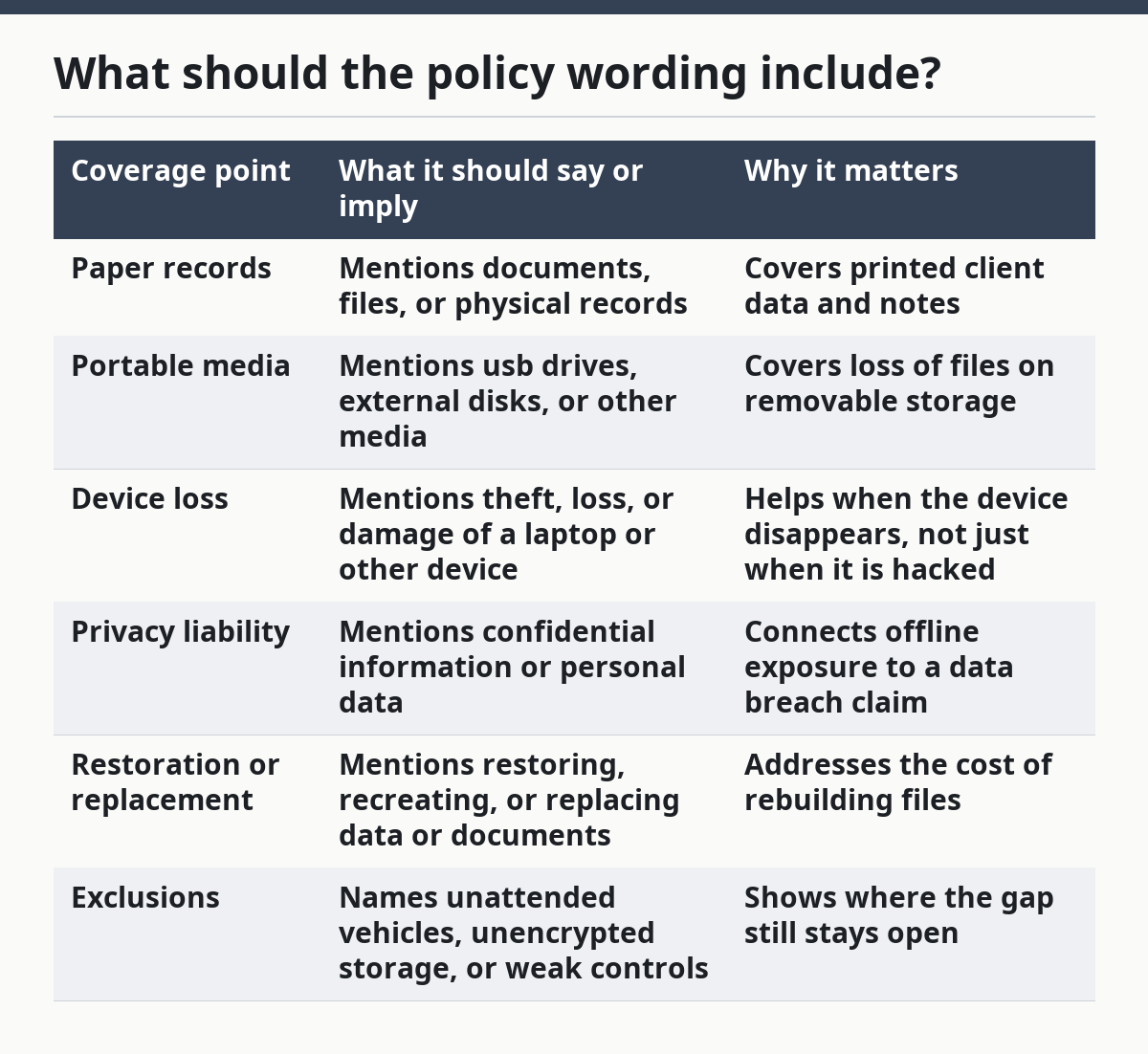
If the wording is broad enough, it can cover more than one path to trouble. If it is narrow, the claim may depend on whether the event looked like a cyber incident, a document loss, or a simple theft. That distinction is often the weak point in offline claims.
A plain-language warning belongs here: not every cyber liability insurance form treats paper records the same way as digital records, so consult a qualified insurance professional before you rely on a generic form. Some forms focus on breach response after a network event, while others are built to include media and documents. The difference can be a single endorsement or a single sentence, and the FTC’s disposal guidance is a useful reminder that old devices and records still need care.
What mistakes cause gaps?
The most common mistake is assuming that no cloud use means no cyber exposure, and that mistake can leave paper files and local storage outside the protection you expected. A second mistake is leaving a laptop or usb drive unencrypted, which can trigger exclusions or create a worse privacy event if the device is lost.
Another mistake is storing client data in too many places without a map. If the same file exists on paper, on a laptop, and on a backup disk, a loss event can become harder to explain and harder to value. The correct alternative is a short inventory of where each version sits and which one is current.
A third mistake is treating printed documents as less sensitive than electronic ones. A stack of invoices, signed forms, or identity documents can be as exposed as a file on a screen. The better habit is to shred, lock, and limit access with the same care you use for a password.
A fourth mistake is assuming the policy will repair everything after a loss. Coverage may help with certain costs, but it does not erase the event, and it may not reach every file type or every device. The correct alternative is to read the wording line by line and match it to your own storage habits.
A fifth mistake is keeping old client files forever without a reason. The more records you hold, the more points of exposure you create. The safer alternative is a retention rule that is simple enough to follow, such as review and cleanup on a regular schedule instead of indefinite storage.
When does the standard approach not apply?
The standard approach does not apply when your offline records are too mixed, too mobile, or too sensitive for a basic cyber form to describe well. In those cases, the issue is not a small wording tweak; it is that the usual cyber liability wording may not match the actual storage pattern.
You keep regulated records: If client files include regulated personal data, tax material, or other protected records, the privacy exposure can be broader than standard wording assumes — get qualified help before relying on a generic form.
You store files across several devices: If one client file lives on a laptop, a usb drive, a phone, and a paper copy, coverage can hinge on where the loss happened — a narrow form may leave one location uncovered.
You work from shared spaces or travel often: If a bag, car, café, or co-working desk is part of the storage chain, theft and unattended-device exclusions matter more — check the wording before assuming a claim would fit.
You destroy documents yourself: If you shred, recycle, or wipe media on your own, the issue becomes whether the policy cares about disposal and reconstruction — weak wording may ignore that step entirely.
You keep archives for years: Long retention increases the chance that old, forgotten data gets exposed — if your archive is large, a short inventory is no longer enough and the coverage needs to be read against the archive itself.
These are the moments when a generic cyber form can become the wrong tool. The fix is usually not to guess; it is to slow down and compare the actual file path with the actual wording.
What does a good result look like?
A good result looks like a clear match between how you handle client data and what the insurance wording says it covers. The file path should be easy to describe in one sentence: paper records in a locked cabinet, a working copy on a laptop, a backup on a usb drive, and a cleanup step for old files.
You should be able to point to the exact language that reaches each of those places. That means you can show where privacy liability starts, what happens if a device is lost, and whether media or document restoration is part of the cover. If the wording is vague, that is not a good result; it is a sign to ask for clearer paper, not to hope for the best.
A useful test is whether you can explain your own setup without using any vague phrase like “everything is covered.” A better explanation names the file type, the storage place, and the event that would trigger the cover. That is the level of detail that helps a freelancer avoid surprises after a data breach.
For this topic, the best outcome is not perfect protection. It is a policy that matches the way you actually handle client files, plus a storage habit that does not create unnecessary gaps. The FTC’s guidance on disposing of electronic devices is a reminder that old hardware and old documents both deserve a clean exit.
FAQ
Does cyber insurance cover paper files too?
Sometimes, but not always. The answer depends on whether the cyber liability insurance wording includes paper records, media liability, or document-related privacy loss. If the form only talks about online attacks, paper files may sit outside it. Read the wording, not the marketing summary, and check whether physical records are named.
What if I keep client data offline?
Keeping client data offline does not remove the privacy risk; it changes where the risk lives. A laptop, usb drive, printed file, or locked cabinet can still create a data breach if records are lost, stolen, copied, or improperly destroyed. The coverage question becomes whether the policy follows those offline storage points.
Do freelancers need cyber coverage if they don’t use cloud software?
They may still need a form that reaches offline client data, because cloud use is not the only source of exposure. Paper records, local storage, and portable devices can all carry private client files. The real issue is whether the policy wording matches the way the freelancer actually stores and moves those files.
Drafted with AI; not yet reviewed by a person.
