
Last updated: November 24, 2026
Quick Answer: Save the email thread, file versions, invoice, payment records, and message logs within 24 hours, then lock them in a separate copy. For How to Preserve Evidence After a Freelance Client Dispute Before a Claim Is Filed, the goal is simple: keep the original record unchanged so the timeline stays clear.
Save the email thread, file versions, invoice, payment records, and message logs before anything gets edited, deleted, or overwritten. In a freelance client dispute, the clearest record is the one that still shows who said what, when they said it, and what changed. Start by copying the original files and locking down the messages you already have.
Key takeaways
- Keep the original email thread intact, not just screenshots.
- Save every file version that shows how the project changed over time.
- Pair the invoice with payment records, not just the amount due.
- Export message logs from the app you used, then store them in one place.
- Do not edit the evidence set to “clean it up”; that can erase context.
What should I save first?
Save the records most likely to disappear in the next 24 hours. That means the email thread, project deliverable files, file versions, invoice, and payment records, plus any chat logs from Slack, WhatsApp, text, or your project tool. If a dispute is active, the clock matters because inboxes, cloud folders, and app history can be changed quickly. For email exports, Google and Microsoft both document how to save messages in portable formats.
1. Email — Export the full thread
Export the entire email conversation as .eml or .msg files, not just copied text or screenshots. The full file keeps headers, timestamps, and sender details that plain screenshots often miss, and it gives you a cleaner record if the thread grows past 10 replies. Save both the message and any attachments in one folder. For a full-thread export, see the guidance from Google and Microsoft.
2. Cloud storage — Copy the file versions
Download each version of the project deliverable that shows progress, revisions, or final approval. If the platform shows version history, preserve that history before you rename, move, or replace files, because a single “final” file hides the steps that led there. Keep the original filenames if you can. If the work lives in Google Drive or Dropbox, save the version trail too.
3. Accounting record — Save the invoice and payment trail
Keep the invoice, payment receipt, bank transfer note, PayPal record, card statement line, or other payment proof together. The invoice by itself shows the demand; the payment record shows what was paid, what remains unpaid, or when a refund was sent. If the client has partial payments, save each one separately. For payment records, PayPal and your bank portal usually let you export transaction details.
4. Messaging app — Export the message log
Use the export feature in the app you actually used, such as Slack, WhatsApp, or SMS backup tools, instead of taking 20 screenshots. An exported log is easier to read across a 3-day exchange and less likely to miss a deleted message or a changed name. Save the export date in the file name. Slack and WhatsApp both support exports or backups, and the exact steps are worth following before the thread disappears.
5. Project folder — Copy the deliverables and notes
Save the project deliverable, drafts, comments, and any notes that explain what was agreed. A single PDF may look neat, but a bundle of drafts, redlines, and attached notes often tells the real story of scope changes and approval points. Keep the folder untouched after you copy it. If the folder contains comments from a client portal or project tool, preserve those exports as well.
How do I keep the evidence from changing?
Keep the evidence in read-only form and store a second copy in a separate place. The goal is to prevent later edits from blurring what happened before the claim is filed. Use one master copy and one backup copy, not a live working folder.
A simple process works best:
- Create one master folder for the dispute and name it with the client and date.
- Export the email thread in its native file format, then save a PDF copy.
- Download file versions from cloud storage and keep the originals, not only the latest file.
- Copy payment records from your payment platform, bank, or processor.
- Export message logs from every app used in the dispute.
- Add a short note to each item with the date saved and what it is.
- Back up the folder to a second device or drive, then leave the master copy alone.
Use one naming pattern for everything, such as ClientName_Invoice_2026-11-24 or ClientName_EmailThread_2026-11-24. A consistent name makes a later claim file easier to build without mixing drafts and final evidence. It also helps if a folder contains 30 or more items. In practice, that naming rule keeps a 20-file set readable.
Do not edit the contents to “make the story clearer.” If you need to explain what a file shows, add a separate note, not a change to the file itself. That keeps the original record intact, which is the point of preservation. If the file needs context, preserve the file first and explain it second.
What gets lost if I only keep screenshots?
Screenshots lose context that the original files still hold. A screenshot may show one message, but it often drops the header, sender address, delivery time, and the messages that came before and after it.
That gap matters in a freelance client dispute because timing and sequence often matter as much as the words themselves. An exported email thread can show a 5-step back-and-forth that a screenshot turns into a single line. A file version history can show that a client approved Draft 2, then asked for a new scope in Draft 4. A screenshot cannot do that well. In a 10-message exchange, the missing context can matter more than the image itself.
Screenshots also invite a second problem: they are easy to crop. Cropping may be harmless for a quick explanation, but it weakens the record if the other side argues that key lines were left out. Keep screenshots only as a quick reference, not as the main evidence set.
A better mix is simple: keep the original export, then keep screenshots only where they help you read a long chain or highlight one narrow point. If you can save the original, save the original. If you can keep the thread, keep the thread.
What mistakes ruin evidence before a claim is filed?
The biggest mistake is cleaning up the record too much. When a freelancer deletes side messages, rewrites notes, or replaces older files with a single “final” copy, the result looks neat but loses the history that shows how the dispute started. That history is often the point of the file.
Another common mistake is saving only one channel. A client may move from email to text, then from text to a project app. If you preserve only the email thread, you may miss the message where scope changed, payment was promised, or a deadline was altered. Missing one channel can leave a gap that is hard to fill later. A claim file with one source is usually thinner than one with three.
A third mistake is renaming everything into one flat pile with no clue about source. A file called proof.pdf tells you nothing in a week, and it tells a claim reviewer even less. Keep source names, dates, and file types visible. Keep the source label, too.
The trade-off is time. A good evidence folder takes longer to build than a quick screenshot dump, but it saves time later because you do not have to rebuild the story from memory. That is why this page belongs under the freelance claims, incidents, and loss response hub: the preservation step comes before the formal claim work. In that sequence, the folder comes before the filing.
Which records matter most in a client dispute?
The records that show agreement, change, and payment matter most. In practice, that means the email thread, file versions, invoice, payment records, message logs, and the project deliverable itself.
| Record type | What it proves | Best format to keep |
|---|---|---|
| Email thread | What was said and when | .eml, .msg, and PDF copy |
| File versions | What changed in the work | Original files and version history |
| Invoice | What was billed | PDF or exported invoice |
| Payment records | What was paid or not paid | Receipt, bank entry, processor record |
| Message logs | Side conversations and approvals | Exported chat log or SMS backup |
| Project deliverable | What was delivered | Original file plus a copy |
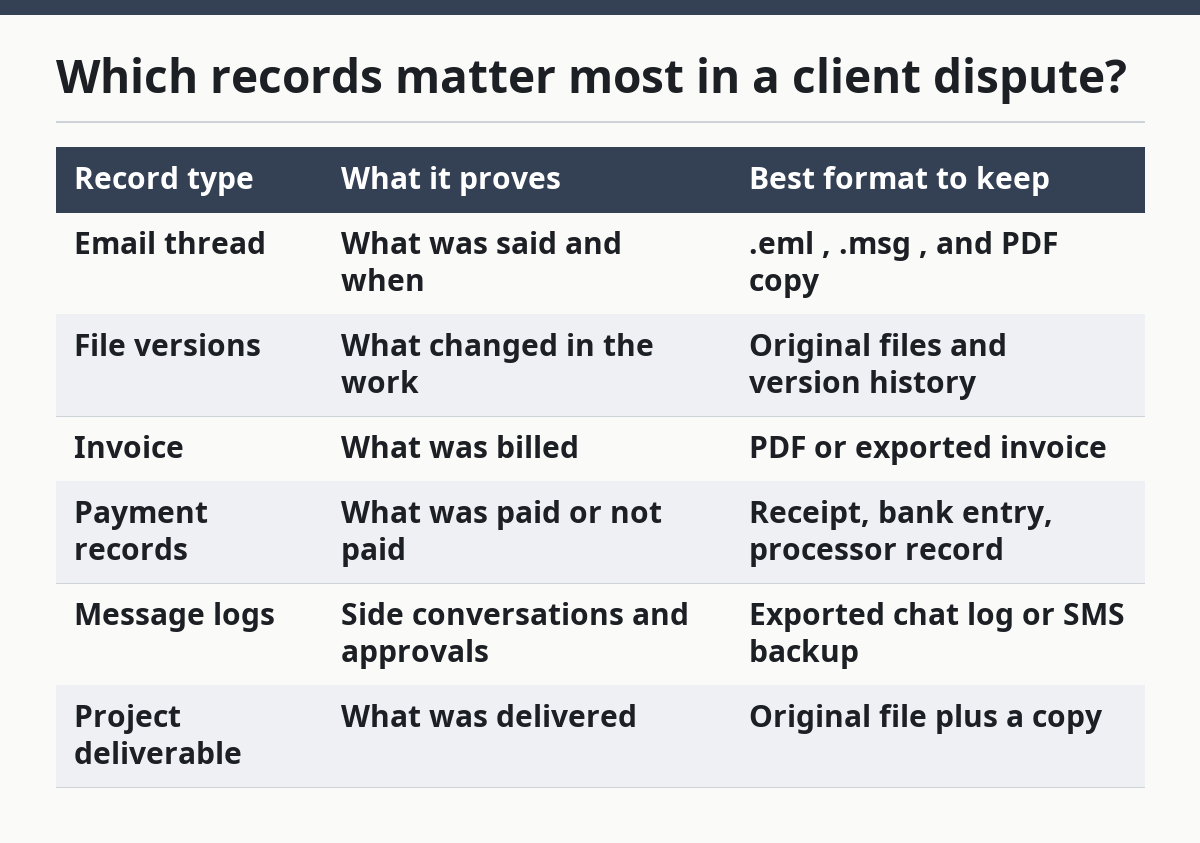
Not every dispute needs every record, but it is safer to keep more than less while the issue is unresolved. If the disagreement is about scope, file versions carry a lot of weight. If the disagreement is about money, the invoice and payment record become the center of the file. If the disagreement is about approval, the email thread and message logs usually matter most. For a scope dispute, keep the versions; for a payment dispute, keep the trail.
When should I stop adding to the evidence set?
Stop adding to the main evidence set when the record is complete enough to show the dispute without constant changes. That usually means the key email thread is saved, the file versions are copied, the invoice and payment records are stored, and the message logs are exported.
After that, add only new material that belongs to the same dispute. Do not keep reshaping older items to make the file look tidier. A clean folder is useful; a changed record is risky. Keep the archive stable and the new items separate.
If the dispute is still active, keep a separate “new items” folder for fresh messages or files that come in after the first save. That keeps the original evidence intact and avoids confusion over what existed on day one versus day five. If a claim is later filed, that split helps show the timeline without you rewriting it here. A day-one folder and a day-five folder are easier to explain than one changing archive.
This article covers preservation only. It does not explain how to organize a claim file by issue type or how to write a full claim timeline.
What evidence should I save after a freelance dispute?
Save the email thread, message logs, file versions, invoice, payment records, and the project deliverable. Those items show what was agreed, what changed, and what money moved. If the dispute involves revisions or missed deadlines, the file history and dated messages matter a lot. Save them before anything gets overwritten.
How do I document a client disagreement for insurance?
Keep the original records first, then add short notes that explain what each file is. Use dated filenames and preserve exports from email, chat, and payment tools. A claim reviewer usually needs the record itself more than a long explanation, so the goal is to keep the source material readable and unchanged. A 2-line note can help, but the source file should carry the weight.
Should I keep messages and drafts after a problem starts?
Yes, keep both because they show the path of the dispute. Messages can prove approval, refusal, or a scope change, while drafts can show how the work evolved over time. Delete nothing from the active record, and store copies in a separate folder so the originals stay intact. The drafts, the messages, and the file history should stay together.
Drafted with AI; not yet reviewed by a person.
