
Last updated: November 24, 2026
Quick Answer: set up automatic renewal and billing for a freelance policy in 7 steps, then verify the renewal notice, payment method, and policy term before the expiration date. Automatic renewal and billing for a freelance policy means giving your insurer permission to renew the policy at the end of the policy term and charge the premium payment by card, bank account, or another approved method. It is mainly an admin task: confirm the renewal notice, set billing authorization, and track the expiration date so coverage does not stop by mistake. For your own situation, consult a qualified adviser or the insurer’s billing team if the policy terms, payment method, or coverage dates are unclear.
Key takeaways
- Auto-renewal keeps the billing side of a freelance policy moving, but it does not replace reading the renewal notice.
- The main jobs are simple: confirm the payment method, give billing authorization, and record the policy term end date.
- A failed charge can create a lapse fast, so the backup card or account matters as much as the first one.
- If the insurer wants new terms, treat that as a separate review step, and consult a qualified professional if the notice is unclear.
- A setup is usually easier to manage when you can track it in a calendar and verify it in the insurer’s portal or billing email.
Who should set this up?
This setup is for freelancers who already have an active policy, know the renewal date, and want the premium payment to repeat without manual action each term. It assumes the insurer offers automatic renewal and that the policyholder can reach the billing page, portal, or agent record that controls payment.
It is not the right tool if the policy is being rewritten, the carrier is changing coverage, or the billing record is already in dispute. In those cases, the problem is not renewal billing; it is the policy itself, and billing changes can mask a larger issue for 1 full term.
If the policy is tied to a business bank account, a business credit card, or a shared finance team, the setup needs an extra check on who can change the payment method. A single missed email or a deleted card can stop the renewal charge even when the policyholder thinks everything is active.
What does automatic renewal and billing actually do?
Automatic renewal and billing tells the insurer to keep the policy running into the next policy term unless the policyholder or insurer stops it under the policy rules. The insurer then bills the premium payment to the payment method on file after the renewal notice is issued or on the renewal date, depending on the billing cycle.
The key terms matter. A renewal notice is the notice the insurer sends before the policy renews; billing authorization is the permission to charge the payment method; and policy expiration tracking is the habit of watching the end date so a lapse does not slip in between terms. That last part matters even when auto-renew is turned on, because a failed payment can interrupt coverage.
For a freelance policy, the billing setup is administrative, not a decision about whether the policy is right. The Consumer Financial Protection Bureau explains how automatic bill payments work in general, and the National Association of Insurance Commissioners has consumer guidance on policy service and billing issues: Consumer Financial Protection Bureau — Automatic bill payments and NAIC — Consumer Insurance Resources.
How do I set it up step by step?
Set it up by confirming the renewal notice, choosing the payment method, and verifying the renewal record before the policy term ends. The cleanest way to do it is in 7 steps, with a check at each step so a missed detail does not turn into a lapse.
-
Find the renewal notice and the policy expiration date. Open the notice and write down the renewal date, the billing date, and the policy term end date. Verify that the notice names the correct policy number and insured business. If the dates do not match your records, the problem may be a wrong account or an old mailing address.
-
Log in to the billing portal or contact the insurer’s billing desk. Go to the place where billing authorization is managed, not just the claims or certificate page. Verify that you are in the right policy file before making changes. If the portal shows a different policy type or the wrong name, stop there and correct the record first.
-
Choose the payment method you want on file. Common options are a card, a bank account, or another approved recurring payment method. Verify that the account is active, the expiration date on the card is current, and the account can accept the charge. A closed card, a frozen bank account, or an expired payment token is a problem even if the policy looks active.
-
Turn on auto-renewal, if the insurer offers it. Select the renewal checkbox, toggle, or authorization field that says the policy can renew automatically. Verify that the portal shows a saved authorization or an active recurring payment status. If the system only saves a card but does not show renewal authorization, the policy may not auto-renew.
-
Review the payment timing and the charge trigger. Look for whether the premium payment is taken on the renewal date, before the renewal date, or after the renewal notice cycle closes. Verify the timing in writing or in the portal summary. If the billing timing is unclear, you may think the policy is covered when the charge has not yet cleared.
-
Set a reminder for the end of the policy term. Put the renewal date in a calendar and add a second reminder a few days before it. Verify that the reminder uses the real policy term end date, not the date the notice arrived. If the reminder is missed, the insurer’s notice may be the only warning left.
-
Save a copy of the confirmation. Download the confirmation page, email, or receipt that shows the billing authorization and renewal setup. Verify that it includes the policy number, payment method, and effective renewal record. If there is no confirmation, the setup may not have been stored.
-
Check the first renewal charge when it posts. Watch the account for the premium payment and confirm that it matches the expected billing cycle. Verify that the charge cleared and that the policy stayed active after the transaction. If the charge fails or is reversed, it is worth treating that as a warning sign and checking the billing record with the insurer or a qualified adviser.
A good result is simple: the notice arrives, the payment posts, and the policy continues without a gap. The paperwork should show one active renewal record, one valid payment method, and one clear expiration date for the next term.
What should I check before I let it renew?
Check the renewal notice, the payment method, and the policy term before you rely on auto-renew. Those 3 items tell you whether the billing setup is actually ready or just stored in a portal.

The renewal notice should match the policy you expect to keep. Look at the named insured, the policy number, and the date the next term starts. If any of those are off, the billing setup may be attached to the wrong file.
The payment method should still be valid for the full term. A card that expires soon, a bank account that has been closed, or a business card that is about to be replaced can break the charge. If the billing source is likely to change, update it before the renewal date, not after.
The policy term should be on your calendar in two places. One place can be the insurer portal, and the other can be your own calendar or task app. That simple duplication helps prevent a lapse if a notice goes to spam or a card fails during the renewal cycle.
Which payment method works best for billing?
The best payment method is the one the insurer accepts and the one you can keep active and monitor without delay. For a freelance policy, the choice usually comes down to a card, a bank account, or a portal-linked payment method.
| Payment method | What it does well | Main drawback | Best check before renewal |
|---|---|---|---|
| Card | Easy to update and replace | Can expire or be replaced often | Confirm the expiration date and billing address |
| Bank account | Can handle recurring charges directly | A closed or low-balance account can fail the payment | Confirm account status and routing details |
| Portal-based payment method | Keeps billing inside the insurer’s system | A saved token can still fail if the source account changes | Confirm that the token is still active |
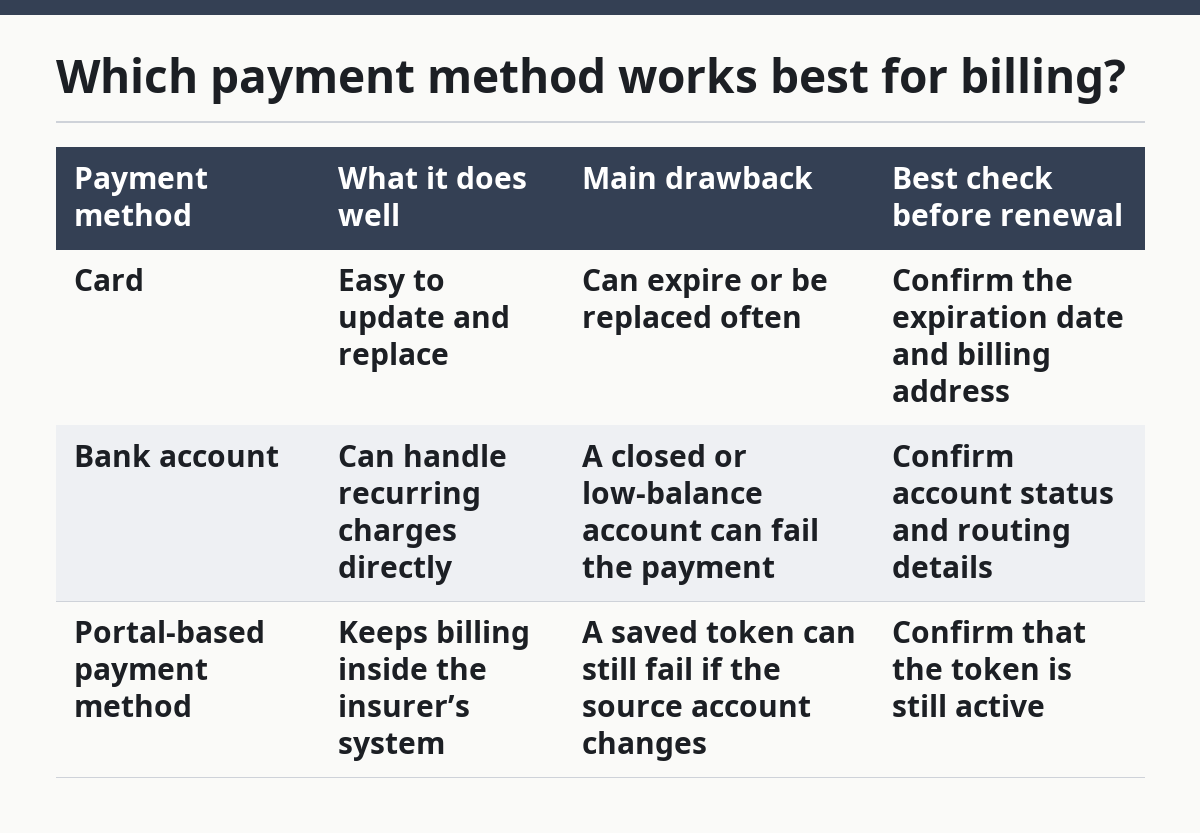
A card is often the simplest to replace, but a replacement card can break auto-renew if the insurer does not receive the updated details. A bank account can stay stable for longer, but if the account is closed, the charge can bounce. A portal payment method is convenient, but it still needs a valid underlying source.
The practical answer is to use whichever method you can inspect before each policy term ends. That is the real control point. The choice is not about convenience alone; it is about how quickly you can catch a failed charge. For related billing setup details, see the freelance insurance policy administration hub, the policy renewal checklist, and the insurance billing guide.
When should I stop and get help?
Stop and get help when the billing setup stops being a simple renewal task and starts changing the policy record, the payment authority, or the coverage dates. The mistake here is trying to push through a billing change when the file itself is already unstable.

The renewal notice shows a different policy number: This means the billing record may not match your active coverage — pause the setup and correct the file before any charge posts.
The insurer asks for a new billing authorization form: This means the old permission is no longer enough — sign only after you confirm what account and what policy term the form covers.
The payment method is closed, expired, or replaced: This means the charge may fail — update the billing source before the renewal date.
The policy term date has already passed: This means auto-renew may no longer be the right tool — check the active status immediately, because a lapse may already exist.
The renewal notice mentions a coverage change or exclusion: This means the issue is no longer billing alone — stop the auto-renew step and review the notice line by line.
The insurer says the payment failed after the deadline: This means the policy may not have renewed on time — contact the billing desk right away and ask what the account status is now.
Those situations matter because auto-renew is a maintenance tool, not a fix for a broken file. If the billing path and the policy path disagree, the charge can go through while coverage does not, or the policy can lapse while the portal still looks active.
What mistakes do people actually make?
People usually make 4 mistakes, and each one has a different cost. The cost is rarely dramatic at first; it is usually a missed notice, a failed charge, or a gap in the policy term.

First, they save a card but do not confirm billing authorization. That can leave the insurer with payment details but no permission to use them, so the renewal never posts. The fix is to verify both the payment method and the renewal setting.
Second, they trust the first notice and skip the confirmation page. That can hide a setup failure or a wrong policy record. The fix is to save the confirmation email or portal receipt in the same month as the renewal.
Third, they let the payment method age out. A card replacement, bank change, or account closure can stop the premium payment. The fix is to review the billing source before each policy term ends, not after a failed charge.
Fourth, they confuse a renewal notice with a bill that has already been paid. Those are not the same thing. The fix is to check the status line in the portal or email so you know whether the policy is active, pending, or unpaid.
Fifth, they ignore a changed billing date. If the insurer shifts the charge timing by even one cycle, the payment can hit when the account is not ready. The fix is to compare the new notice with the old one and update your calendar the same day.
Can auto-renew still fail?
Yes, auto-renew can fail if the billing authorization is valid but the payment source is not. The most common failure points are a declined card, a closed bank account, a missing authorization, or a mismatch between the policy term and the billing date.
A failed charge is not just a paperwork issue. It can interrupt the premium payment flow and create a lapse if the insurer does not receive a replacement payment in time. The safe response is to confirm the reason for the failure first, then update the billing record and verify the policy status after the payment is retried.
Some insurers also require extra steps after a failed payment, such as a new authorization or a manual payment. That is why the renewal notice matters. It is the earliest place where the rules for the next term usually appear, and it gives you time to act before the policy expires.
What does a good setup look like?
A good setup is one where the renewal notice matches the policy, the payment method is current, and the insurer confirms the next term without a gap. You should be able to point to one policy term end date, one active billing authorization, and one saved payment method in the record.
That setup still needs monitoring. Automatic renewal is a tool for reducing manual work, not for removing the need to check the file. If you can find the policy number, the expiration date, and the next premium payment in under a minute, the setup is probably in good shape.
For broader policy administration, this page sits under the hub on freelance insurance policy administration. The hub is the place for the larger workflow; this page is the part that keeps billing and renewal moving.
Can freelancers set insurance to auto-renew?
Yes, many policies allow auto-renewal if the insurer offers it and the billing authorization is in place. The exact setup depends on the insurer, the policy term, and the payment method on file. Check the renewal notice and the portal before the expiration date so you know whether the setting is active.
What happens if a payment fails at renewal?
A failed payment can interrupt the premium payment and may leave the policy inactive if it is not fixed in time. The insurer may retry the charge, ask for a new payment method, or require a manual payment. Check the renewal notice and the account status right away so you know whether coverage continued or stopped.
How do I avoid a lapse in coverage?
Track the policy expiration date, keep the payment method current, and confirm the renewal notice before the term ends. A second reminder in your calendar helps catch problems before the insurer does. If the payment fails or the notice changes, consult the insurer or a qualified adviser right away and confirm the policy status immediately.
Drafted with AI; not yet reviewed by a person.
