

Last updated: November 23, 2026
Quick answer: for a freelancer claim file, start with one root folder and 3 to 6 issue folders, then sort each folder by date and document type. In other words, for How to Organize a Freelancer Claim File by Issue Type, put billing, scope, deliverables, and communication records in separate places so the proof stays readable when the dispute changes shape.
Key takeaways
- Start with one master claim file, then split it by issue type instead of by client name alone.
- Keep each folder narrow: one issue, one timeline, one set of documents.
- Use file names that show date, issue, and version so the latest draft is obvious.
- Put screenshots, invoices, and drafts in separate buckets, then cross-reference them.
- Leave out anything that does not help explain the specific problem in front of you.
How do you set up the main claim file?
You set up the main claim file as one top-level folder that holds every issue-specific folder and a short index. That gives you a single place to start, even when the dispute touches billing, scope, delivery, and communication at the same time.
Use a plain folder structure with one root folder and 3 to 6 subfolders. A simple set might include Billing, Scope, Deliverables, Messages, and Versions. If the file gets crowded, consider adding a date-based subfolder such as a month or quarter label where that makes navigation easier.
Create the root folder name with the client or project name, then add the claim topic. A name like ClientName_Claim_File is easier to spot than final final docs. If you manage more than one dispute, keep each claim file separate so one matter does not borrow papers from another.
Put a 1-page index at the top of the folder if you can. The index should list the issue folders, the date range they cover, and the key documents inside each folder. That makes a difference when you need to rebuild the story in 5 minutes instead of 50.
For longer or more sensitive matters, it can also help to ask a lawyer or records professional to review the structure before you rely on it. Recordkeeping guidance from the National Archives and file-version guidance from Microsoft Support both point to the same practical idea: keep the system simple enough that you can find the right record again.
How should you sort by issue type?
You should sort by issue type by giving each problem its own folder and keeping mixed documents out of the wrong place. A billing dispute folder should not sit next to a delivery-delay folder unless the same file is truly relevant to both.
Use issue types that match the facts, not broad labels that blur them. Good labels are things like Billing, Scope Change, Late Delivery, Missing Approval, Revisions, and Nonpayment. If the dispute has only 2 issues, do not force 6 folders; empty folders waste time and hide the real record.
Because each folder is carrying its own part of the timeline, keep the order consistent within it. Put the oldest document at the top or use date-prefixed names such as 2024-05-02_invoice.pdf. Keep documents in the order the issue happened, not the order you found them. That way, a reviewer can follow the path from request to draft to invoice without guessing.
If one item belongs to two issues, keep one copy in the primary folder and add a note in the other folder that points to it. Do not duplicate the same file in 4 places unless your system is so small that duplication will not cause confusion. Cross-references work better than copies because they cut down on version drift.
Which documents belong in each folder?

Each folder should hold only the documents that prove that issue, such as invoice records, project drafts, and the messages tied to that topic. The point is not to keep every file you ever received; the point is to keep the ones that explain the dispute.
A billing folder usually holds invoice records, payment reminders, and any line-item notes that show what was billed. A scope folder usually holds the brief, change notes, and the draft that shows where the work shifted. A deliverables folder usually holds the final file, the earlier draft, and the approval trail if there was one.
Keep communication records tied to the folder they support. If a message confirms a scope change, place the message in the scope folder, not a general inbox dump. If a screenshot shows payment status, keep it with billing records rather than with draft files.
Use one standard for file types so the folder does not turn into a grab bag. For example, keep PDFs together, images together, and editable project files together. That makes it easier to compare the final invoice with the draft that led to it, without opening 12 unrelated files.
How do you name files so versions stay clear?
You name files by date, issue, and version so the newest file is obvious at a glance. A clear pattern usually prevents the classic final, final2, and really final mess that slows down a claim file.
Use one naming formula and keep it for every folder. A practical pattern is YYYY-MM-DD_issue_document_version. For example: 2024-05-18_billing_invoice_v1.pdf or 2024-05-20_scope_draft_v3.docx. The date belongs first because it sorts cleanly in most file systems.
Keep version control simple. Use v1, v2, v3, and stop there unless the document really changed. If you need to show a revision after feedback, name the new file as a new version instead of overwriting the old one. That usually preserves the trail and reduces the risk of losing earlier drafts, especially in systems that track version history (Microsoft Support).
Do not stuff the file name with every detail. A 120-character name is hard to scan and easy to mistype. If a file needs more explanation, put that detail in the folder index or a note file inside the folder.
How do you keep communication records from taking over?
You keep communication records under control by saving only the messages that matter and placing them in the issue folder they support. A claim file becomes harder to use when every casual note, auto-reply, and unrelated thread sits in the same stack.
Keep one thread per issue if possible. If an email chain covers both scope and billing, save the thread once in the main folder and add a short note in the second folder pointing to it. That avoids 2 copies of the same chain with different names.
Use dates in message file names, especially for exports or screenshots. A name like 2024-06-03_email-thread_scope.pdf is easier to place than thread-final-2. If you are saving screenshots, keep them near the message they support so the context stays intact.
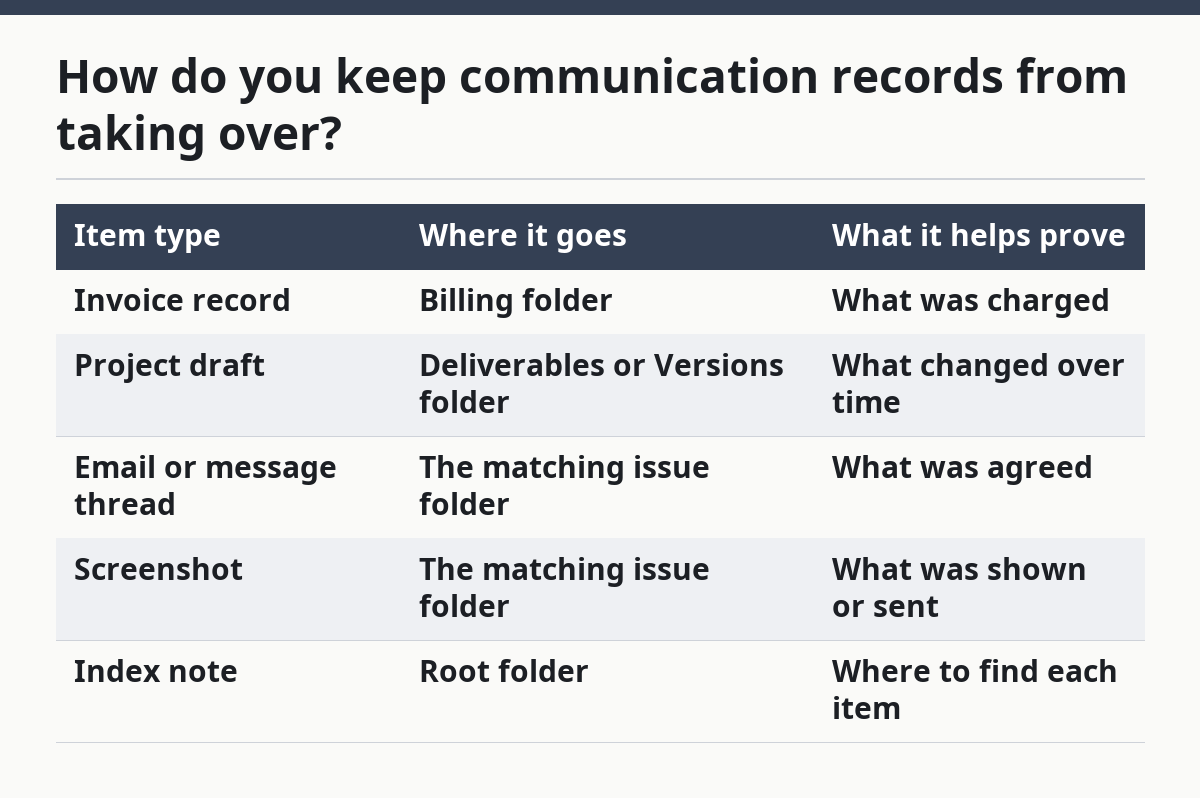
Here is the cleanest division of work:
| Item type | Where it goes | What it helps prove |
|---|---|---|
| Invoice record | Billing folder | What was charged |
| Project draft | Deliverables or Versions folder | What changed over time |
| Email or message thread | The matching issue folder | What was agreed |
| Screenshot | The matching issue folder | What was shown or sent |
| Index note | Root folder | Where to find each item |
If the message is not tied to an issue, leave it out. A claim file is easier to use when it is selective.
What should you leave out of the file?
You should leave out anything that does not help prove the issue, explain the timeline, or identify the work in dispute. Extra files cost time because they force you to sort noise before you find the point.
Do not mix unrelated projects into one claim file just because the same client appears in all of them. That creates false connections and slows down the review. Do not keep duplicate copies of the same PDF in multiple folders unless your system absolutely needs a backup inside each issue folder.
Do not save rough notes without a label. Unnamed notes from 3 weeks ago can confuse the file more than they help. If you need notes, give them a date and a purpose, such as 2024-06-01_note_scope_change.txt.
This approach is not right for someone who wants one giant folder and does not plan to sort anything. It is also a poor fit if you never expect to compare versions, dates, or message threads. If the file is small enough to fit in your head, a lighter system may be enough.
For larger freelance claims, incidents, and documentation hubs, this structure keeps the evidence usable when the problem is split across more than one issue.
What mistakes make a claim file hard to use?
The biggest mistake is mixing issue types in one folder, because it hides the story under a pile of files. The second is using vague names like docs or stuff, which turn a 2-minute search into a 20-minute hunt.
Another common mistake is overwriting old files. That destroys the trail between draft, revision, and final record, and it can make the timeline look cleaner than it really was. Keep the old version and save the new one with a new number.
A third mistake is sorting by importance instead of by issue. A payment dispute may matter more than a revision dispute, but both need separate folders if both are part of the claim. The folder structure should follow the facts, not the feeling.
A final mistake is building the file once and never checking it again. If new documents arrive, slot them into the right folder the same day if possible. A claim file that stays current for 30 days is much easier to trust than one that gets updated in a rush at the end.
What is the best way to separate evidence by topic?
A practical way to separate evidence by topic is to give each topic its own folder, its own date range, and its own file names. That lets you find the right proof without dragging unrelated material into the review.
Start with the top issue, then split again only if the folder grows too crowded. For example, a billing folder can stay whole if it has 6 files, but it may need a subfolder for invoices and another for payment messages if the file gets larger. Use subfolders only when they make the timeline easier to read.
Keep one master index at the root, even if the issue folders are clear. The index is the map that tells you where billing ends and scope begins. A good index saves more time than another folder ever will.
If you want the file to stay usable, choose clarity over completeness inside each folder. A clean issue folder with 8 well-named files is better than a dump of 40 mixed items. The goal is not to store everything; the goal is to find the right thing fast.
What should go in the main claim folder?
The main claim folder should hold the issue folders, a short index, and only the highest-level files that apply to the whole dispute. It should not become a catch-all for everything you have ever saved. If a document belongs to billing, scope, or deliverables, put it in that folder instead of the root.
How should I label files?
Label files with a date, an issue name, and a version tag such as v1 or v2. That makes the sequence clear and keeps older drafts from vanishing behind newer ones. Avoid vague names like final or misc, because they tell you nothing when you return 2 weeks later.
What is the best way to separate evidence by topic?
A practical answer is to assign one folder per issue type and keep only that topic’s files inside it. If a document helps more than one issue, keep one copy in the main folder and add a note pointing to it from the other folder. That preserves order without creating duplicates.
FAQ
How many folders should a freelancer claim file have?
Most claim files work well with 3 to 6 issue folders under one root folder. If you have fewer issues, keep the structure smaller. If you have more, split only where the timeline or document type really demands it.
Should I keep screenshots with emails or with the issue folder?
Keep them in the issue folder they support. If a screenshot proves a billing point, put it with billing. If it proves a scope change, put it with scope.
What if one document fits two issues?
Keep one copy in the primary folder and add a note in the other folder that points to it. That avoids duplicate files and makes the chain easier to follow.
Do I need a version system if there are only a few drafts?
Yes, even a small file benefits from version labels. Use v1, v2, and v3 so the newest draft is obvious and the older ones stay available if someone needs to compare them.
What if the dispute is small?
If the file is small enough to fit in your head, a lighter system may be enough. But if the file is already crossing issues, dates, or message threads, the folder structure above is still the safer choice.
Drafted with AI; not yet reviewed by a person.
