
Last updated: November 21, 2026
Quick Answer: Use 2 copies, keep 1 original file, and save the record in 3 parts: screenshot or export, clear file name, and backup.
How to Store Screenshots and Messages for an Insurance Claim means keeping screenshots, text messages, chat exports, and email exports in more than one place, while leaving the original file details intact and making each file easy to match to the date and conversation it came from. That approach is usually the safest starting point for an insurance claim later, because insurers care about what was said, when it was said, and whether the record still looks unchanged.

Key takeaways
- Keep the original screenshot, not just a cropped version with the header removed.
- Save text messages and chat exports in their export format, then back them up in cloud storage and one other place.
- File names should tell you the date, sender, and topic at a glance.
- Metadata matters because it can help show when a file was created or saved.
- If the record is unclear, incomplete, or easy to challenge, get help from the insurer or a qualified adviser for your own situation. This is information, not financial advice.
Who this is for
This is for someone who needs to save digital messages for How to Store Screenshots and Messages for an Insurance Claim and wants the files to still make sense weeks or months later. It assumes you already have the screenshots, text messages, chat exports, or email exports, and that you can save files to a phone, laptop, or cloud storage account.
This is not the right approach if the claim is already in dispute over authenticity, if the message history is missing key parts, or if the insurer has asked for a formal record format. In those cases, follow the insurer’s instructions as closely as you can and get qualified help for your own situation. The same warning applies if the claim could affect a large sum, a deadline, or a legal dispute. For general evidence handling, the NIST guide on digital evidence and the FTC’s advice on backing up data are useful reference points: NIST SP 800-86 and FTC consumer advice on backups.
How do you store screenshots and messages for an insurance claim?
You store them by keeping the original file, naming it clearly, exporting the full conversation where possible, and backing it up in at least two places. The aim is not decoration; it is to preserve the date, sender, and context so the file still works as evidence if someone opens it 3 months later.
- Capture the screenshot or export from the original app, then verify that the full message, sender name, date, and time are visible; if any of those are cut off, the file is weak and should be retaken.
- Save the file in a native format first, such as a chat export, PDF, or original image file; if the only copy is a cropped image, the record is harder to trust.
- Name the file with a date and plain description, such as YYYY-MM-DD_sender_topic, and verify that the name still tells you what the file is without opening it; if the name says only “Screenshot 1,” it will not help later.
- Export the whole chat when the app allows it, because one screenshot often misses earlier context; verify that the export includes the full thread or the date range you need, and watch for missing attachments or blank gaps.
- Copy the file into cloud storage and one other place, such as a phone and a laptop or a drive and an email folder; verify that both copies open correctly, because a backup that will not open is no backup.
- Record the source in a simple note file by listing the app name, the other party, the date range, and the claim topic; verify that the note matches the file name, or the trail becomes hard to follow.
- Preserve metadata by avoiding edits that strip file properties, and verify that the creation date, file type, and image dimensions still appear when you inspect the file; if the file has been converted or resaved many times, that history can be harder to read.
- Review the set once more before you send it, and verify that the messages line up with the claim timeline; if there are gaps, missing names, or unclear timestamps, add a short note instead of trying to hide the problem.
A good result is a folder where each file can be traced in under a minute. A bad result is a camera roll full of “Screenshot 2026-01-14” files with no context, which can force the insurer to guess what matters.
What should be in the file name?
A useful file name should tell the story of the file without opening it. The easiest pattern is date, sender or app, and topic, because that keeps files sorted and readable in both cloud storage and a laptop folder.
| File name style | What it tells you | Weak point |
|---|---|---|
| Screenshot 1 | Almost nothing | Easy to mix up |
| 2026-01-14_TextMessage_landlord_damage | Date, source, topic | Needs consistency |
| 2026-01-14_ChatExport_AdjusterCall | Date, source, purpose | Can get long |
| 2026-01-14_EmailExport_ClaimUpdate | Date, source, topic | Best when kept short |
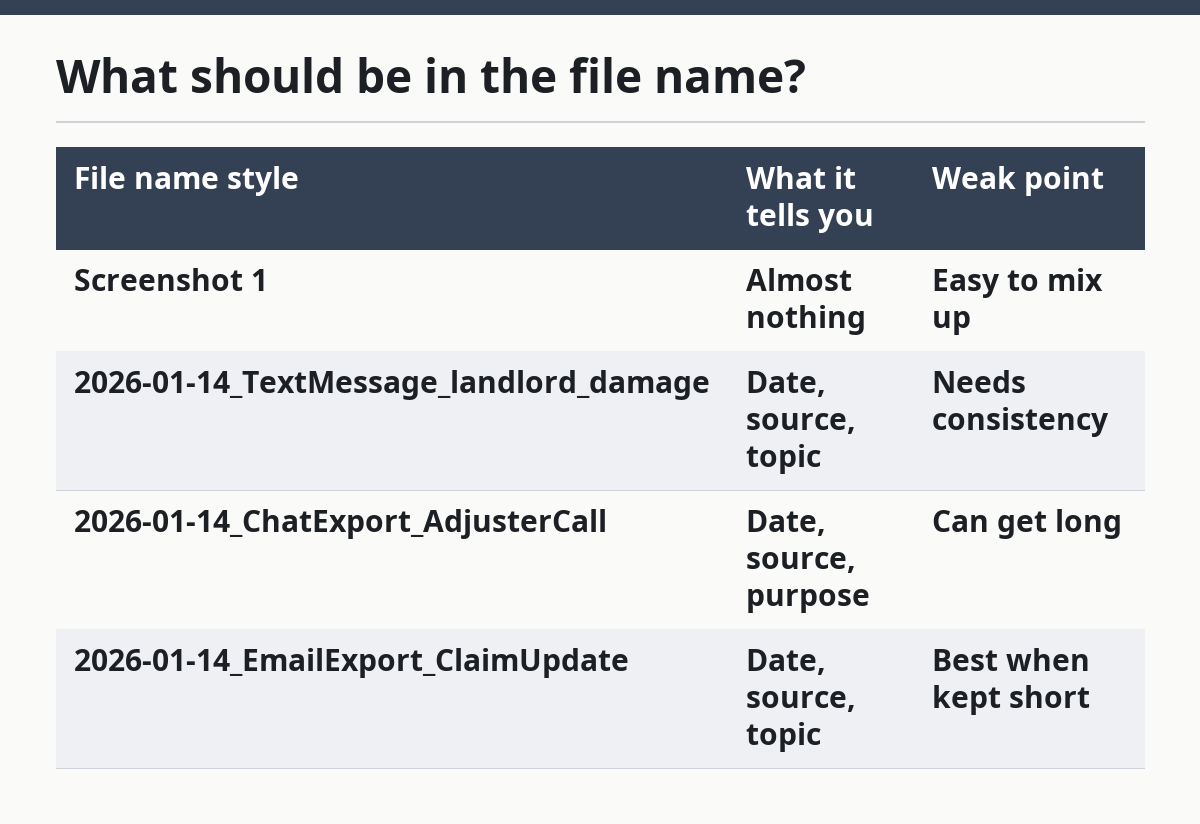
A plain English name is better than a clever one. If the claim file grows over 10 or 20 messages, consistency matters more than style, because you may need to find one message again under pressure.
Why does metadata matter?
Metadata matters because it can show when a file was created, saved, or changed. Metadata is the data about the file itself, not the words in the message, and it can help support the timeline if the insurer asks for more than a screenshot.
Do not rely on metadata alone. A cropped screenshot can still have a date stamp inside the image, but that does not prove the whole conversation. The stronger approach is to keep the message text, the visible time, and the original file properties together.
Some edits can reduce what metadata remains. Resaving an image, forwarding it through another app, or taking a photo of a screen can all make the record harder to read. For claim storage, the cleaner the chain from original app to saved file, the better.
What is the best format for digital evidence?
What is the best format for digital evidence? The answer depends on what the insurer needs, but the safest working choice is the one that keeps the original content readable and keeps the context intact. For screenshots, that often means the original image file; for message threads, an exported chat file or PDF is often easier to keep in order than a batch of loose images.
Here is the practical trade-off:
| Format | Good for | Drawback |
|---|---|---|
| Screenshot image | Quick proof of one message | Can miss earlier context |
| Chat export | Full thread and timestamps | Some apps make awkward files |
| Email export | Sender, subject, and date | Can be long and messy |
| Easy sharing and reading | May flatten detail if overused |
If the insurer wants a specific file type, follow that request. If no format is named, keep the original plus a readable export. That gives you both the source and the version most people can open.
When should you stop and get help?
You should stop using a simple storage method when the record is likely to be challenged or when the insurer asks for something more formal. In those situations, the problem is no longer just storage; it is evidence handling.
The app hides timestamps or sender details: the file may be hard to verify — use a different export method or ask the insurer what format they will accept.
The conversation was deleted and only partial screenshots remain: the thread is incomplete — stop building certainty from fragments and disclose the gap.
The messages were copied into another app or edited heavily: the chain from source to file is weaker — keep the original and note what changed.
The claim may turn on the exact wording of one message: small errors matter — preserve the source file and do not paraphrase the message in your own notes.
The insurer has a deadline or has asked for a formal record: the process is now time-sensitive — follow the request exactly and get qualified help if needed.
The digital record is part of a dispute or complaint: the storage method may need more care — keep the original files untouched and ask for guidance from the insurer or another qualified professional for your situation.
A simple folder is fine for routine claims support. It is not enough when the record itself is under attack.
What mistakes do people make?
The most common mistakes are small, but they can make the evidence harder to use. A claim file does not fail because of one missing detail; it fails because the details stop lining up.
- Cropping out the date or sender. The consequence is that the message loses context, and the insurer may not know who said it. The better choice is to keep the full screen.
- Saving only one screenshot of a long chat. The consequence is missing earlier or later context. The better choice is a full chat export or a set of ordered screenshots.
- Using vague file names. The consequence is confusion when you need the file again. The better choice is a date-based name with a short description.
- Keeping everything in one place. The consequence is loss if the device breaks or the folder is deleted. The better choice is cloud storage plus one other copy.
- Editing images to make them look cleaner. The consequence is that the file can look altered. The better choice is to save an original copy and leave it untouched.
What about cloud backups and exported chats?
Cloud backups and exported chats are a strong way to keep How to Store Screenshots and Messages for an Insurance Claim available after a phone change, app crash, or lost device. A cloud backup gives you a second copy, while an exported chat gives you a version that is easier to review outside the app.
Use both when possible. A cloud backup protects against device loss, but an export helps if the app becomes hard to open later. If you store files in email, cloud storage, and a phone, keep the same file name across all 3 locations so you can match them fast.
The weak point is control. Cloud accounts can sync changed files if you edit the original later, so keep one untouched source copy. If the platform offers version history, that can help, but do not depend on it as the only record.
FAQ
Are screenshots enough for a claim?
Screenshots can help, but they are often stronger when paired with chat exports or email exports. A single image may show what was said, but not the full thread or enough context. If the message is central to the claim, keep the original file and the broader conversation together.
How should I save messages for insurance?
Save the original message, then export the full conversation if the app allows it. Put the files in cloud storage and one other place, and give each file a date-based name that shows the app or sender. Keep the wording unchanged and avoid edits that remove headers or timestamps.
What is the best format for digital evidence?
For many message claims, the best format is the one that keeps the source readable and the context intact. That often means keeping the original screenshot or export plus a PDF copy for easy viewing. If the insurer asks for a different format, follow that request and keep your original copy too.
Drafted with AI; not yet reviewed by a person.
