
Last updated: November 20, 2026
Quick Answer: build a 5- to 10-line timeline that starts with the date of loss, then lists the notice date, the project milestone affected, the client email trail, and each insurer response in order. This guide is about How to Create a Timeline for a Freelance Insurance Claim; claim rules and deadlines vary by country and policy, so a qualified adviser should be consulted for your own situation.
Key takeaways
- Start with one anchor date: the date of loss, not the day you remembered the problem.
- Put every event in date order and label each one with a short fact, not a story.
- Keep the timeline tied to proof: client emails, project milestones, and insurer notices.
- Leave out opinion and blame; the timeline should read like a record, not an argument.
- If the dates are unclear or the loss touches more than one project, the timeline needs extra care.
Who this is for
This timeline method is for freelancers who need to turn a scattered claim into a clean date order that an insurer can read fast. It assumes you already have some records, such as a client email thread, a project plan, an invoice, or a notice from the insurer.
It is not a fit for someone trying to prove a complex loss with missing records, disputed dates, or more than one policy trigger. In those cases, the problem is not just formatting. The timeline may need help from a claims professional, because one wrong date can shift how the insurer reads the whole file.
The goal is simple: make the chain of events easy to follow from the first loss event to the latest response. If the timeline cannot do that in one page or a few pages, it is too vague. A good rule is that every line should point to one dated event, one source, or one next step.
What dates belong in the timeline?
A useful timeline includes the date of loss, the notice date, every project milestone that matters, key client communications, and every insurer action. The date of loss is the day the problem started or the loss happened; the notice date is the day the claim was first reported to the insurer. Those are not the same thing, and mixing them up can confuse a claim file.
The timeline should also show project milestones that make the loss meaningful. For a freelance project, that might be a draft due date, a delivery date, a revision deadline, or a missed handoff. Those dates help the reader see what was supposed to happen before the loss interrupted it.
Client emails belong in the timeline when they change the claim story. A message that confirms a deadline, reports a problem, cancels a job, or asks for rework is usually more useful than a long chain of routine chatter. The same logic applies to insurer messages: include the notice of claim, follow-up requests, and any response deadline that was given in writing. For background on keeping claim records organized, see the NAIC consumer guidance and the Financial Ombudsman Service complaints guidance.
How do I build the claim timeline?
Build the claim timeline by collecting dates first, then writing each event as one short line in order. A clean version can be made from a spreadsheet, a document, or even a dated list, as long as each entry has the same structure.
- Write the date of loss at the top. Use the earliest date the loss or triggering event happened, not the date you noticed the damage. Verify it against the strongest record you have, such as an email, contract, or invoice. If two records give different dates, that is a problem because the insurer may ask which one controls.
- Add the notice date next. Record the date you told the insurer, broker, or claims contact about the issue. Verify the message was sent, received, or logged, depending on the channel. If there is no proof of notice, the timeline has a gap that needs fixing before the file looks complete.
- List the project milestone that was affected. Write the due date, delivery date, or review date that the loss interrupted. Verify it from the contract, brief, calendar invite, or project file. If the milestone is only a guess, the timeline becomes weak because the loss has no work context.
- Place each client email in order. Include only the emails that changed the project or the claim story, and keep the date shown on each message. Verify the sender, recipient, and subject line. If the chain is missing the first or last message, the record may look incomplete.
- Add every insurer response with its date. Include request letters, acknowledgment notices, and any written deadline the insurer gave you. Verify the exact wording if the message sets a time limit or asks for documents. If the deadline is unclear, mark it as unclear instead of guessing.
- Attach supporting documents to each line. Put the file name or document label beside each event, such as “client email,” “invoice,” or “claim notice.” Verify that each attachment matches the date line it supports. If a document cannot be tied to a date, it is hard to use in a claim review.
- Check for gaps longer than one project stage. Scan for any stretch where the timeline jumps from one major event to another with no explanation. Verify whether a call, email, or calendar entry exists for that gap. If not, the claim may need a note that the record is incomplete rather than a guess at what happened.
- Finish with the latest live item. End with the most recent insurer action, pending request, or open response date. Verify that nothing newer is sitting in your inbox or file folder. If the timeline ends on an old event while a newer one exists, the reader will not know where the claim stands.
A good timeline has one event per line, not one paragraph per memory. Short lines make patterns visible, and patterns matter more than polish. If the same date appears in two places with two different meanings, fix that before the file goes out.
What should each entry look like?
Each entry should be short enough to scan in under a minute and specific enough to prove why it belongs there. A strong line often follows this shape: date, event, source, and impact. For example, “12 March: client email confirmed delivery delay; source: email thread; impact: missed project milestone.”
That format helps because insurers and adjusters usually need the chronology, not the backstory. A line that says “problem with client” tells them almost nothing. A line that says “client email on 12 March moved review meeting to 19 March” gives a usable fact.
Keep the wording neutral. A timeline that says “client ignored the work” sounds like an argument; a timeline that says “no reply received after 12 March email” sounds like a record. Neutral language does more work because it gives the insurer facts without forcing a conclusion.
Which format is easiest to use?
A simple table is often easier to read than a long paragraph, but the best format depends on how many events you have. A spreadsheet works well when the claim has several dates and attachments. A one-page list works when the file is small and the sequence is obvious.
| Format | Best for | Strength | Weak point |
|---|---|---|---|
| Spreadsheet | Multiple dates, many emails, several project milestones | Easy to sort by date | Can become cluttered if notes are long |
| One-page list | Small claim with a tight sequence | Fast to scan | Harder to manage many attachments |
| Narrative memo | Complex claims that need context around each date | Explains links between events | Easy to drift into story instead of record |
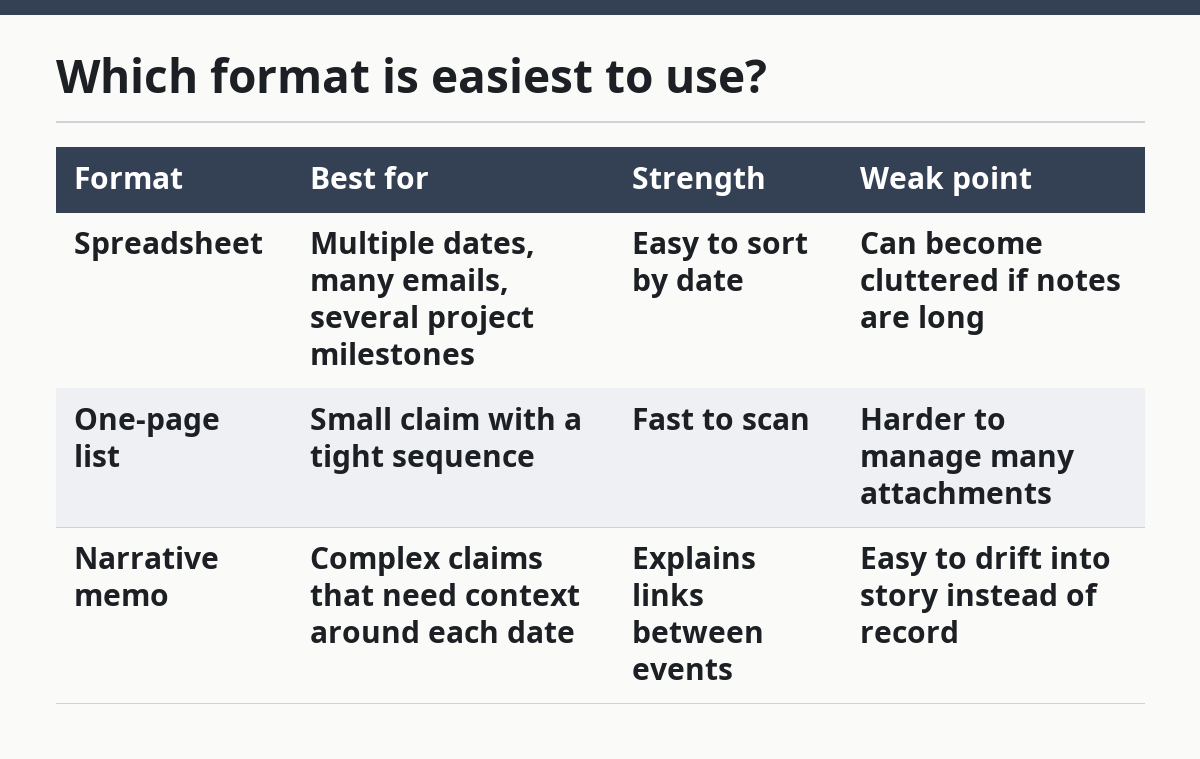
If the claim has only a few dated events, a list is usually enough. If the file has multiple client emails, several milestone changes, or more than one insurer request, a spreadsheet often keeps the record cleaner. A narrative memo is useful only when the dates need context; it should not replace the timeline itself.
When should you stop and get help?
You should stop and get qualified help when the timeline no longer matches the documents or when the claim touches a legal or policy dispute. This is the point where a neat list can do real harm if it is wrong.
Two records give different dates for the loss: that means the timeline has a date conflict — get help before you submit, because the wrong anchor date can change how the claim is read.
The insurer says the notice date is late or unclear: that means timing may matter to coverage — stop guessing and get the claim file checked by someone qualified.
The loss spans more than one project milestone or contract: that means one timeline may not be enough — split the events carefully so the dates do not blur together.
You only have partial email chains: that means the record may look incomplete — recover the missing messages before filling gaps with memory.
The insurer has set a response deadline you do not understand: that means a missed date could affect the claim — ask a qualified adviser to review the notice before you reply.
The claim involves a disputed invoice, refund, or unpaid fee: that means the timeline may overlap with a payment dispute — keep the facts separate and get guidance on how to frame them.
A timeline is a tool, not a verdict. If the facts are unstable, the safest move is to slow down and rebuild the record before it leaves your desk.
What mistakes trip people up?
People usually make the same few errors, and each one weakens the claim in a different way. The fix is simple, but only if the problem is caught early.
First, they start with the day they noticed the problem instead of the date of loss. That can shift the whole story and make the claim look late or inconsistent. The better choice is to anchor the timeline to the first event that started the loss.
Second, they mix client emails and insurer emails into one blur without labels. That makes it hard to see who said what and when. The better choice is to tag each line as “client” or “insurer” and keep the order exact.
Third, they write long explanations beside each date. That makes the timeline harder to scan and can turn a record into an argument. The better choice is a short factual note with the document that proves it.
Fourth, they leave out project milestones because they seem obvious. That creates a gap between the loss and the work it affected. The better choice is to include the due date, delivery date, or revision date that shows why the loss mattered.
Fifth, they add every email, even the ones that never changed anything. That can bury the key dates under noise. The better choice is to include routine messages only when they confirm timing, scope, or response.
How detailed should the timeline be?
The timeline should be detailed enough that a stranger can follow the sequence without reading every attachment. That usually means one line per event, with enough detail to show date, source, and effect, but not so much that the record turns into a diary.
A useful test is whether each line answers three questions: what happened, when did it happen, and why does it matter to the claim. If a line cannot answer at least two of those, it probably does not belong. If a line takes a full paragraph, it is usually too much for the timeline and belongs in a separate note.
The right level of detail depends on the size of the claim. A small, single-project file may only need a handful of dates. A larger file with multiple client emails and several insurer responses may need a fuller log so the sequence stays clear.
What dates belong in a claim timeline?
The core dates are the date of loss, the notice date, project milestones, client communications, and insurer responses. Those are the dates that show when the problem started, when it was reported, what work was affected, and how the claim moved.
A timeline does not need every personal note or every internal reminder. It needs the dates that can change how the claim is understood. If a date cannot be tied to a project event, a client email, or an insurer action, it is probably not part of the main timeline.
How detailed should a claim timeline be?
A claim timeline should be detailed enough to prove sequence, not enough to repeat the whole file. One short line per key event is usually the right shape, especially when each line already points to a document or email.
Too much detail can hide the dates that matter. Too little detail can leave gaps that make the claim hard to follow. The best version is usually in the middle: clear, dated, and backed by records.
Do i need to include every email in the timeline?
No, only the emails that change the claim story or prove timing need to be in the timeline. Routine messages that do not affect the project, the notice date, or an insurer response can stay out.
If an email confirms a project milestone, reports the loss, or sets a response deadline, it should usually be included. If it is just a thank-you or a routine check-in, it may belong in the file but not in the main timeline.
Drafted with AI; not yet reviewed by a person.
