

Last updated: November 23, 2026
Quick Answer: A strong freelance claim timeline usually needs 7 steps: first event, notice, reply, version change, milestone, resolution, and a final check. A freelance claim timeline is a dated, page-by-page record of what happened from the first event to the final resolution. To write How to Write a Freelance Claim Timeline from First Event to Resolution, keep the sequence tight, tie each event to a document date, and use short language so an adjuster can follow it without reading the whole project history.
Key takeaways
- Start with the first event, not the backstory.
- Put each event in date order and match it to one source document.
- Keep emails, project versions, and notices in the same chain of events.
- Mark the claim milestones clearly so the end of the story is easy to see.
- Leave out guesses, opinions, and unrelated project drama.
What belongs in a freelance claim timeline?
A freelance claim timeline holds the date, event, and proof for every step that matters to the claim. It is not a diary, and it is not a full project recap; it is a narrow record that shows how the problem started, how it changed, and how it ended.
A good freelance claim timeline usually includes 5 core parts: the first event, the notice, the communication log, the version history, and the resolution. If the claim hinges on a missed handoff on 12 March, a revised file on 14 March, and a written reply on 18 March, those three points belong in the timeline because they show sequence, not just facts.
Leave out items that do not move the claim forward. A lunch meeting, a design preference, or a side request can clutter the page unless it changed the project version or triggered a reply that matters. The timeline should read like a chain of 1 event causing the next, not a scrapbook.
A clear claim timeline also helps separate the claim file from the rest of the job record. If the email, project version, and notice all point to the same date, an adjuster can check the record quickly. If they point to different dates, the mismatch becomes part of the story and needs to be explained, not hidden.
How do I start the timeline from the first event?
Start the timeline with the first event that matters to the claim, then list each later event in date order. The first line should answer, “What happened first, and when did it happen?”
Use a simple working order: first event, notice, reply, version change, milestone, resolution. If the issue began on a Monday and the first written notice came on Tuesday, do not bury Monday under a long preface. The opening line should identify the event and the exact date, even if the event itself was small.
- Open your document tool and create one page with a date column, an event column, and a source column so each entry stays tied to proof.
- Enter the first event with the exact date and one short description, which gives the timeline its starting point.
- Add the notice next, using the date the issue was raised or received, so the timeline shows when the claim began to exist.
- Record the reply in the next line, which shows how the other side responded and keeps the sequence intact.
- Insert the next project version with its file date or version number, so changes in the work sit beside the event that caused them.
- Mark the claim milestone when the matter changes stage, such as escalation or agreement, so the reader sees the handoff points.
- Finish with the resolution date and outcome, which closes the chain and shows the end state.
Keep each line to one event. A timeline with 9 clean entries is easier to read than one with 3 crowded paragraphs, because the date trail is visible at a glance. If a date is unclear, note that it is unclear rather than guessing.
How do I use emails, project versions, and notices together?
Use emails, project versions, and notices as three linked columns of evidence, with each item attached to the date it belongs to. The goal is to show that the message, the file change, and the formal notice all line up.
An email usually tells you when someone raised the issue or answered it. A project version shows when the work changed. A notice shows when the matter became official enough to record in the claim file. If all three happened on different days, the timeline should make that separation obvious instead of collapsing it into one line.
A clean way to do this is to give each entry a source tag. For example, the timeline can show “email dated 8 May,” “version 4 dated 9 May,” and “written notice dated 10 May.” That structure helps the reader follow the order without opening the full thread every time. It also stops the timeline from drifting into a vague summary that says “around that week,” which is too loose for a claim file.
When a file version and an email disagree, keep both dates and state the difference plainly. Do not choose one just because it looks neater. A claim timeline loses value when it smooths over mismatched records.
What dates belong on a claim timeline?
A claim timeline should include the date of each event, the date on each document, and the date of each notice that changed the claim. Those three date types often tell different parts of the same story.
Use the exact date on the email, file version, notice, or letter when it exists. If a version was saved on the 14th but sent on the 15th, both dates may matter because they show when the work changed and when the other side saw it. The same goes for a notice that was drafted one day and delivered the next. A timeline that ignores that gap can look tidy while losing the real sequence.
Do not add every possible timestamp if it adds noise. Minute-by-minute detail is rarely useful unless timing itself is the issue. A claim about a missed deadline may need the hour, but most freelance claim timelines only need the day. The point is clarity, not a wall of timestamps.
If a record has no exact date, mark it as undated and explain why it sits in the sequence where it does. That is better than forcing it between two events because you want the page to look complete. An honest gap is easier to defend than a guessed one.
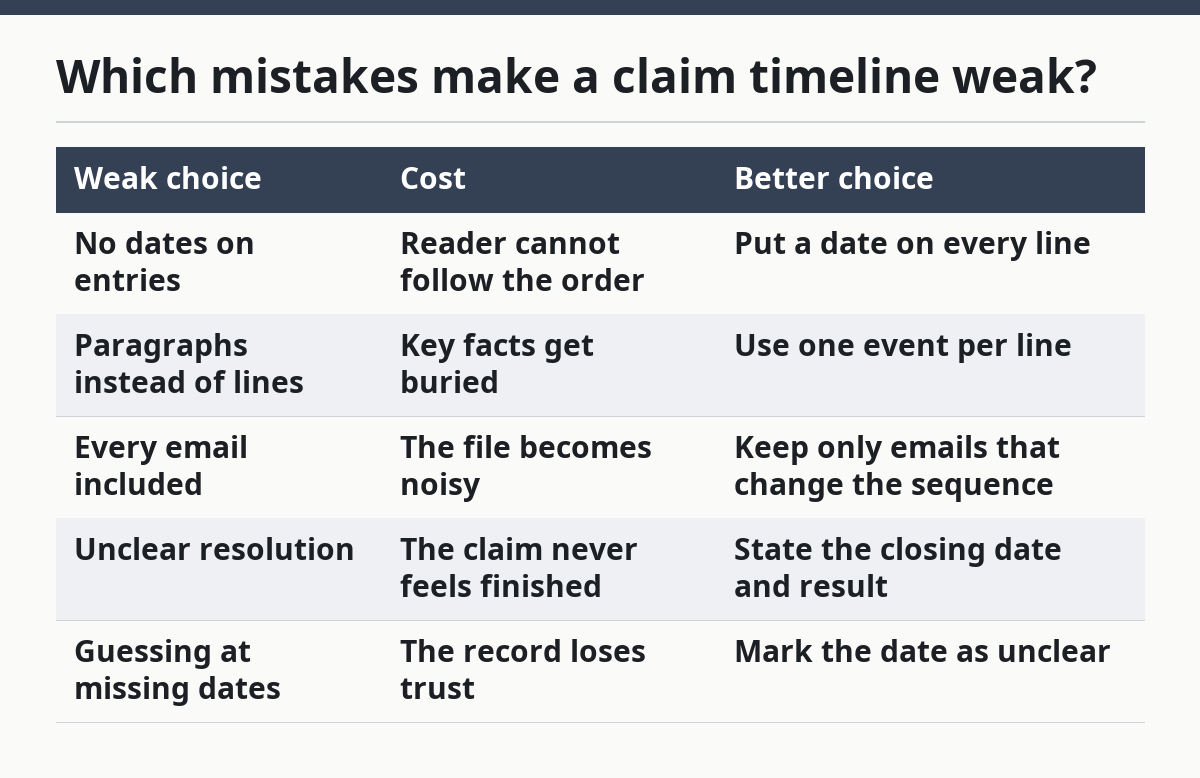
Which mistakes make a claim timeline weak?
A weak claim timeline usually mixes opinion, skips dates, or hides the order of events. Those mistakes can make a clear file look uncertain, and uncertainty is expensive because it forces the reader to do extra work.
The most common error is writing the story in paragraphs instead of lines. That costs the reader time because the sequence becomes fuzzy. The fix is simple: one event per line, one date per line, one source per line. Another common error is listing every email in the thread without choosing the ones that changed the claim. That turns the timeline into a dump and buries the turning points.
A third mistake is mixing the claim file with project gossip. A note about mood, frustration, or unrelated scope changes may feel relevant, but if it does not move the claim forward, it belongs elsewhere. The timeline should show cause and effect, not personality. A fourth mistake is letting the final resolution sit without a clear date. If the closeout happened on 22 June, say so; a vague ending leaves the claim hanging.
| Weak choice | Cost | Better choice |
|---|---|---|
| No dates on entries | Reader cannot follow the order | Put a date on every line |
| Paragraphs instead of lines | Key facts get buried | Use one event per line |
| Every email included | The file becomes noisy | Keep only emails that change the sequence |
| Unclear resolution | The claim never feels finished | State the closing date and result |
| Guessing at missing dates | The record loses trust | Mark the date as unclear |
How do I make the timeline easy to read in the claim file?
Make the timeline easy to read by keeping each entry short, dated, and tied to one source in the claim file. The person reading it should be able to scan 10 lines and understand the shape of the case.
A simple layout works best: date, event, source, note. If you can keep each line to 1 sentence and each note to 1 fact, the timeline stays usable in the claim file and can be checked against the emails or project versions without hunting. If a line needs 4 sentences, it probably belongs in a summary, not in the timeline.
Use the same labels throughout the document. If you call one item “notice” on page 1, do not switch to “alert,” “warning,” or “message” on page 2. Consistent labels make the timeline feel like a record, not a draft. That matters when the file contains more than one milestone or more than one round of communication.
A readable timeline also keeps the resolution visible. End with the last dated event and the final status so the claim does not trail off. If the matter ended after a revised file was accepted, the timeline should show that last change and the date it closed.
For broader recordkeeping habits, the records guidance from ISO 15489-1 and the U.S. National Archives’ records management resources on email management are useful reference points. They are not about freelance claims alone, but they reflect the same discipline: date, source, and traceable order.
When should I stop and revise the timeline?
Stop and revise the timeline any time a new document changes the story or a date no longer fits the sequence. A claim timeline is a working record, so it should be updated when the claim file changes, not frozen on the day you first write it.
Revise it if a later email shows the first notice was actually sent earlier, if a new project version changes the point of conflict, or if the resolution date moves because the matter stayed open longer than expected. The timeline should keep up with the record, not fight it. If it no longer matches the file, the reader loses trust fast.
It also helps to do one final pass before you share it. Check that the first event is really the first event, the notice is where it belongs, and the final milestone is clearly labeled. A 15-minute review can catch gaps that would otherwise force a second round of questions.
A timeline is not right for every dispute. If the only issue is a one-line billing question with no sequence, this format may be more than you need. This method fits better when the claim has a visible chain of events, several project versions, or more than 2 notice points.
What happens after the timeline is finished?
After the timeline is finished, it becomes the backbone of the claim file and the quickest way to explain the case. The next task is not to rewrite it; the next task is to keep it aligned with the documents it points to.
Use the timeline as the index for the emails, project versions, notices, and milestone dates that sit behind it. If someone asks about a specific date, the timeline should show where to look without forcing you to rebuild the sequence from memory. That is the real value of the document: it turns a messy pile of records into a dated path.
A good final check is to read the timeline straight through and ask whether each line moves the story forward by one step. If a line does not change the sequence, remove it or move it elsewhere. A strong claim timeline is short enough to scan, detailed enough to trust, and clear enough to explain the route from first event to resolution.
For the related pieces in this topic cluster, see the hub on freelance claims, incidents, and documentation.
FAQ
What dates belong on a claim timeline?
Put the date of the event, the date on the email or notice, and the date of any file version that changed the record. Those dates are the backbone of the timeline because they show what happened, when it was recorded, and when the project moved.
If the exact date is unknown, mark it as unclear instead of guessing. A guessed date is worse than a blank one because it can break the order of the claim file.
Should I include every email?
No, only include emails that change the sequence, the notice, the reply, or the project version. A claim timeline should show the turning points, not the full inbox.
If 6 emails say the same thing, one dated line can point to the thread without crowding the page. Too many emails make the timeline hard to read and hide the events that matter.
How do I order the events?
Order the events by date, then by the way they changed the claim: first event, notice, reply, version change, milestone, and resolution. That gives the reader a clear path from start to finish.
If two events share the same date, put the one that happened first higher on the page and label it clearly. When the order is still uncertain, say so rather than forcing a guess.
Drafted with AI; not yet reviewed by a person.
