
Last updated: November 24, 2026
Quick answer: in the first 24 hours, handle the freelance data breach by containing the device, preserving evidence, and telling clients only when the facts are clear enough to avoid confusion. If cyber coverage may apply, your job in the first hour of How to Handle a Freelance Data Breach Before the Insurer Gets Involved is not to build the perfect case file for an insurer; it is to stop more data from leaving the device and keep the record clean for later.
Key takeaways
- Cut off access first. A live laptop, phone, or cloud account can keep leaking client data while you are still deciding what happened.
- Save proof before you clean anything up. Screenshots, logs, filenames, and timestamps matter more than a polished explanation.
- Do not guess at client impact. Send a short notice when you know what data is involved, not when you have every detail.
- Keep business and personal accounts separate during the response. One shared password reset can create more damage than the breach.
- If cyber coverage may be involved, avoid wiping devices or deleting email until you have copied the evidence you can preserve.
What should you do first after a freelance data breach?
The first thing to do in How to Handle a Freelance Data Breach Before the Insurer Gets Involved is stop the breach from spreading by isolating the device or account that was touched. Shut off Wi-Fi, disconnect Ethernet, sign out of the affected cloud account, and pause any syncing service that could push changed files to the wrong place. If a phone or laptop is involved, power it down only after you have taken a few screenshots or photos of what you see.
Use a short 10-minute containment pass before you do anything else. Check for active logins, open sessions, forwarding rules, and file-sharing links tied to client data. If you find a shared folder with outside access, revoke the link right away so the next edit does not expose more material.
Then capture the basics in one note: the date, the device, the account, the client name, and the type of data exposed. A simple incident log is enough at this stage. The goal is to preserve the shape of the event, not to write a report in full sentences.
This is the part most people get wrong. They jump to cleanup, change passwords on every account, and lose the trail that explains how the breach started. That can make later insurance reporting harder, because the evidence becomes thin. For a quick overview of reporting and containment basics, see the FTC’s data breach guidance.
How do you contain the device without making it worse?
You contain the device by freezing the parts that still have access and leaving the rest alone. On a laptop, that means turning off Wi-Fi and Bluetooth, closing remote-access tools, and stopping cloud sync before you start deleting files or uninstalling software. On a phone, lock the screen, turn off mobile data if needed, and stop any app that can still send client files.
A cautious approach is usually better than a hard wipe in the first 30 minutes; do not factory reset, reimage, or “clean up” the device unless a security tool or qualified professional tells you to do that as a live response step. A full wipe destroys logs, browser history, and file timestamps that can show what happened. That evidence is often more valuable than the device itself. If the situation is unclear, NIST SP 800-61 is a useful reference, and a security professional can help you choose the least destructive option.
Use a short containment checklist:
- Disconnect the device from the internet.
- Disable shared links, guest access, and forwarding rules.
- Lock the most exposed account with a password change after you preserve evidence.
- Record what changed, in order, with timestamps if you can see them.
- Keep the device powered if the screen shows a useful clue, such as a login prompt or an error code.
NIST’s Computer Security Incident Handling Guide, SP 800-61, treats containment and evidence preservation as separate steps, and that split matters here. If you are unsure how to apply that guidance to a freelance setup, consult a qualified security professional. The faster you erase the signs, the less you can prove later. For a freelance setup, that usually means one laptop, one email inbox, and a cloud drive doing too much work at once.
What evidence should you save in the first 24 hours?
You should save anything that shows what was touched, when it happened, and who could have seen it. Start with screenshots of the alert, the folder, the login screen, the error message, or the strange email rule. Then save file names, access logs, message headers, and the names of any client folders that were shared.
A plain text incident log works better than a long memo. Put the date and time on each line, then add one fact per line. If you can copy logs from your cloud service, do that before you change passwords, because many services keep only a short history window visible to the account holder. For more background on incident records, the CISA incident reporting page is a useful reference.
Keep the evidence in a separate folder, ideally on a device that was not involved in the breach. If you have an external drive, use it only for this incident pack so you do not mix new files with old ones. That makes it easier to hand the file to an insurer, a lawyer, or a security consultant later without rebuilding the story from scratch.
The FTC’s data breach guidance points to preserving records and limiting further exposure while you investigate. That is the right rhythm for freelancers too. A scattered record can waste hours later, and a tidy record can shorten the next conversation by days.
When do I tell clients about a freelance data breach?
You tell clients when you know enough to describe the risk without guessing, and you do not wait for a full forensic report if delay would leave them exposed. If client data, credentials, or private files may be involved, a short notice is usually better than silence. The notice can be brief: what happened, what data may be affected, what you have already done, and what the client should watch for next.
Do not send a long apology email before you know the facts. That can lock you into details you may later need to correct. Use one clear message and one follow-up if new facts appear. If the breach touches more than one client, send separate notices so each person gets only the details relevant to their files. If you need a template, a brief client notice can be aligned with the practical steps in the FTC’s data breach response guide.
A 3-part rule helps here:
| Situation | What to do now | What to avoid |
|---|---|---|
| Lost access to a device, but no sign of data exposure | Document it and continue checking logs | Telling clients you have a confirmed breach |
| Client files may have been opened, copied, or shared | Send a short notice once you can name the file set | Waiting for a perfect explanation |
| Passwords or login tokens may be exposed | Warn the client to reset access quickly | Assuming the problem is limited to your account |
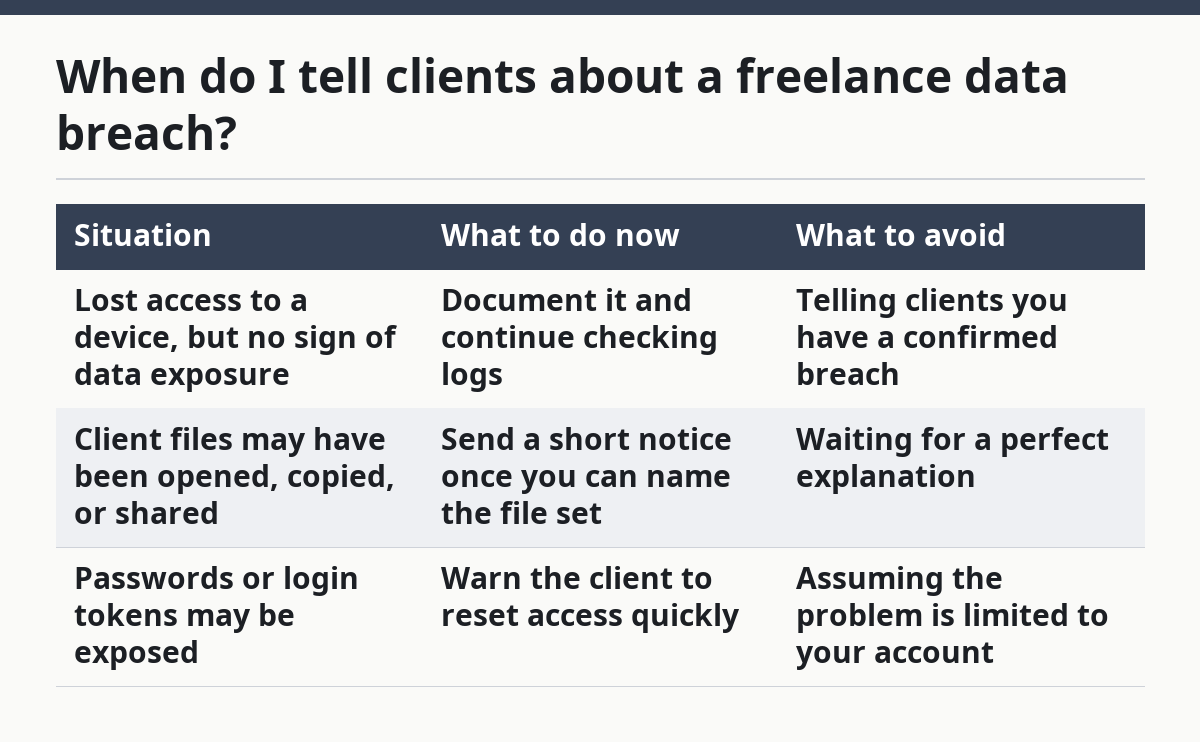
This is where a lot of generic advice goes wrong. It treats every incident like a legal script, but freelancers often need a practical notice that protects trust and keeps work moving. If the situation involves regulated data or contractual duties, consult a lawyer or other qualified professional before you send a formal notice. The right message is factual, short, and specific to the files involved.
How do password resets fit into the response?
Password resets come after containment, not before it. If you reset everything first, you can cut off your own access to the logs and alerts that show what happened. Start with the account most likely to be active in the breach, then move to connected services in the next 30 to 60 minutes.
Reset the primary email password, then review recovery email addresses, phone numbers, and app passwords. After that, check file storage, invoicing tools, project boards, and any shared client platform. If a 2-factor authentication app is available, turn it on for the accounts that hold client data. The point is to reduce repeat access, not to create a maze of new passwords you cannot track.
Use a password manager if you have one, and change the passwords in a deliberate order. Start with the account that can reset the others, usually email. Then handle the cloud drive and any service with shared folders or admin rights. Keep a short list of what changed so you can tell the insurer later, if needed, which controls were updated and when. For account-hardening basics, see CISA’s guidance on multifactor authentication.
The common mistake here is changing every password in a panic and forgetting the account recovery paths. That can lock you out of the old evidence and the new account. A 15-minute reset plan is safer than a 2-hour scramble.
What belongs in your incident record for cyber coverage?
Your incident record should show the timeline, the affected data, the actions you took, and the names of any clients or services involved. Keep it factual and short. A one-page record can be enough at first if it includes the date of discovery, the device, the suspected cause, the client data type, and the containment steps already taken.
This is also the place to keep source material separate from interpretation. Save one folder for evidence and one note for your summary. That keeps you from mixing “what I saw” with “what I think it means,” which matters when a future insurer reviews the file. If you have cyber coverage, the insurer will usually want the clean chain of events, not a guess built from memory. If you need help understanding the documentation side, the NIST incident handling guide is the most directly relevant public source.
A useful record usually includes these items:
- the device model or account name
- the time of discovery
- the files, folders, or client records involved
- the steps already taken
- the people notified and when
- any outside help you contacted
Do not delete browser history, message threads, or cloud activity logs just because they look messy. Those items often show whether the breach came from a bad password, a stolen session, or a sharing mistake. A tidy folder of evidence can save hours if the next question comes from an insurer, a client, or both.
What mistakes cost freelancers the most?
The most expensive mistake is treating the breach like a housekeeping problem instead of a security event. If you delete files, wipe the device, or keep working in the same account, you can lose both evidence and control. That can turn a manageable incident into a longer dispute about what happened and when.
Another costly mistake is telling clients too little for too long. Silence may lead them to assume the worst, especially if their data may be affected. On the other hand, giving a guess can create corrections you may need to undo later. The safer path is a short, direct notice with one next step for the client.
A third mistake is mixing the response with normal freelance work. Do not keep sending invoices from the same inbox that may have been touched. Do not reuse a shared folder while you are still sorting out access. Put the incident first for at least the first 24 hours, because the cost of one lost login can be larger than a paused project.
This approach is not for someone who wants to keep every file exactly where it is and hope the issue fades. It is for a freelancer who needs to protect client data first and sort out the insurance side later. That order keeps the story cleaner and the damage smaller. If you are deciding whether the incident is serious enough to escalate, the FTC’s breach response guide and CISA incident reporting pages are good starting points.
FAQ
What should a freelancer do first after a data breach?
The first step is to isolate the device or account so the breach cannot spread. Turn off network access, stop syncing, and preserve a screenshot or note of what you found before changing anything else. A 10-minute containment pass can prevent more client data from leaving the system.
When do I notify clients about a breach?
You notify clients once you can name the affected data and explain the immediate risk without guessing. If their files, credentials, or private information may be exposed, a short notice is better than waiting for a perfect report. Keep the message factual and send a follow-up if new facts appear.
Should I call my insurer before I investigate?
You should first preserve evidence and stop further access, then review your cyber coverage terms before making a call if the policy requires notice. A rushed call with no facts can create confusion, but a long delay can also create problems. The safest order is containment, documentation, then policy review within the first day.
Drafted with AI; not yet reviewed by a person.
