
Last updated: November 20, 2026
Quick answer: if a freelancer handles client data in email, cloud storage, a laptop, a phone, or a file-transfer tool, cyber coverage is worth a close look. In How to Decide Whether a Freelancer Needs Cyber Coverage for Client Data, the question is usually not “Can I ignore cyber risk?” but “How much exposure do I create by handling data, and what would happen if that data were lost, stolen, or misdirected?” If your work touches client records at all, cyber insurance for freelancers is often part of the decision. This is information, not financial advice; a qualified adviser should be consulted for your own situation.
Key takeaways
- If you store, send, or edit client data, cyber risk is part of the job, even if you work alone.
- The biggest triggers are not just hacking. A wrong-file email, stolen laptop, phishing login, or ransomware lockout can all start a claim.
- The more personal, financial, or confidential the client records are, the more serious the privacy liability risk becomes.
- A freelancer with no client data exposure may not need cyber coverage, but that is a narrow case.
- The right question is not “Do I use a laptop?” It is “What client data do I handle, how often, and what would a breach cost me?”
Who should think about cyber coverage?
Cyber coverage matters most for freelancers who handle client records, because those records create both breach risk and privacy liability risk. If your work puts names, addresses, tax forms, health details, payment details, or login credentials on your device or in a cloud account, you are in the zone where a cyber claim can start from one bad click or one lost file.
This is not only for developers or IT contractors. A bookkeeper who keeps bank statements, a designer who receives brand assets through a portal, a virtual assistant who manages inboxes, and a copywriter who gets client lists all create a data trail. The more clients and systems you touch, the more paths there are for a mistake.
A freelancer with no client data exposure is the main exception. If you never hold client records, never log into client systems, never store files, and never exchange sensitive data, cyber liability may be less relevant than other forms of cover. Even then, the line can blur fast once you use shared drives, email attachments, or cloud notes.
Two useful reference points are the Federal Trade Commission’s Data Breach Response: A Guide for Business and the NIST Cybersecurity Framework. Those sources are not insurance guides, but they show how common business risk centers on access, data handling, and response. For practical risk basics, see the small business cyber risk guide.
What client data makes the risk real?
Client data makes cyber coverage more relevant when the data could hurt someone if it is exposed, altered, or unavailable. That includes client records such as contracts, invoices, customer lists, payroll files, tax forms, medical files, payment information, and login credentials. A breach involving simple contact details is still a problem, but a breach involving bank data or identity data usually raises the stakes.
The technical word to know is social engineering: a trick that gets a person to hand over access, money, or information. A freelancer may think the risk is technical, but many claims start with a fake login page, a spoofed invoice request, or a message that looks like a client’s email. For more on that threat pattern, see phishing and social engineering basics.
The other big trigger is ransomware, which is malicious software that locks files or systems until a payment demand appears. Even one encrypted laptop can stop a freelancer from sending work, finding invoices, or proving what was stored. If client files are the thing that gets locked, the problem is no longer just an IT issue. It can become a liability issue if the client loses access or blames the freelancer for the interruption.
A quick test helps: if a file would be embarrassing, expensive, or legally sensitive if it were leaked, it is the kind of file that can make cyber coverage relevant. If the file is only a public logo draft, the exposure is lower. The line is not perfect, but it is useful.
How do I decide step by step?
You decide by tracing what data you handle, where it sits, and what happens if it is breached. The point is not to guess. The point is to map the risk in a way that matches your actual workflow.
- List every type of client record you touch. Write down categories, not just client names: invoices, passwords, tax records, customer lists, contracts, or uploaded files. Verify that the list covers email, cloud storage, phone notes, and file-transfer tools. A problem exists if you discover data that was not on your list.
- Mark each record as public, internal, or sensitive. Public means something anyone could see; sensitive means it could trigger privacy liability or identity theft if exposed. Verify that every category has a label. If you cannot label it, consult a professional and treat it as sensitive until you can sort it out. A guide such as the FTC’s Data Breach Response: A Guide for Business can help frame the question.
- Trace where the data is stored. Include laptop hard drives, shared drives, backup folders, inboxes, and password managers. Verify that you know which systems hold copies, not just the “main” file. A problem exists if the same record lives in 3 or more places and you do not control all of them.
- Check who can access it. Count your own devices, assistants, subcontractors, and any client portal access. Verify that access is limited to the people who truly need it. If access rights are vague, the chance of a mistake goes up.
- Think through one breach scenario. Ask what happens if a laptop is stolen, a password is phished, or a file is sent to the wrong person. Verify that you can name the first 2 or 3 problems that follow: lost work time, notice duties, client claims, or recovery costs. If you cannot describe the chain, you do not know your exposure yet.
- Check whether a contract shifts cyber risk to you. Look for confidentiality clauses, data-handling promises, incident notice duties, or indemnity terms. Verify whether the contract makes you responsible for the client’s losses if something goes wrong. A problem exists if the paperwork assigns you duties you do not have the tools to meet.
- Compare the exposure with your ability to absorb it. Ask whether one breach would be a minor cleanup or a serious cash hit. Verify that you could cover lost time, notice costs, or a claim without damaging the business. If the answer is no, cyber coverage becomes more relevant.
- Match the risk to a policy conversation. Use your data map to ask the insurer or adviser whether privacy liability, breach response, and ransomware are part of the discussion. Verify the policy language, not just the name on the brochure. A problem exists if the policy sounds broad but excludes the exact events you are worried about.
A useful rule: the more often you handle client data, the less “theoretical” the risk becomes. A freelancer who sends one non-sensitive file a month is in a different place from one who stores dozens of client records all week. The gap matters.
When is cyber coverage probably worth a closer look?
Cyber coverage is worth a closer look when a breach could affect your client, your cash flow, or your contract duties. That usually happens when you work with personal data, financial data, login credentials, or confidential files.
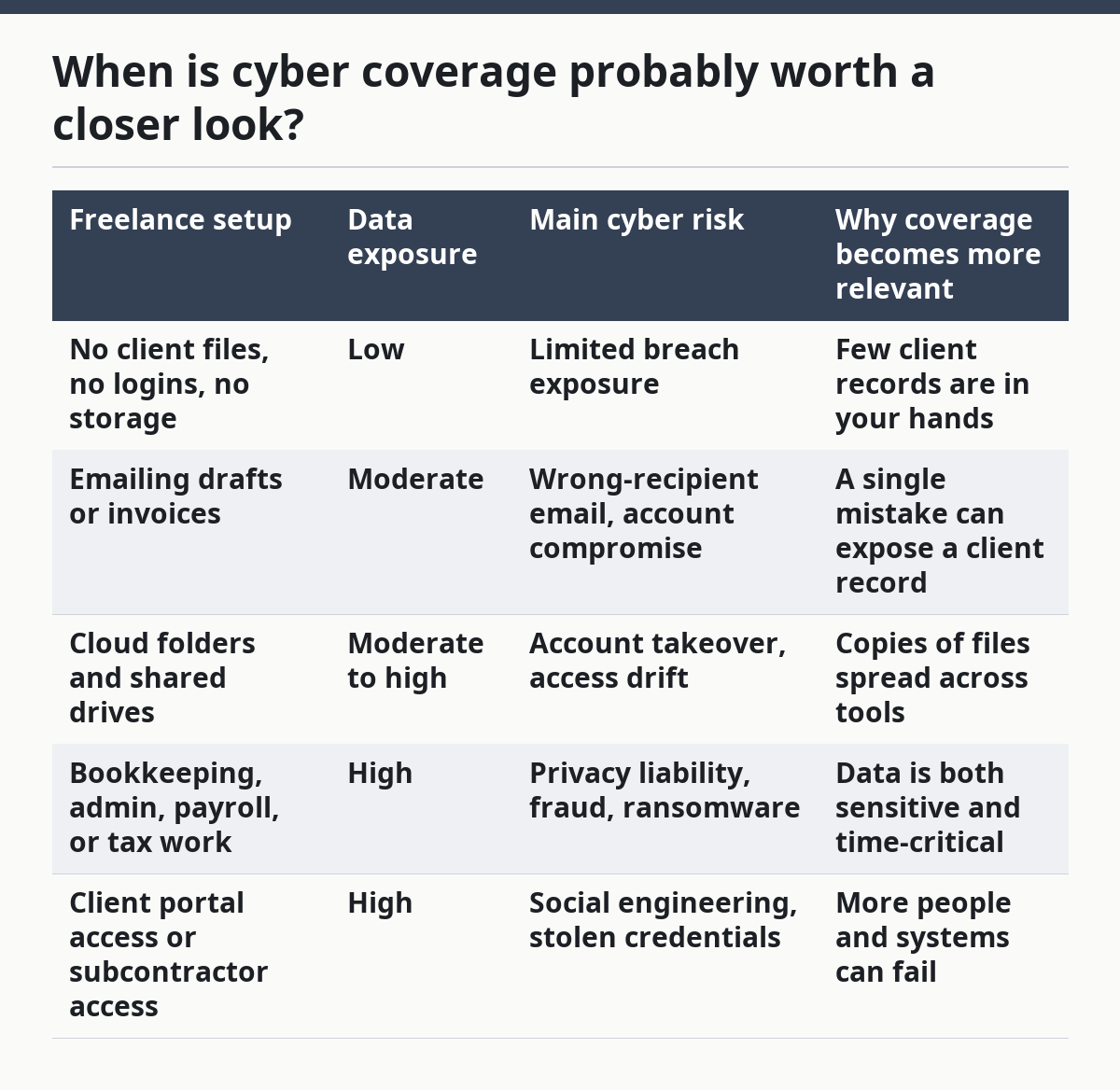
The table below helps compare common freelance setups.
| Freelance setup | Data exposure | Main cyber risk | Why coverage becomes more relevant |
|---|---|---|---|
| No client files, no logins, no storage | Low | Limited breach exposure | Few client records are in your hands |
| Emailing drafts or invoices | Moderate | Wrong-recipient email, account compromise | A single mistake can expose a client record |
| Cloud folders and shared drives | Moderate to high | Account takeover, access drift | Copies of files spread across tools |
| Bookkeeping, admin, payroll, or tax work | High | Privacy liability, fraud, ransomware | Data is both sensitive and time-critical |
| Client portal access or subcontractor access | High | Social engineering, stolen credentials | More people and systems can fail |
A claim does not need a dramatic hack. A misdirected attachment can still become a privacy issue. A phishing email can still let an outsider into a mailbox full of client records. The scale of the loss is what changes, not the fact pattern.
The case for coverage is stronger if your contract mentions confidentiality, breach notice, or liability for data handling. Even one clause can turn a simple mistake into a formal dispute. That is where cyber liability insurance starts to matter as part of the business setup, not as an abstract add-on. If you want a broader policy view, see professional liability vs cyber coverage.
When should you pause and get qualified help?
You should pause when the data picture is unclear, when contract terms shift liability onto you, or when one breach could affect regulated records. In those situations, guesswork is a bad tool.
You handle payment data, tax records, or other regulated client records: that raises privacy liability and may trigger extra duties — get qualified insurance or legal help before relying on a generic policy.
Your client contract requires notice, defense, or indemnity for data incidents: that can put your business on the hook for costs you did not expect — have the wording reviewed.
You use subcontractors or virtual assistants who can see client files: access broadens the exposure — make sure the risk chain is clear before deciding coverage is optional.
Your work depends on a single email account, laptop, or cloud drive: one account problem can stop the business — check whether your current setup can survive ransomware or account theft.
You do not know where copies of client records live: hidden storage is a common cause of breach confusion — map the locations first.
You are comparing policies and exclusions are unclear: a name on the policy is not enough — get help interpreting the wording before making a decision.
What mistakes do freelancers make?
Freelancers usually misjudge cyber coverage by focusing on the wrong risk. The mistake is not always that they ignore cyber risk; it is often that they think only “hackers” matter.
-
Thinking only large firms need cyber coverage. The consequence is that a solo business with a small tool stack still has no plan for a breach, phishing event, or ransomware lockout. The correct alternative is to look at data exposure, not company size.
-
Assuming a good password is enough. The consequence is false confidence, because wrong-recipient emails, stolen devices, and social engineering still happen. The correct alternative is to assess the whole data path, including storage and transfer.
-
Ignoring client contracts. The consequence is that a freelancer may accept privacy duties or notice obligations without noticing them. The correct alternative is to read the sections that mention confidentiality, indemnity, and data handling.
-
Treating all files as equal. The consequence is that sensitive records get the same protection as public drafts, which blurs the real risk. The correct alternative is to sort files by sensitivity and, if you are unsure, consult a professional before deciding what belongs in the sensitive category.
-
Waiting for a breach before thinking about coverage. The consequence is that the business learns too late that the problem was not just technical; it was financial and contractual. The correct alternative is to review exposure before the incident, not after.
What if the standard advice does not fit?
The standard “check your data exposure” method needs adjustment when your work is low-volume, highly regulated, or spread across many client systems. In those cases, the normal freelancer checklist can miss the real source of risk.
If you only handle public content and never store client data, cyber coverage may be less central than other forms of liability cover. That is the narrow case where the answer may lean toward “not much exposure here.” But the moment you start accepting files, credentials, or client records, the picture changes.
If you work in bookkeeping, tax prep, healthcare admin, or other record-heavy work, the issue is bigger than a laptop. The sensitive records are the exposure, and the policy question should match that. A freelancer in that position should not rely on the same light-touch standard used by a copywriter who only gets marketing briefs.
If you use multiple subcontractors or a shared workflow, the risk is not just your own mistakes. It is also who can see, forward, copy, or delete the files. That pushes the decision away from a simple yes/no answer and toward a close look at access and contract language. For related guidance, review freelancer data handling best practices.
How do I know I have enough information to decide?
You have enough information to decide when you can describe your data, your access, and your worst plausible breach in plain language. That usually takes less than 30 minutes if your workflow is simple, and longer if you keep many client records.
A good result is not “I feel safer.” A good result is “I know which files create privacy liability, where they live, who can reach them, and what would go wrong if one account were compromised.” That is the level of clarity a cyber coverage decision needs.
The answer is often that cyber liability insurance becomes relevant once client data is part of the business routine. The more that routine includes storage, transfer, login access, or confidential records, the harder it is to justify ignoring the risk.
What does cyber insurance cover for freelancers?
Cyber insurance for freelancers usually responds to problems tied to data incidents, account compromise, or system interruption, but the exact terms vary by policy. The key is to read the wording on privacy liability, breach response, and ransomware rather than assuming every policy works the same way. A policy name alone does not tell you what events are included.
When is cyber coverage worth it for freelancers?
Cyber coverage is worth a closer look when client records, login access, or confidential files are part of your daily work. A freelancer who handles bank details, tax records, or client data has a different risk profile from one who only sends public content. The more a breach could trigger claims or downtime, the more relevant coverage becomes.
Does a freelancer handling files need cyber insurance?
A freelancer who handles files may need cyber insurance if those files contain sensitive client data, not just because the files exist. The important question is what is inside them, where they are stored, and who can reach them. Public drafts are one thing; client records, credentials, and financial files are another.
Drafted with AI; not yet reviewed by a person.
