

Last updated: November 23, 2026
A business change log is the cleanest way to document freelance changes for an insurance renewal, and it should list what changed, when it changed, and how it affects your work. This is information, not financial advice; a qualified adviser should be consulted for your own situation.
Key takeaways
- Track changes that alter what you do, who you work for, or how you deliver the work.
- Write each change in plain language with a date, not a long backstory.
- Keep the log tight enough that a carrier can scan it in under a few minutes.
- Include both completed changes and planned changes if they may affect the renewal.
- If a change touches contracts, subcontractors, or your software stack, note the details, not just the headline.
Who should use a business change log?
A business change log fits any freelancer who wants a renewal file that explains operational changes in 1 place. It assumes you already know the basics of your own business: your service line, your client roster, the tools you use, and the contracts you work under.
This approach is right for a freelancer whose work changed during the policy term, even if the change felt small at the time. It is wrong for someone trying to fix a coverage problem after the fact, or for someone who cannot yet say what changed in the business model. In those cases, the log becomes guesswork, and guesswork is weak renewal support.
The goal is not to impress a carrier with volume. The goal is to make the change easy to assess. A 1-page summary with dates, plus a fuller log if needed, usually works better than a messy folder of screenshots and invoices.
For a broader planning view, this page sits under the site’s freelance insurance renewal planning hub.
What should go into the log?

A useful log records the change, the date, the reason, and the operational effect in 4 fields. It should cover service additions, client mix shifts, software changes, contract changes, and expansion notes.
Use plain language. “Added website maintenance for 3 clients” helps more than “expanded digital offerings.” “Moved from one invoicing app to another” is better than “updated systems.” The carrier is looking for exposure, not branding language.
These are the details to include:
- Change type: service line, client roster, software stack, subcontractor, contract, or location
- Effective date: the month and year the change started
- Scope: how many clients, projects, sites, or team members are affected
- Risk touchpoint: whether the change affects liability, data access, deadlines, advice, or physical work
- Status: completed, active, or planned
A log that leaves out the risk touchpoint is incomplete. A carrier cannot tell whether a new service is close to your old work or a real expansion into a new exposure.
How do I document the changes step by step?
You document the changes by turning each business move into a dated entry that shows what changed, what it affects, and what proof backs it up. The cleanest version can be built in 7 steps.
- List every change since the last renewal date. Write each item as one line, using the last 12 months as your review window if you do not have a stricter policy period. Verify that you have not mixed ordinary admin updates with real business changes. A problem sign is a note that says “lots of things changed” but names none of them.
- Sort the changes into 5 buckets. Use service additions, client roster shifts, software stack changes, contract changes, and expansion notes. Verify that each item fits one bucket only; overlap usually means the entry is too vague. A problem sign is a bucket with broad labels like “ops” or “admin.”
- Write the effective date beside each change. Use month and year if the exact day is not needed, and add the day if the timing matters to the work. Verify the date matches the first real use, not the date you planned it. A problem sign is a change that seems current but has no start date.
- State the operational effect in 1 sentence. Say what the change altered: more clients, a new service line, new data handling, new subcontractor use, or a different contract term. Verify the sentence explains exposure, not just activity. A problem sign is a sentence that could describe any freelance business.
- Add a short scale note. Include a count, such as 1 new service line, 3 new clients, or 2 subcontractors, if those figures are accurate and already known. Verify that the count is stable enough to stand in a renewal file. A problem sign is a number that you are guessing at.
- Attach the support in the same file or folder. Keep the item next to the log entry, such as a contract, proposal, software receipt, or scope note. Verify that a reviewer could trace the entry in under 5 minutes. A problem sign is a log that points to evidence scattered across 6 locations.
- Flag anything that changes the risk picture. Mark entries that involve new advice, new data access, new subcontractor work, or a larger client roster. Verify that the flag is used only for material changes, not every small tweak. A problem sign is a log with no clear way to tell minor edits from exposure changes.
- Review the full log once before submission. Read it as if you were a carrier seeing the business for the first time. Verify that the story is consistent across the log, invoices, and contract notes. A problem sign is a change list that conflicts with the rest of the file.
If the log takes more than 1 short sitting to understand, it is too busy. Simplicity is not a style choice here; it is what makes the change readable.
What details matter most to a carrier?

The details that matter most are the ones that change what you do, who you do it for, or how much exposure you carry. That usually means service additions, client concentration, data handling, subcontractor use, and contract terms.
A new service line matters if it is different from your old one in any meaningful way. A freelance designer who adds email automation is still working in marketing, but the work may bring new software, new data, and new failure points. A new client roster matters if one client now makes up a larger share of the work, even if the total number of clients stays flat.
The same logic applies to software stack changes. Moving from one invoicing tool to another is often minor. Moving to a platform that stores customer data, automates deliverables, or gives subcontractors access is a bigger signal. Contract changes matter too, especially if a new agreement changes timelines, approval steps, or who is responsible for final sign-off.
| Change type | What to record | What makes it material |
|---|---|---|
| Service line | Name of service, start date, 1-line description | New type of work, new advice, or new deliverable |
| Client roster | Number of clients, major client share, industry mix | Fewer clients or heavier reliance on 1 client |
| Software stack | Tool name, what it handles, who can access it | Data access, automation, or delivery changes |
| Subcontractor | Role, start date, scope, supervision | Delegated work or shared responsibility |
| Contract change | New clause, term, or scope change | New duties, deadlines, or liability language |
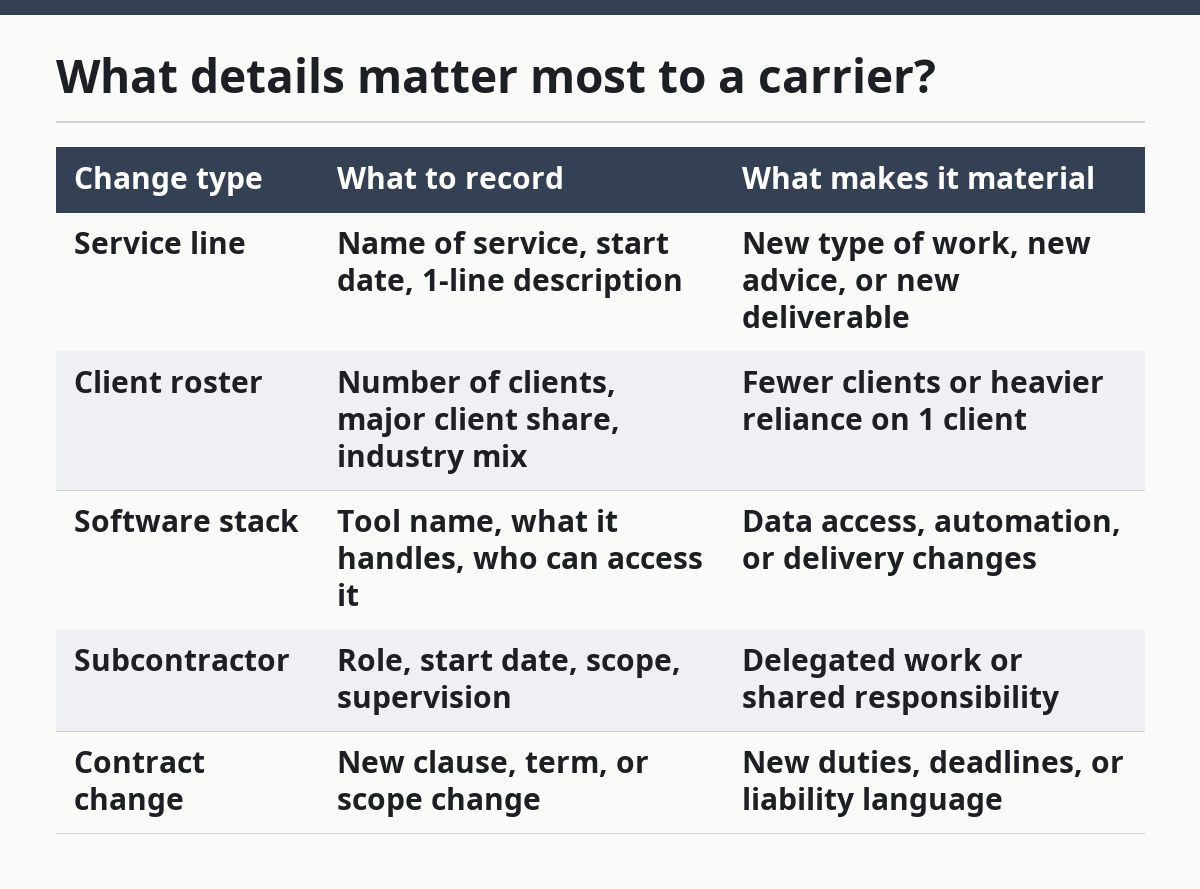
That table is not a universal rulebook. It is a practical filter for deciding which entries deserve a line in the log.
Which mistakes cause the most trouble?
The most common mistake is writing a business summary instead of a change log. That creates a document that sounds polished but hides what actually shifted. The fix is to write dated entries, not a profile.
Another mistake is mixing planned work with completed work and never labeling the difference. That can make a renewal file look either inflated or out of date. The fix is to mark planned items as planned and to keep them separate from completed changes.
A third mistake is naming the service but not the risk. “Added consulting” says almost nothing. “Added contract review for 2 recurring clients” says far more because it shows the work type and the scale.
A fourth mistake is forgetting subcontractors. If a freelancer now uses a subcontractor for part of delivery, the carrier needs to know that the work is no longer entirely solo. The correct alternative is to record the subcontractor’s role, when the arrangement started, and what part of the service it touches.
A fifth mistake is leaving out software. Software stack changes matter when they affect storage, access, or delivery. The correct alternative is to name the tool and the function it serves, even if the change felt routine.
When should the standard log be adjusted?
The standard log should be adjusted when the business change is unusual, fast-moving, or partly unfinished. A single format does not fit every freelance setup.
You changed your service line halfway through the term: the old and new work may need separate entries — split them by date and keep the start month for each service clear.
You added a subcontractor for 1 project only: the work is limited, but the exposure still changed — note the project, the start date, and the subcontractor’s role.
Your client roster shifted toward 1 large client: concentration risk may matter more than total client count — show both the count and the share of work tied to that client if you know it.
You changed software after a client data issue: the reason for the change matters as much as the tool itself — record the switch, the date, and what the new software now handles.
You are planning an expansion but have not started yet: the change is not live, but it may still matter at renewal — label it as planned and keep it separate from completed work.
The standard log also needs more care if the business is split across 2 service lines or 2 work modes. A freelancer who does both client work and training work should not squeeze them into one vague entry.
What makes a good renewal file?
A good renewal file tells the story of the business in 1 page of summary plus a dated change log behind it. It should show what changed, when it changed, and whether the change is active, planned, or complete.
The best sign is consistency. The log, invoices, contracts, and software notes should point in the same direction. If the log says you added 3 clients, the rest of the file should not suggest a very different workload. If the log says the software stack changed, there should be a clear note about what the new tool does.
A good result is not a thick stack of paper. It is a file that answers the likely follow-up questions before they get asked. That makes it easier to assess the renewal without forcing the reader to assemble the story from scraps.
For general recordkeeping structure, the U.S. Small Business Administration’s recordkeeping guidance and the IRS page on business records can help frame what to keep and why:
https://www.sba.gov/business-guide/plan-your-business/keep-good-records
https://www.irs.gov/businesses/small-businesses-self-employed/recordkeeping
FAQ
What business changes matter at renewal?
The changes that matter most are the ones that alter your service line, client roster, software stack, subcontractor use, or contract terms. If a change affects what you do or how you deliver it, it belongs in the log. Small admin edits that do not change exposure usually do not need the same level of detail.
How detailed should my change log be?
Keep each entry to enough detail that a third person could understand it in under 1 minute. A practical target is 3 to 5 facts per change: what changed, when it changed, how many clients or projects are affected, and what risk area it touches. Long narratives make the log harder to scan.
Should I include planned changes or only completed changes?
Include both, but label them clearly as planned or completed. Planned changes can matter if they are already shaping the business, while completed changes show the current state. Keeping them separate prevents the renewal file from looking either outdated or overconfident.
Drafted with AI; not yet reviewed by a person.
