

Last updated: November 20, 2026
Quick answer: preserve 5 core items first — the original email, the full chat log, the native file, version history, and a screen capture. In the context of How to Preserve Digital Evidence After a Freelance Project Failure, those records are most useful when they still show who sent what, when it was sent, and what changed in the file itself. If a freelance project has failed and money, scope, or deliverables may later be disputed, this guide shows how to keep the record intact without turning your laptop into a legal filing cabinet.
Key takeaways
- Keep the original email, chat log, cloud file, and screen capture, not just copied text.
- Preserve metadata where possible, because timestamps and version history often matter more than the content alone.
- Use read-only copies, exports, and backups so the source record is not changed by accident.
- Screenshots help, but they are weaker than the native file or platform export.
- If a record has already been deleted or altered, stop trying to “fix” it and preserve what remains.
Who this applies to
This applies to freelancers who still have access to the project trail: email, chat logs, cloud storage, file version history, and screen captures. It assumes the reader can still open the project files and export messages or copies from the platforms used. This is information, not financial advice; for a claim that may affect money or legal rights, a qualified adviser should be consulted for the reader’s own situation, and sources such as the FTC’s evidence guidance and NIST’s digital evidence recommendations can help frame the next step.
The point is not to build a claim file here. The point is to stop the evidence from getting worse. A generic folder of screenshots is not the same thing as digital evidence with preserved context, and a tidy desktop is not a substitute for the original record.
This is not the right method if the issue is already in formal dispute and a lawyer, insurer, or another qualified professional has given specific instructions. It is also the wrong approach if the source system is managed by a platform that has its own export rules, such as a chat service or cloud app that can create a time-stamped download. In that case, the platform export usually matters more than a home-made copy.
How do you preserve digital evidence without ruining it?
You preserve digital evidence by copying it in ways that keep the original record visible, then backing up the copy in at least 2 places. A practical sequence is: collect the source, export the native file, verify the timestamp, then store a read-only copy.
- Freeze the source file first. Save the original project file, not a renamed version, and note its file extension and last-modified time. Check whether the file still opens in the same app it was created in, because a format change can strip metadata. If the original has already been edited, that is a problem because the version history may no longer reflect the project failure.
- Export email in its native format. Save the full message with headers, not just copied text, and keep the sender, recipient, date, and subject line together. For many mail systems, an `.eml` or `.msg` export is stronger than a pasted screenshot. If the export loses headers or date stamps, the record is weaker because it no longer shows the full message path.
- Save the chat log as a complete thread. Keep the whole thread from the first relevant message through the last reply, not only the lines that feel important. A complete log shows context, pauses, and follow-up requests. If the export skips images, links, or deleted messages, note that gap, because missing pieces can change the meaning of the thread.
- Capture file version history where the platform shows it. Download or record the version list from cloud storage so the sequence of edits is visible. Version history is the record of prior states, and it can show when a file changed, who changed it, and whether work was overwritten. If the version list is gone, the project may still be preserved, but the timeline is weaker.
- Take screen captures only after the native record is saved. Use screen captures as support, not as the main proof. Capture the full window, the system clock, and the file name when possible. If the image crops out the address bar, date, or file title, it is less useful because it can be read as a fragment rather than a record.
- Create a second backup in cloud storage. Upload the saved files to cloud storage in a new folder and keep the upload time visible if the service shows it. A cloud backup is useful because it protects against one laptop failure, but it can also sync over a bad edit if auto-sync is left on. If the cloud copy changes the original file name or date, check the sync settings immediately.
- Keep the timestamp format consistent. Record dates in ISO 8601 form when you make notes, because `2026-11-20` is less ambiguous than a local format that can be read two ways. Match the system time zone shown on the device or in the platform export. If the date appears in different formats across records, sorting the evidence later becomes harder.
- Lock the archive copy against casual edits. Store the preserved set in a read-only folder, an archived volume, or another place where files are not likely to be renamed by accident. The goal is not perfect immutability; the goal is to avoid accidental overwrite. If you can still open and type over the file without a warning, the archive is not protected enough.
What should be saved first?
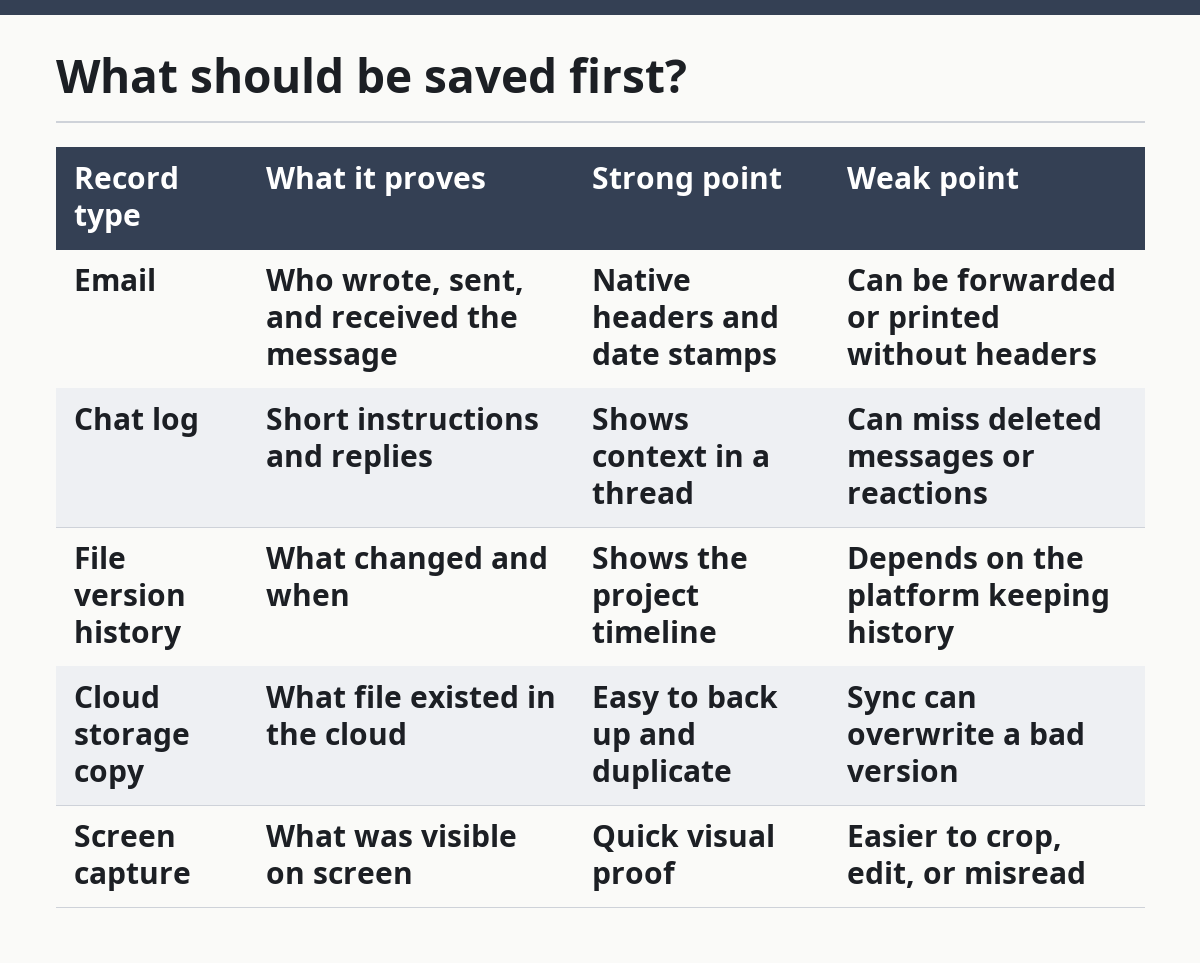
The first things to save are the records that prove contact, change, and delivery: email, chat log, file version history, cloud storage copies, and screen capture. Those five items usually tell the whole story better than a polished summary, because they show how the project failed over time.
| Record type | What it proves | Strong point | Weak point |
|---|---|---|---|
| Who wrote, sent, and received the message | Native headers and date stamps | Can be forwarded or printed without headers | |
| Chat log | Short instructions and replies | Shows context in a thread | Can miss deleted messages or reactions |
| File version history | What changed and when | Shows the project timeline | Depends on the platform keeping history |
| Cloud storage copy | What file existed in the cloud | Easy to back up and duplicate | Sync can overwrite a bad version |
| Screen capture | What was visible on screen | Quick visual proof | Easier to crop, edit, or misread |
The most common mistake is saving only a screenshot because it feels complete. A screenshot can help, but it is not a substitute for the original email or the exported thread. If the same fact appears in 2 forms, the native export usually carries more weight than the image.
If the project involved Google Drive, Dropbox, OneDrive, Figma, Slack, or a similar tool, check whether the platform has its own export or history screen. Platform records often keep the date and file state better than a handheld capture. If there is a choice between a platform export and a copied image, keep both.
What should be checked before you go further?
The evidence should be checked for time, source, and completeness before it is moved into long-term storage. A record that looks fine on screen can still be missing headers, edited timestamps, or part of a thread.
Start with the timestamp on each item. The message date, file modified date, and cloud upload date should not be confused with one another, because each one tells a different part of the story. If a file shows a later modified date than expected, that may mean it was opened, synced, or saved again after the failure.
Then check the source path. An email exported from the mail app, a chat log exported from the platform, and a screenshot taken from the desktop all carry different levels of proof. A record that has passed through 2 or 3 apps may still be useful, but it is not as clean as the original export.
Finally, check whether the file can still be opened without repair. If a document prompts for recovery, claims corruption, or loses layout on open, preserve that broken copy too. A damaged file can still matter because the damage itself may be part of the dispute.
When should you stop and get help?
This approach stops working when the record is already unstable, partly deleted, or likely to be challenged on process rather than content. At that point, the right move is to preserve what exists and get qualified help on the next step.
The client or platform has already deleted messages: The main record may be incomplete — stop trying to rebuild it from memory and keep any remaining exports, headers, or notifications.
The file shows signs of tampering or overwriting: The timeline may be disputed — preserve the current version and avoid further edits that could blur the history.
The project used a platform with strict export rules: The native export process may matter more than screenshots — follow the platform’s export path exactly before making copies.
The evidence is tied to a formal claim or legal dispute: The record may need a specific chain of custody — do not improvise a new structure if a qualified adviser has given instructions.
The cloud sync has already changed the file: The backup may have copied the wrong state — disconnect auto-sync long enough to preserve the current copy, then check each version separately.
If the only surviving proof is a screenshot, the record may be too thin for a strong dispute — keep the image, but treat it as partial evidence, not the whole file.
What mistakes do people make most often?
People most often weaken evidence by changing it while trying to save it. A file renamed, converted, or pasted into another document can lose the very details that made it useful.
One common error is forwarding email to a new address and treating the forward as the evidence. The consequence is that the original headers can disappear, which makes the message look less exact. The better alternative is to export the original message in its native format and keep the forward only as a convenience copy; if the record may matter in a formal dispute, consult a qualified professional before relying on the forward, because sources such as RFC 5322 and NIST both emphasize the importance of message structure and metadata.
Another mistake is copying chat text into a note app. The consequence is that the platform details, time stamps, and message order can vanish. The better alternative is to export the whole thread and keep the note only as a pointer.
A third mistake is taking screen captures without the system clock, file name, or visible window frame. The consequence is a record that looks edited even if it was not. The better alternative is a full-window capture with the relevant title bar and date visible.
A fourth mistake is letting cloud storage auto-sync after a bad edit. The consequence is that one wrong save can replace the version you needed. The better alternative is to pause sync on the device and confirm which version is current before backing anything up.
A fifth mistake is mixing working files and archive files in the same folder. The consequence is accidental overwrite, especially after a long project and a rushed cleanup. The better alternative is to separate a working folder from an archive folder and keep the archive copy untouched.
When does the standard approach need to change?
The standard approach changes when the project sits across several systems or when a single file does not tell the story. In those cases, preserve the whole chain: message, file, version history, and screen capture.
If the work passed through cloud storage and local editing, keep both the cloud copy and the local copy. The cloud file may show who had access and when it changed, while the local file may show the last unsynced state. If the two versions differ, do not merge them manually; keep them side by side.
If the project involved a long chat thread, preserve the thread in chunks as well as in full. A large thread can be hard to open or search later, and small exports may be easier to review. The trade-off is that chunks can hide context, so the full export should still be kept.
If the platform does not give a clean export, use screen captures plus a note that says what could not be exported. That note should be factual, not interpretive. A line like “no native export available in platform X” is more useful than a guess about why the export failed.
For long-term readability, keep at least one copy in a stable format such as PDF/A for documents or plain text for copied notes. That does not replace the original file; it just gives you a copy that is easier to open later. The limitation is plain: converted files can lose features, so the native original still matters most.
What makes digital evidence stronger over time?
Digital evidence stays stronger when the original record is preserved, the timestamps remain visible, and the file is copied with as little change as possible. That is why email headers, chat exports, file version history, and platform exports matter more than a single polished screenshot.
The goal is not to prove the whole case on day one. The goal is to keep the record from becoming weaker while the project failure is still fresh. If the evidence remains in its original form, with its dates and paths intact, it is much easier to explain later why the project failed and what changed along the way.
For broader claim-preparation guidance, the hub on freelance insurance claim preparation and documentation covers how these records fit into a larger file. This page stays focused on preservation, because preservation comes before organization.
What evidence should I save after a project failure?
Save the original email, the full chat log, the cloud file, the file version history, and any screen capture that shows the file name or date. Those items show who said what and when, which is the core of digital evidence. If a platform offers an export in a native format, keep that too.
How long should I keep project records?
Keep them until the dispute risk has clearly passed and the records are no longer needed for the project, the client, or any related claim. Because retention rules differ by country and situation, there is no universal time limit that fits every freelance job. If the matter may affect money or rights, a qualified adviser should be asked about the right retention period.
Can I use screenshots in a claim?
Yes, but screenshots should usually support the record, not replace it. A screenshot can show what was visible on screen, yet it may not preserve headers, message paths, or file metadata. Keep the native email, chat export, or file version history whenever possible, then use the screenshot as backup evidence.
Drafted with AI; not yet reviewed by a person.
