

Last updated: November 23, 2026
A freelance incident report for insurance should state who was involved, when and where it happened, what project it touched, what happened in plain facts, and what evidence exists. For What to Include in a Freelance Incident Report for Insurance, that means a report built from dates, names, file references, and attachments, not guesses. It should stop short of blame, admissions, or legal conclusions, because the report becomes part of a claim file and may be read against other records later.
This is information, not financial advice. Insurance wording, claim rules, and deadlines differ by country and policy, so a qualified adviser or claims professional should be consulted for your own situation. For general records guidance, see the National Archives guidance on records and the National Association of Insurance Commissioners.
Key takeaways
- A good incident report records facts first: date, time, people, project, and evidence.
- The report should help build a claim file without turning into a confession or argument.
- Screenshots, messages, and file names matter because they show what happened and when.
- Keep the wording neutral. Say what you saw, sent, received, or lost.
- Do not use the report to decide fault; that belongs in the insurer’s process.
Who should use a freelance incident report?

A freelance incident report is for a self-employed worker who needs to document a project problem for an insurer, client, or broker. It fits situations like missed deadlines, corrupted files, accidental deletion, device damage, data loss, or a dispute that may become a claim file. In a routine case, one report can cover one incident on one date.
It assumes the reader already has the basics: the project name, the client’s contact details, the approximate date of the incident, and any messages or screenshots tied to the event. If the event involves injury, threats, fraud, or a legal dispute, the report alone is not enough; a qualified professional should help shape the next step because the stakes are higher than a simple record.
The page also sits inside the wider freelance claims, incidents, and documentation hub, so the report should be treated as one piece of a larger paper trail, not as the whole case. A strong report helps the insurer understand the sequence, but it does not replace invoices, contracts, or the policy terms that control the claim. For related guidance, see /freelance-claims/, /freelance-documentation/, and /freelance-insurance/.
The wrong reader for this approach is someone who wants the report to prove fault, force payment, or argue with the client in real time. That is the fast way to make the record messy. A clean incident report is for evidence, not for persuasion.
What should an incident report say?
An incident report should say the facts that let someone rebuild the event without guessing. A practical structure is: identifying details, event details, project context, evidence, and immediate impact.
Use the real term “claim file” here in a practical sense: it is the collection of records the insurer uses to assess the incident. A good report adds enough detail for that file to make sense on its own, even if the person reading it has never seen the original messages. For a short claim note, that often means 5 core items in 1 to 2 pages.
Include these core items:
- The date and time the incident happened, and the date and time it was first noticed.
- The names and roles of everyone involved, including the client, contractor, platform, or third party if relevant.
- The project name, deliverable, file name, or service type linked to the incident.
- A plain description of what happened, in chronological order.
- The evidence you still have, such as screenshots, message threads, email headers, file versions, or invoices.
- The immediate effect on the work, such as a missed upload, lost draft, broken link, or unusable file.
A weak report says “the project failed” and stops there. A usable report says what failed, on which date, in which file or channel, and what record shows it.
How do you write one step by step?
You write one by collecting facts in order, then putting them into a report that can be attached to the claim file. The point is to make the record usable within minutes, not to write a long essay.
- Open with the incident date and time. Write the exact date first, then the time if you know it, and mark whether that time is local time or email/server time. Verify that the timestamp matches the message thread, file history, or platform log. A problem is a vague phrase like “last week,” which forces the reader to guess.
- Name the people and roles involved. List the freelancer, client contact, subcontractor, platform, or vendor by role and name. Verify spelling against email signatures or contract documents. A problem is mixing up roles, which makes the sequence hard to follow and can confuse the claim file.
- State the project context in one short block. Include the project name, deliverable, milestone, or file name tied to the event. Verify that it matches the contract, brief, or invoice description. A problem is leaving out context, because a reader then cannot tell whether the issue involved one logo file, one campaign, or the whole assignment.
- Describe what happened in plain order. Write the events as they occurred, from first sign to final known result. Keep each sentence tied to one action, such as “sent,” “received,” “uploaded,” “saved,” or “lost.” Verify that the order matches your messages and file timestamps. A problem is jumping ahead to conclusions or blame.
- Record what was observed, not what was assumed. Say what you saw on screen, in email, in chat, or in the file system. Verify that each statement can be backed by a screenshot, message, or log entry. A problem is wording like “the client ignored me,” which may be true, but is still an inference unless the message record shows it.
- List the evidence you still have. Note screenshots, exported messages, email headers, file versions, backups, or receipts. Verify that each item is saved in a format you can attach or describe, such as PDF, PNG, or original email. A problem is mentioning evidence that you cannot later find.
- Explain the immediate effect on the work. Say whether the delivery was delayed, the file was damaged, the revision was lost, or access was cut off. Verify that the effect is tied to the incident, not to later stress or business loss that has another cause. A problem is overstating the impact and weakening trust in the rest of the report.
- Close with the next known step. Note whether you paused work, notified the client, preserved files, or started a backup copy. Verify that the step actually happened and can be shown in a message or system record. A problem is writing “resolved” when the insurer still needs more facts.
That structure is enough for many routine claim files. It is also short enough to be read quickly, which matters when a claims handler is scanning several documents at once.
What evidence belongs in the file?
The strongest evidence is the record that shows the incident as it unfolded, not a later summary of it. For a freelance incident report, that usually means screenshots, messages, emails, file history, and any document that carries a time stamp.
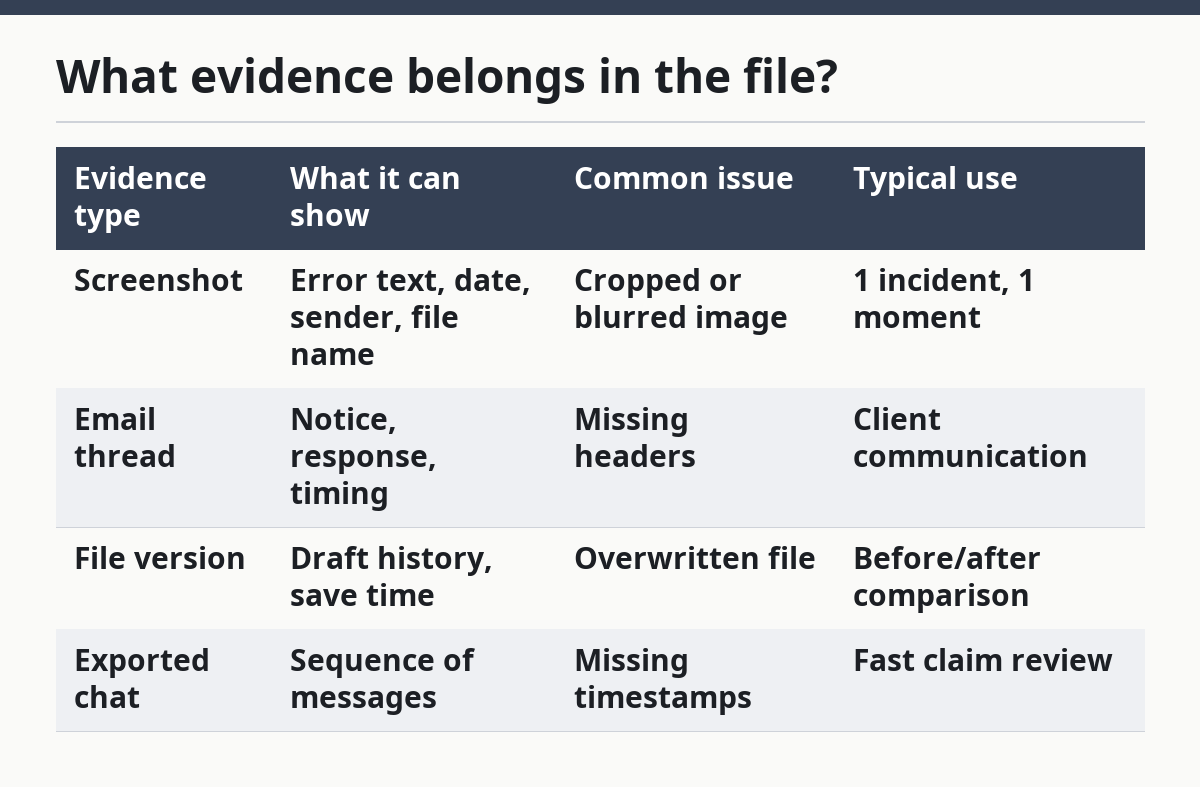
Screenshots are most useful when they show the whole screen area that matters, including date, time, sender, file name, or error text. Messages matter because they often show notice, response, or delay. File versions matter because they show whether a draft existed before the loss or damage. If you have an exported email thread, keep the original header data, not just a pasted quote.
Two outside references that are worth keeping in mind are the National Association of Insurance Commissioners and the National Archives guidance on records. They are not a substitute for your policy, but they reflect the basic idea that records should stay intact and traceable.
The drawback is that not every piece of proof is equally useful. A blurred screenshot, a cropped chat, or a photo with no visible date can raise more questions than it answers. If the evidence cannot be matched to the incident date or the project context, it is weaker than a clean message thread.
| Evidence type | What it can show | Common issue | Typical use |
|---|---|---|---|
| Screenshot | Error text, date, sender, file name | Cropped or blurred image | 1 incident, 1 moment |
| Email thread | Notice, response, timing | Missing headers | Client communication |
| File version | Draft history, save time | Overwritten file | Before/after comparison |
| Exported chat | Sequence of messages | Missing timestamps | Fast claim review |
What should you leave out?
You should leave out blame, speculation, legal conclusions, and emotional language. A report that says “the client clearly caused this” or “the platform was negligent” reads like an argument, not a record.
Do not write that a person lied unless you have direct, verifiable proof in the document itself. Do not guess at hidden causes such as a server issue, a device fault, or a policy breach unless the evidence shows it. A claim file is stronger when it stays close to observed facts.
Leave out side stories that do not change the incident record. A 600-word backstory about the client relationship may feel complete, but it usually dilutes the useful facts. The report should support the insurer’s review, not replace the contract file or the conversation history.
Also leave out any statement that sounds like an admission unless you know it is accurate and necessary. Saying “I forgot to back up the file” may be honest, but it may also belong in a different document or under advice tied to your policy wording. This is one place where a qualified adviser can matter.
When should the report stop and something else begin?
The report should stop being a simple log and turn into professional help when the facts are unclear, the loss is large, or the dispute has legal weight. A 1-page report works for a routine file problem; it is not enough for every case.
There is a threat, injury, or safety issue: the incident is no longer just a documentation problem — get appropriate help and follow any required reporting steps first.
The client is accusing you of breach, fraud, or negligence: the language has moved into legal territory — keep the report factual and get qualified advice before sending anything further.
The loss involves sensitive data or confidential work: the claim may carry privacy or contractual duties — preserve the facts and ask for help with the right reporting route.
The records conflict with each other: email, chat, and file history do not tell the same story — stop and reconcile the timeline before filing, because contradictions weaken the claim file.
The insurer asks for a formal statement or sworn version: the process has moved beyond an internal incident note — respond carefully and get guidance on what the policy requires.
You are unsure whether the problem belongs to insurance at all: the issue may be a billing dispute, contract dispute, or platform issue instead — do not force it into an insurance form just because a report exists.
The consequence of pushing ahead in these cases is a messy record that can be harder to explain later. A better next step is to slow down, protect the evidence, and get the right help for the type of problem you actually have.
What mistakes do people make?
The most common mistake is writing a story instead of a record. The result is a long paragraph full of feelings, but missing the date, file name, or message that matters most. The better alternative is a short chronology with one fact per sentence.
Another mistake is changing the wording later to sound more certain. That can create gaps between the report and the original messages. The better alternative is to keep the first version and add a dated note if more facts appear.
A third mistake is attaching only a summary and not the source material. That leaves the claim file dependent on your memory. The better alternative is to keep the original screenshot, email, or file metadata alongside the report.
A fourth mistake is guessing at the cause. Saying “the upload failed because the platform was down” may turn out wrong if the log shows a local connection issue. The better alternative is to state the symptom and attach the evidence that shows it.
A fifth mistake is mixing up the incident report with the claim itself. The report records what happened; the insurer decides what the policy may cover. The better alternative is to keep those jobs separate and use neutral language in the report.
What if the incident is unusual?
The standard report needs modification when the incident spans more than one system, more than one person, or more than one day. In those cases, add a simple sequence marker for each event so the reader can separate the parts without rereading the whole document.
If the problem happened across email, cloud storage, and a client platform, label each source clearly. If the incident involves several messages on the same date, keep the timestamps visible and preserve the order. If the loss continued over 2 or more days, note each day separately instead of compressing everything into one paragraph.
That is where many generic templates fail. They ask for “description of incident” and leave it at that. A better report names the channel, the file, the date, and the next action for each step. The more moving parts the incident has, the more useful a clean structure becomes.
How detailed should it be?
The report should be detailed enough that a stranger could follow it in a few minutes, but not so long that it buries the key facts. For many routine incidents, that means a page or two, with the evidence listed in short bullets rather than packed into one block.
A good test is whether the reader can answer five questions after one pass: what happened, when it happened, who was involved, what project it touched, and what proof exists. If any of those are missing, the report is too thin. If the report spends 3 paragraphs explaining frustration but gives no timestamps, it is too loose.
The right level of detail also depends on the policy process. Some insurers want a brief note first, then a fuller statement later. Others ask for direct attachments right away. Because requirements change by insurer and country, the safest move is to match the report to the request you received, not to a template someone else used.
What should an incident report say?
An incident report should say the facts that identify the event, the people involved, the project context, and the evidence you still have. It should read like a record, not a defense. In a freelance incident report for insurance, that usually means 5 parts and no editorial language.
The strongest reports use dates, file names, message references, and short action verbs. The weakest reports use opinions, blame, and vague timing. If a stranger cannot reconstruct the incident from the report and its attachments, it is too thin.
How detailed should the report be?
The report should be detailed enough to explain the event without outside memory, but short enough to scan quickly. For many freelance claims, one to two pages is enough if the evidence is organized well.
A useful benchmark is whether the report answers who, what, when, where, and which project. If those points are clear, extra commentary usually adds little.
Who should prepare the report?
The person closest to the facts should prepare the first draft. That is usually the freelancer, because the timestamps, messages, and file history are already in hand.
If the incident is disputed, sensitive, or legally loaded, a qualified adviser should review the wording before it is sent.
Drafted with AI; not yet reviewed by a person.
